
Chatbot development means building software that interprets what a person types or says, then answers or acts on it, using anything from a scripted decision tree to a large language model. The right starting move for most organizations is narrower than people expect: define one business goal, then build a limited prototype, either a retrieval-augmented flow grounded in your own data or a low-code build, to prove value before committing to a full platform. A four-to-eight-week pilot should tell you whether to scale, adjust the goal, or stop.
TL;DR:
- Most organizations should start with a narrow pilot focused on one goal and one channel, which typically costs a low five-figure budget and takes a few weeks.
- Rule-based bots are suitable for predictable tasks, while retrieval-augmented generation bots ground responses in company data for higher accuracy, making them ideal for support and knowledge tools.
- The cost and complexity of a chatbot project depend on scope, with simple pilots in weeks and a few thousand dollars, and enterprise systems requiring months and multi-team coordination.
- Effective chatbot architecture choices include hosted LLMs for control and cost, vector-based retrieval for accuracy, and hybrid routing to balance cost and flexibility.
- Ongoing testing, monitoring, and version control are essential post-launch to prevent performance drift, with layered fallback strategies maintaining user trust during failures.
Table of Contents
- What Types of Chatbots Should You Build?
- How Do You Scope a Chatbot Project for Measurable Results?
- What Technical Stack Do You Need to Build a Chatbot?
- How Do You Design Conversations That Feel Natural?
- How Do You Test and Monitor a Chatbot Before and After Launch?
- How Do You Deploy and Scale a Chatbot Without Overspending?
- How Do You Integrate a Chatbot With Existing Business Systems?
- What Will a Chatbot Project Cost, and Who Do You Need on the Team?
- How Requestum Approaches Chatbot Projects
- How Do You Prepare and Annotate Data for Chatbot Training?
- How Do You Handle Multiple Languages and Localization?
- How Do You Keep Improving a Chatbot After Launch?
- What Fallback Strategies Prevent Chatbot Failures?
- Expert Perspective: MVP or Enterprise-Grade Assistant?
- How Requestum Can Help You Build a Chatbot That Fits Your Business
- Sources
- FAQ
What Types of Chatbots Should You Build?
Chatbot development isn't a single technology decision. It's a choice among five architectural patterns, each with different cost, risk, and control profiles. Picking the wrong one is the most expensive mistake teams make before writing a line of code.
Rule-based bots follow decision trees and keyword matching. They cost the least to build and audit, and they never hallucinate, because every response is pre-written. They work well for narrow, predictable tasks: password resets, order status lookups, appointment scheduling. They break down fast when a user phrases a question in a way the tree didn't anticipate.
Retrieval-augmented generation (RAG) bots combine a language model with a search layer over your own documents, so answers are grounded in company data rather than the model's general training. This pattern is widely considered the highest-value upgrade once you move past a basic chat loop, because it cuts hallucination risk while keeping responses current with your actual policies and product data. RAG suits support desks, internal knowledge tools, and any use case where accuracy against a specific document set matters more than open-ended conversation.
Generative LLM bots without retrieval rely purely on the model's trained knowledge and conversational fluency. They're flexible and good at tone, but they can invent facts when they lack grounding, which makes them risky for regulated industries like finance or healthcare unless paired with strict guardrails.
Hybrid bots route simple, high-frequency requests to rule-based logic and escalate ambiguous or complex requests to an LLM or RAG layer. This is often the pragmatic production choice: cheaper to run at scale, easier to audit, and still capable of handling open-ended questions when needed.
Voice and multimodal bots add speech recognition, image input, or both, and are relevant for phone-based support, in-car assistants, or field service apps where typing isn't practical.
A few signals point you toward the right choice:
- If your data is scattered across PDFs and wikis with no clean structure, RAG needs upfront cleanup before it's reliable.
- If you operate under compliance rules that require exact wording (insurance disclosures, medical advice), lean rule-based or tightly constrained hybrid.
- If your support volume is high but repetitive, hybrid usually beats a full LLM build on cost per resolved query.
How Do You Scope a Chatbot Project for Measurable Results?
Start with one business outcome, not a feature list. A goal like "add a chatbot to the website" gives you nothing to test against, and it's the single most common reason pilots stall. Microsoft's guidance on chatbot planning makes the same point: effective bots start from a defined business goal, and the technology choice follows from that goal, not the other way around.
Once the goal is set, map the journey narrowly. Pick one channel (website widget, WhatsApp, Slack) and one audience segment rather than trying to serve every customer type at once. A pilot that tries to handle billing questions, product recommendations, and technical troubleshooting simultaneously will underperform a pilot that nails one of those three.
Useful success metrics vary by goal, but a simple starting set includes:
- Containment rate: percentage of conversations resolved without human handoff.
- Resolution accuracy: sampled human review of whether the bot's answer was correct.
- Time to first response and total resolution time.
- Deflection value: support tickets avoided, translated into agent hours saved.
Pro Tip: Track a "confusion rate," the share of sessions where the bot asks a clarifying question more than twice in a row. It's an early warning sign of scope creep long before customer satisfaction scores drop.
By the numbers: Course material from Coursera's chatbot-building program cites cases where chatbots cut customer support costs by a notable percentage. Treat that as a directional benchmark tied to specific use cases, not a guaranteed outcome for every deployment.
Budget expectations fall into three rough tiers. A pilot using a low-code platform or a single RAG flow typically runs a matter of weeks and a modest five-figure budget. An MVP with custom integrations, proper testing, and analytics usually takes two to four months. An enterprise-grade assistant with multi-channel deployment, compliance review, and dedicated monitoring is a multi-quarter, multi-team commitment. Treat these as planning buckets, not fixed quotes; actual cost depends heavily on integration count and data readiness.
What Technical Stack Do You Need to Build a Chatbot?
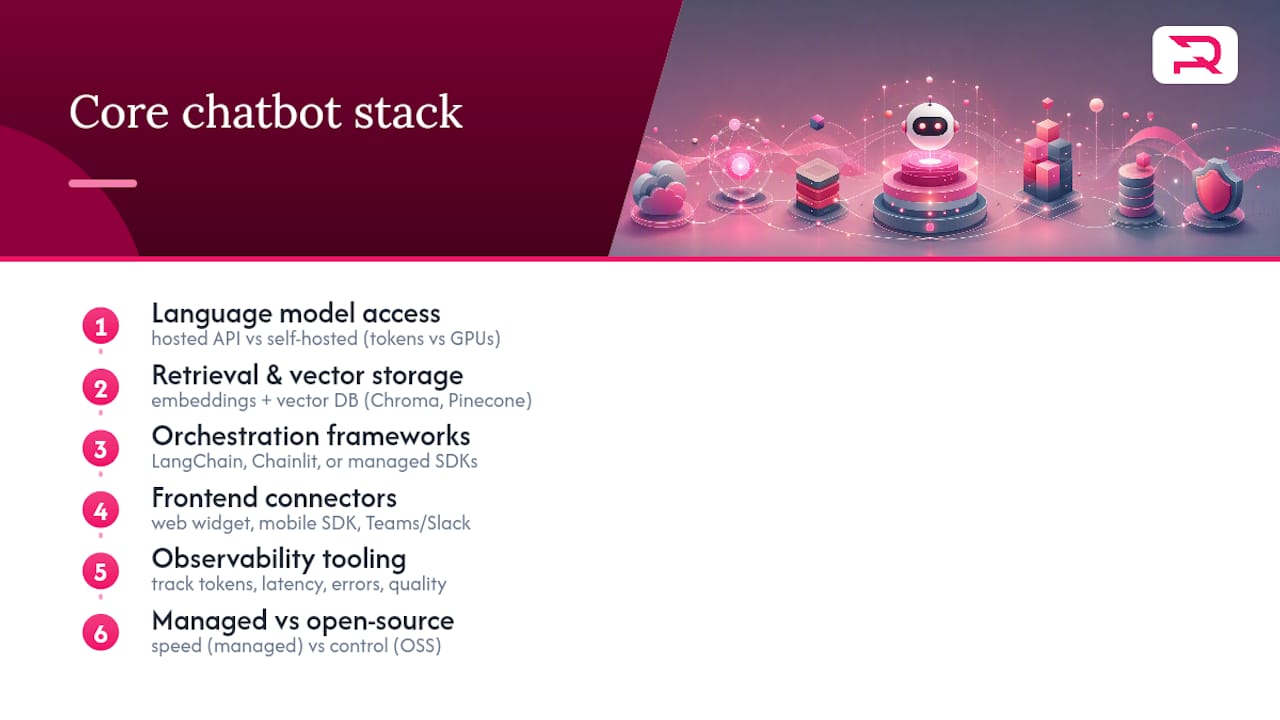
Every production chatbot assembles the same rough set of components, whether the team buys managed services or self-hosts each piece. Understanding the categories matters more than memorizing specific vendors, because the market shifts fast.
Language model access is the first decision: call a hosted LLM API or self-host an open-weight model. Hosted APIs remove infrastructure work and update automatically, but you pay per token and depend on the provider's uptime. Self-hosting gives you control over data residency and cost at scale, but it requires GPU infrastructure and a team that can maintain it. Most teams start hosted and reconsider self-hosting only once volume justifies the operational overhead.
Retrieval and vector storage power the RAG pattern described earlier. Documents get converted into embeddings, numerical representations of meaning, and stored in a vector database such as Chroma or Pinecone, so the bot can pull the most relevant passage before answering. This is the layer that grounds an LLM's answers in your actual policies, product specs, or support history instead of its general training data.
Orchestration frameworks stitch together the model calls, retrieval steps, and business logic. LangChain is the most widely adopted option for custom builds, handling prompt chains, tool calls, and memory. Chainlit is worth a look for teams that want to prototype conversational interfaces quickly; it's an open-source framework that integrates with LangChain and vector databases like Pinecone out of the box, and supports multimodal chat and session persistence with relatively little setup code. On the managed side, Microsoft Copilot Studio and the Bot Framework SDK give enterprise teams built-in connectors, governance, and compliance tooling without assembling every piece from scratch.
Frontend connectors determine where users actually meet the bot: an embedded web widget, a native mobile SDK, or platform integrations like Microsoft Teams or Slack. Each channel has its own latency expectations and message formatting constraints, so pick the channel before finalizing the backend, not after.
Observability tooling tracks token usage, latency, error rates, and conversation quality over time. Skipping this layer is the most common regret teams report six months into a live deployment, once nobody can explain why response quality quietly degraded.
The managed-versus-open-source decision usually comes down to speed versus control. Managed platforms accelerate pilots with enterprise connectors and governance features baked in, while open-source stacks cost more engineering time upfront but avoid vendor lock-in and give finer control over data handling.
How Do You Design Conversations That Feel Natural?
Every LLM-based chatbot conversation is built from three roles: the system message that sets behavior and boundaries, the user message containing the person's input, and the assistant message the model generates in response. Getting the system prompt right is the single highest-leverage design task, since it's where you define tone, scope limits, and what the bot should refuse to answer.
Memory is where most conversations degrade if not planned deliberately. A minimal chatbot loop sends the full conversation history back to the model on every turn to maintain context, but that approach gets expensive and hits context-window limits as chats grow long. The typical fix is a summarization strategy: periodically condense older turns into a short summary and keep only recent messages in full detail.
Follow this basic sequence when designing a new conversation flow:
- Write the system prompt first, defining scope, tone, and explicit refusal conditions.
- Draft three to five example user inputs, including at least one deliberately off-topic or hostile query.
- Decide which actions require function calls (booking an appointment, pulling account data) rather than freeform text generation.
- Build the memory or summarization strategy before writing more than a handful of test conversations.
- Test the flow with buttons or suggested replies before opening it to fully open-ended typing.
Function calls and tool use matter more than most first-time builders expect. Instead of letting the model generate a free-text answer about an account balance, the system calls a defined function that queries the actual database and returns structured data the model then explains in natural language. This single pattern eliminates a huge share of hallucination risk, because the model is reporting real data rather than guessing at it.
Pro Tip: Ask one question per message and offer buttons wherever the possible answers are finite. Open-ended text fields invite ambiguity; a tap on a button never does.
How Do You Test and Monitor a Chatbot Before and After Launch?
Prelaunch testing needs to go beyond "does it respond correctly to a friendly question." Build a scenario library that includes edge cases: angry customers, ambiguous requests, questions outside the bot's scope, and attempts to manipulate the system prompt. That last category matters more than it sounds: conversational AI systems face documented risks around prompt injection and data leakage, where a crafted input tricks the model into ignoring its instructions or revealing information it shouldn't. Test for it deliberately before launch, not after a customer finds it first.
A practical pre-launch checklist:
- Run at least 50 to 100 scenario-based test conversations covering common, edge-case, and adversarial inputs.
- Verify function calls return correct data under realistic account and inventory conditions.
- Confirm human handoff triggers correctly when confidence is low or a user explicitly asks for a person.
- Load-test the expected concurrent session volume before go-live, not after.
By the numbers: QA systems built on natural language processing are designed to learn from interactions over time, which is exactly why post-launch monitoring matters as much as prelaunch testing. A bot that passes every test on day one can still drift as real user language and product data change underneath it.
Post-launch, track containment rate, resolution accuracy through sampled human review, and a rolling measure of user-reported satisfaction. Instrument all three from day one rather than adding measurement later, because early baseline data is what lets you prove impact to stakeholders in month three.
Human-in-the-loop review deserves a standing weekly slot, not just a launch-week check. Have someone read a sample of flagged or low-confidence conversations every week and feed corrections back into the prompt, the retrieval documents, or the escalation rules. The most common monitoring failure is prompt drift: small updates to the system prompt accumulate over months until nobody remembers why a rule exists, paired with stale retrieval data that no longer matches current policies. Schedule a quarterly audit of both.
How Do You Deploy and Scale a Chatbot Without Overspending?
Hosting choice shapes both cost and latency from day one. Serverless functions work well for lower, spikier traffic since you pay only for actual usage, but they carry cold-start latency that can add a noticeable delay to the first message in a session. Containerized deployments (Docker on a managed service) give steadier latency and easier local testing, at the cost of paying for idle capacity. Fully managed platforms remove the operations burden entirely but limit how much you can customize the underlying infrastructure.
Scaling a chatbot rarely means scaling the model itself; it means controlling how often and how expensively you call it. Effective techniques include:
- Caching common responses so repeated questions don't trigger a fresh model call every time.
- Summarization of long conversation histories to keep token counts, and therefore cost and latency, in check.
- Batching background tasks like embedding updates rather than processing them one at a time.
- Hybrid routing, sending simple queries to cheaper rule-based logic and reserving the LLM call for genuinely complex requests.
Cost control comes down to a few concrete levers. Model selection matters most: a smaller, cheaper model often handles routine queries fine, reserving a larger model only for complex reasoning steps. Trimming context, sending only what's relevant rather than the full conversation history, cuts token costs directly. Fallback rules that cap retry attempts prevent a single confused conversation from silently generating dozens of expensive model calls.
Set latency expectations by channel before launch. A web chat widget can tolerate a second or two of "typing" delay comfortably; a voice assistant cannot, since silence over a phone line feels broken within a few hundred milliseconds. API rate limits from your LLM provider should factor into your capacity planning early, since a traffic spike that exceeds your rate limit produces failed requests, not just slow ones, unless you've built retry and queuing logic in advance.
How Do You Integrate a Chatbot With Existing Business Systems?
A chatbot that can't see your CRM, ticketing system, or knowledge base is a demo, not a business tool. Integration work is usually the part of a project that timelines underestimate.
Common connector patterns include:
- Pulling customer records from a CRM (Salesforce, HubSpot) via API so the bot can personalize responses and update records after a conversation.
- Creating or updating tickets in systems like Zendesk or Jira when a conversation requires follow-up.
- Querying a structured knowledge base or document store for the RAG retrieval step described earlier.
- Triggering a warm handoff to a human agent with full conversation context attached, not a cold transfer that forces the customer to repeat themselves.
Authentication needs to be solved before the bot goes live, not bolted on afterward. Decide whether the bot operates with its own service account credentials or authenticates as the end user, since that decision affects what data it can legally and technically access. API keys and tokens need the same secret-management discipline as any other production credential: rotation policies, scoped permissions, and audit logging.
Human handoff deserves an explicit, tested workflow rather than a vague "escalate if confused" instruction. Define the confidence threshold that triggers escalation, what context gets passed to the human agent, and how the handoff is logged for later review.
On compliance, keep the notes practical rather than legalistic: know what personal data the bot collects, how long conversation logs are retained, and whether any of that data flows to a third-party LLM provider's servers. If the chatbot touches financial data or health information, that data-handling question becomes a design constraint from the start, not a review step at the end. For any system that integrates with financial workflows, the governance considerations for AI in finance applications apply directly.
What Will a Chatbot Project Cost, and Who Do You Need on the Team?
Budget bands roughly track project scope. A pilot using a no-code or low-code platform with a single use case typically lands in the low five figures and takes a few weeks. An MVP with custom integrations, proper testing, and real analytics moves into the mid five to low six figures over two to four months. An enterprise assistant spanning multiple channels, languages, and compliance requirements is a larger, ongoing investment measured in quarters, not weeks.
Team composition scales with ambition but rarely shrinks below a core set of roles:
- A product owner who defines the business goal and prioritizes features against it.
- A conversation designer who writes prompts, dialogue flows, and fallback language.
- A backend engineer who builds integrations, function calls, and the retrieval layer.
- A QA specialist who runs scenario testing and adversarial checks before launch.
- Ongoing, a support or ops person who reviews flagged conversations and feeds fixes back into the system.
A pilot can run with a two- or three-person team over four to six weeks. An enterprise build usually needs a dedicated squad of five to eight people plus stakeholder input from legal, compliance, or security depending on industry.
The build-versus-agency decision often comes down to internal capacity and timeline pressure. Building in-house makes sense when you already have engineers with LLM experience and can absorb a slower ramp. Bringing in an outside team makes sense when the deadline is fixed, the domain (healthcare, finance, logistics) carries regulatory weight, or your team has never shipped a production RAG system before and doesn't want the pilot to double as a training exercise.
How Requestum Approaches Chatbot Projects
They build custom web, mobile, and AI solutions for clients across industries. The team's AI and data science work spans predictive analytics, forecasting, and applied machine learning, the same technical foundation that underlies production-grade chatbot builds.
The process generally follows the sequence covered in this guide: a business analysis phase to pin down the goal and scope, a narrow prototype to validate the approach against real data, then a build phase that adds integrations, testing, and monitoring before scaling. Requestum's business analysis services exist specifically to prevent the scope-creep problem described earlier, where a bot tries to do everything and does nothing well.
If you're evaluating outside help for a chatbot build, a few questions separate serious partners from order-takers:
- Can they show a live RAG or LLM-based system they've shipped, not just a demo?
- Do they have a QA process for adversarial and prompt-injection testing, or is testing an afterthought?
- Will they define success metrics with you before writing code, or after?
- Who owns the conversation logs and model outputs once the project ends?
Red flags include vague timelines with no milestone structure, an unwillingness to discuss data governance, or a pitch that skips straight to technology choice without ever asking what business problem you're solving. Requestum's AI agent development and LLM development services are built around answering those questions upfront, not after a contract is signed.
How Do You Prepare and Annotate Data for Chatbot Training?
A chatbot is only as accurate as the data it's grounded in, and most delays in real projects trace back to messy source material rather than model limitations. Before any RAG system goes live, documents need cleaning: outdated policy PDFs removed, duplicate FAQ entries merged, and inconsistent formatting normalized so the retrieval layer doesn't pull contradictory answers to the same question.
Annotation matters most for intent classification and function-calling accuracy. If the bot needs to recognize "I want to cancel my order" versus "I want to change my order," someone needs to label a representative set of real customer phrasings for each intent, ideally pulled from actual support transcripts rather than invented examples, since real language is messier and more varied than what a team guesses in a meeting.
A practical preparation workflow looks like this: audit existing documents for accuracy and remove anything outdated, chunk long documents into retrieval-sized passages that preserve enough context to answer a question standalone, and label a seed set of at least a few hundred real user queries by intent before training or tuning anything. Skipping the audit step is the most common cause of a RAG bot confidently citing a policy that changed six months ago.
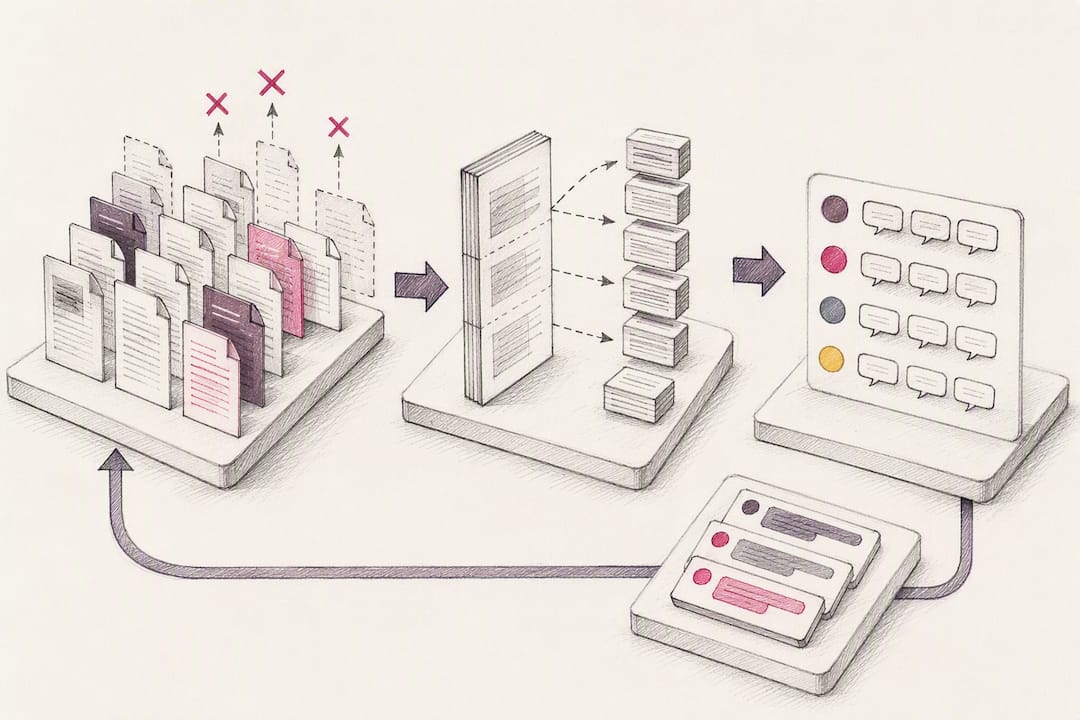
Ongoing annotation doesn't stop at launch. Every flagged conversation from the human-review process described earlier becomes a candidate for the training or retrieval dataset, which is what turns a static launch-day bot into a system that measurably improves over its first few months live.
How Do You Handle Multiple Languages and Localization?
Multilingual chatbot development is not a translation problem sitting on top of an English bot. It's a design decision that touches retrieval data, intent recognition, and tone from the start.
The first choice is architectural: run one model that handles multiple languages natively, or maintain separate language-specific pipelines. Modern LLMs handle many languages reasonably well out of the box, but retrieval accuracy depends on whether your underlying documents exist in each target language. A RAG bot answering in French from English-only source documents will either mistranslate on the fly or quietly default to English, both of which frustrate users.
Localization goes beyond word-for-word translation. Date formats, currency symbols, honorifics, and even the directness of tone that feels natural in one culture can feel abrupt or overly formal in another. A support bot that's appropriately casual for a US audience may read as unprofessional translated literally into a market where formal address is the norm.
Practical steps that hold up across projects: maintain source documents in each supported language rather than relying on real-time translation of a single source; test intent recognition separately per language, since phrasing patterns for the same request vary significantly across languages; and route ambiguous or low-confidence non-English queries to human agents fluent in that language rather than guessing. Budget extra QA time per additional language. Teams consistently underestimate this, treating it as a translation checkbox instead of a full testing pass.
How Do You Keep Improving a Chatbot After Launch?
Launch day is the start of the maintenance clock, not the finish line. Treat every prompt, retrieval dataset, and integration as versioned artifacts, the same discipline applied to application code, so you can roll back a change that degrades quality without guessing which of five recent tweaks caused it.
A practical versioning setup tags each system prompt revision, retrieval document update, and model version change with a date and a short description of what changed and why. When containment rate or resolution accuracy dips after an update, that log is what lets you isolate the cause in minutes instead of days.
Continuous improvement runs on the feedback loop described in the testing section: flagged conversations get reviewed weekly, and the fixes feed back into three places depending on the root cause. A wrong answer from stale data goes back into the retrieval documents. A misunderstood intent goes into the annotation set for future tuning. A tone or scope problem goes into the system prompt itself.
Set a cadence rather than reacting only when something breaks. A weekly review of flagged conversations, a monthly look at aggregate metrics against the original success goals, and a quarterly audit of the full prompt and retrieval stack catch different classes of drift. The weekly review catches obvious errors fast. The quarterly audit catches the slow accumulation of small inconsistencies that no single week's review would flag on its own.
What Fallback Strategies Prevent Chatbot Failures?
Every chatbot fails on some percentage of conversations. The difference between a good system and a frustrating one is what happens at that moment, not whether it happens at all.
A layered fallback strategy handles failure at three levels. First, low-confidence detection: when the model's retrieval match is weak or the intent classification is ambiguous, the bot should ask a clarifying question rather than guessing and answering confidently wrong. Second, scope boundaries: a well-written system prompt explicitly defines what the bot won't attempt, and the fallback response for out-of-scope requests should say so plainly rather than improvising an answer outside its grounding data.
Third, and most important for user trust, is the human handoff path. Every fallback chain needs a clear exit to a human agent, triggered automatically after a set number of failed clarification attempts or immediately when a user explicitly asks for one. A bot that traps a frustrated user in an endless loop of "I didn't understand that" does more damage to the business relationship than simply admitting it can't help and connecting them to someone who can.
Error handling also needs to cover technical failures, not just conversational confusion: a timed-out API call to a CRM or a failed function call should produce a graceful, honest message rather than a broken response or a silent hang. Log every fallback trigger with its cause. That log becomes the single richest source of ideas for what to fix in the next version, since it's a direct record of exactly where the system's understanding fell short of the real world.
Expert Perspective: MVP or Enterprise-Grade Assistant?
Most organizations overbuild their first chatbot. The instinct is to plan for every channel, every language, every edge case before writing a prompt, and that instinct is usually wrong. Speed to value beats theoretical completeness almost every time, because a narrow pilot generates the real usage data that tells you which edge cases actually matter, versus the ones a planning meeting imagined might matter.
The trade-off isn't really speed versus quality. It's speed versus technical debt you haven't incurred yet. A rushed MVP that skips governance, logging, and a versioning discipline will cost more to unwind in month six than it saved in month one. The organizations that get this right treat the pilot as disposable in scope but not in rigor: narrow ambition, full testing discipline.
For executive sponsors, the realistic timeline is a working pilot in four to eight weeks and a genuinely stable production system closer to two quarters out. Set KPIs before launch, not after, or you'll spend month three debating whether the bot "worked" instead of measuring it.
— Dmitry
How Requestum Can Help You Build a Chatbot That Fits Your Business
Custom software can include chatbots designed around a specific business goal rather than a generic template pulled off a marketplace. Where many teams get stuck choosing between a rigid no-code widget and an expensive from-scratch build, the engagement model often starts with a business analysis phase: define the goal, scope a narrow pilot, then decide whether a low-code platform, a custom RAG system, or a hybrid approach fits the data and budget.
That flexibility matters because most chatbot failures trace back to a mismatch between the tool chosen and the actual business problem, not a lack of technical sophistication. Requestum's AI development services cover everything from a focused proof-of-concept to a full enterprise build with integrations, testing, and monitoring in place from day one.
The suggested first step is a discovery call: bring your business goal, your current data situation, and your rough timeline, and leave with a scoped recommendation rather than a generic sales pitch. Get in touch with Requestum to start that conversation.
FAQ
How much does it cost to develop a chatbot?
Costs range from roughly five figures for a narrow no-code or low-code pilot to well into six figures for an enterprise-grade assistant with multiple integrations and compliance review. The main cost drivers are integration count, data readiness, and whether you need custom RAG infrastructure versus a managed platform.
How do I build my own AI chatbot?
Start by defining one business goal, then build a minimal prototype that sends conversation history to an LLM API in a multi-turn loop, adding retrieval over your own documents once the basic flow works. Production systems then layer in persistence, authentication, function calls, and monitoring on top of that core loop.
What are the four main types of chatbots?
The commonly recognized categories are rule-based (decision-tree logic), retrieval-based or RAG (grounded in your own documents), generative or LLM-based (open-ended conversational AI), and hybrid bots that combine rule-based routing with generative fallback. Voice and multimodal bots add a fifth category layered on top of any of these for spoken or image-based input.
What company builds AI chatbots?
Requestum builds custom AI chatbots and conversational assistants as part of its broader AI and agent development services, scoping each build around a defined business goal rather than a one-size-fits-all template. Many general software agencies and specialized AI vendors offer similar services, so evaluate any provider against a live shipped example, not just a sales demo.
Should I use a no-code platform or custom development for my chatbot?
No-code and low-code platforms suit narrow pilots and standard use cases where speed matters more than deep customization, while custom development fits complex integrations, regulated industries, or conversation flows a template can't support. Many teams start on a low-code platform to validate the business goal, then move to custom development once the pilot proves the concept.