
Cloud cost optimization is the ongoing practice of aligning what you spend with the business value you get back, not a one-time discount hunt. Start with visibility and enforced tagging, delete the resources nobody is using, gather 14 days of usage metrics before rightsizing anything, and turn on anomaly detection. Most organizations waste roughly 32% of their cloud budget, and a structured 30-day sprint following that sequence typically recovers 30 to 50% of it without touching application architecture.
TL;DR:
- Prioritizing visibility, resource cleanup, and rightsizing within the first two weeks can recover up to 50% of cloud costs by eliminating waste and optimizing use.
- Tagging resources at deployment, enforcing standards, and establishing billing hierarchies ensure accurate attribution and ongoing cost control across teams.
- Rightsizing should be based on 14-day data with p95 or p99 metrics, using staged testing for larger adjustments to prevent underprovisioning or disruption.
- Storage, data transfer, and observability budgets are vulnerable to silent waste, which can be cut with lifecycle policies, cleanup, and proper sampling, often without re-architecture.
- Ongoing governance, KPIs, and weekly review loops are essential to sustain savings, as initial improvements erode without disciplined processes and dedicated ownership.
Table of Contents
- What Is the Fastest Path to Cutting Cloud Costs?
- How Do You Get Accurate Visibility Into Cloud Spend?
- How Should You Rightsize Compute Before Buying Commitments?
- Where Does Storage and Data Transfer Waste Hide?
- Why Are Observability and SaaS Tools Draining the Budget?
- How Does FinOps Turn One-Time Savings Into a Habit?
- Which Tools and Automation Should You Trust With Production?
- Requestum's Perspective: Cost Discipline Starts in the Build
- Sources
- FAQ
What Is the Fastest Path to Cutting Cloud Costs?
The highest-leverage work happens in a specific order, and skipping steps is exactly why most cost-cutting efforts stall out after month one. Buy a reservation before you rightsize, and you have just locked in waste for one to three years. Rightsize before you have real usage data, and you will undersize something critical and spend the next quarter firefighting.
Here is the sequence that holds up across most environments, from a two-person startup account to a multi-business-unit enterprise:
- Visibility and tagging (days 1 to 5). Turn on billing exports, enforce owner and cost-center tags at deploy, and get a real cost-attribution baseline. Owner: platform or cloud engineering lead. Impact shows up almost immediately once spend is attributable.
- Remove idle and orphaned resources (days 5 to 10). Unattached volumes, forgotten test environments, idle load balancers. This is the fastest win in the entire playbook and often the least controversial.
- Rightsize compute (days 10 to 18). Use the usage data collected in step 1 to downsize overprovisioned instances and enable autoscaling where load is variable.
- Storage lifecycle policies (days 15 to 20). Tier cold data automatically and prune old snapshots.
- Observability tuning (days 18 to 24). Cut log retention and sampling rates without losing incident-response signal.
- Buy commitments (days 24 to 28). Only now, once your baseline usage is stable, purchase reservations or savings plans against it.
- Governance loop (ongoing from day 28). Weekly review of anomalies, tag coverage, and commitment utilization so the gains don't erode.
Statistic Callout: IBM research puts typical waste at 32% of cloud spend, with well-run optimization sprints cutting bills anywhere from 30% to 90% depending on the account's starting condition and how aggressively the team executes.
Steps 1 and 2 usually deliver results within the first week. Steps 3 through 6 take longer to show up on an invoice because most providers bill in arrears, so budget four to six weeks before you see the full effect in a statement.
How Do You Get Accurate Visibility Into Cloud Spend?
You cannot optimize what you cannot attribute. Most teams discover this the hard way when finance asks which product line is burning through 40% of the AWS bill and nobody can answer with confidence.
Start with the mechanics. Enable automated billing exports and programmatic cost APIs so cost data flows into a queryable table rather than sitting in a dashboard only one person checks. From there, build a tagging standard that is mandatory, not aspirational.
- Require four tags on every resource at creation: owner, team, environment, and cost center.
- Enforce those tags with policy-as-code tools like Open Policy Agent, HashiCorp Sentinel, or AWS Service Control Policies, blocking untagged deploys rather than auditing them after the fact.
- Design a billing hierarchy (account, business unit, team) that mirrors how your organization actually makes decisions, not how the cloud provider structures its console.
- Set up showback or chargeback so teams see their own consumption on a recurring basis, and configure budget alerts and anomaly detection so spikes get caught in hours, not at month-end reconciliation.
Retroactive tagging campaigns almost never reach full coverage. Enforcing tags at deploy through policy-as-code is the only approach that reliably holds coverage above 90%, because it stops the untagged resource from ever existing rather than trying to find it later.
Pro Tip: Pipe your billing export directly into the analytics tool your finance team already uses, whether that's a warehouse table or a BI dashboard. If finance has to ask engineering for a custom report every month, the visibility program will quietly die within a quarter. A business analysis partner can help design the cost-attribution model so it maps to how your finance team actually thinks about the business, not just how engineering organizes infrastructure.
How Should You Rightsize Compute Before Buying Commitments?
Rightsizing works when it is driven by data, not gut feeling, and it fails when teams downsize based on a single busy afternoon they remember from last month.
The rule that holds up: watch CPU and memory over a representative window, at minimum 14 days to capture weekly cycles, and make decisions using p95 and p99 usage rather than averages. Averages hide the spike that matters. A server that averages 20% CPU but hits 95% every Monday morning during batch processing is not a rightsizing candidate; it is correctly sized for its actual job.
- Default to a one-size-down move as the safe baseline reduction. It is reversible and low risk.
- Anything larger than one tier requires a staged test window, typically one to two weeks in a canary or lower-traffic environment, before rolling to production.
- Use autoscaling for variable workloads, and treat CI/CD runners, batch jobs, and dev/test environments as ephemeral by default. They should not run 24/7 just because someone forgot to schedule a shutdown.
- Reserve spot or preemptible instances for fault-tolerant, interruptible work such as batch processing or stateless CI jobs, always with an on-demand fallback path so an interrupted job doesn't stall a release.
- Build your commitments portfolio last, once usage is stable, targeting 60 to 80% coverage of steady-state baseline and tracking utilization as an ongoing KPI rather than a one-time purchase decision.
Commitment discounts deliver the most value when purchased after rightsizing, because buying a three-year reservation against an oversized fleet just locks in the waste you were trying to eliminate. Provider tools like reservations and savings plans exist specifically to reward this sequencing. Buy early, and you've prepaid for capacity you're about to shrink.
Where Does Storage and Data Transfer Waste Hide?
Storage and network costs rarely spike dramatically, which is exactly why they survive budget reviews for years. Nobody notices a snapshot that's been accumulating $40 a month in charges since 2023 until someone finally audits the account.
- Apply lifecycle policies that move object storage to cooler tiers automatically. A common pattern: standard tier for 30 days, infrequent-access for the next 60, then archive tier after 90 days of no access.
- Delete orphaned block storage volumes left behind after instance termination. These accumulate silently and rarely get flagged unless someone is looking specifically for them.
- Prune old snapshots on a retention schedule. Seven daily, four weekly, and twelve monthly is a defensible baseline that most compliance requirements will accept without modification.
- Colocate compute and the data it reads most often in the same region and availability zone to avoid cross-zone transfer fees.
- Use VPC endpoints and caching layers to cut egress traffic, particularly for high-volume API calls to storage or database services.
None of this requires a re-architecture. A cron job that enforces lifecycle rules and a quarterly snapshot audit will handle most of it, and unlike compute rightsizing, storage cleanup rarely introduces performance risk.
Why Are Observability and SaaS Tools Draining the Budget?
Observability platforms bill by volume, and most teams instrument everything at maximum verbosity during an incident and then never turn it back down. That single habit is often the single largest line item nobody questions on a monitoring invoice.
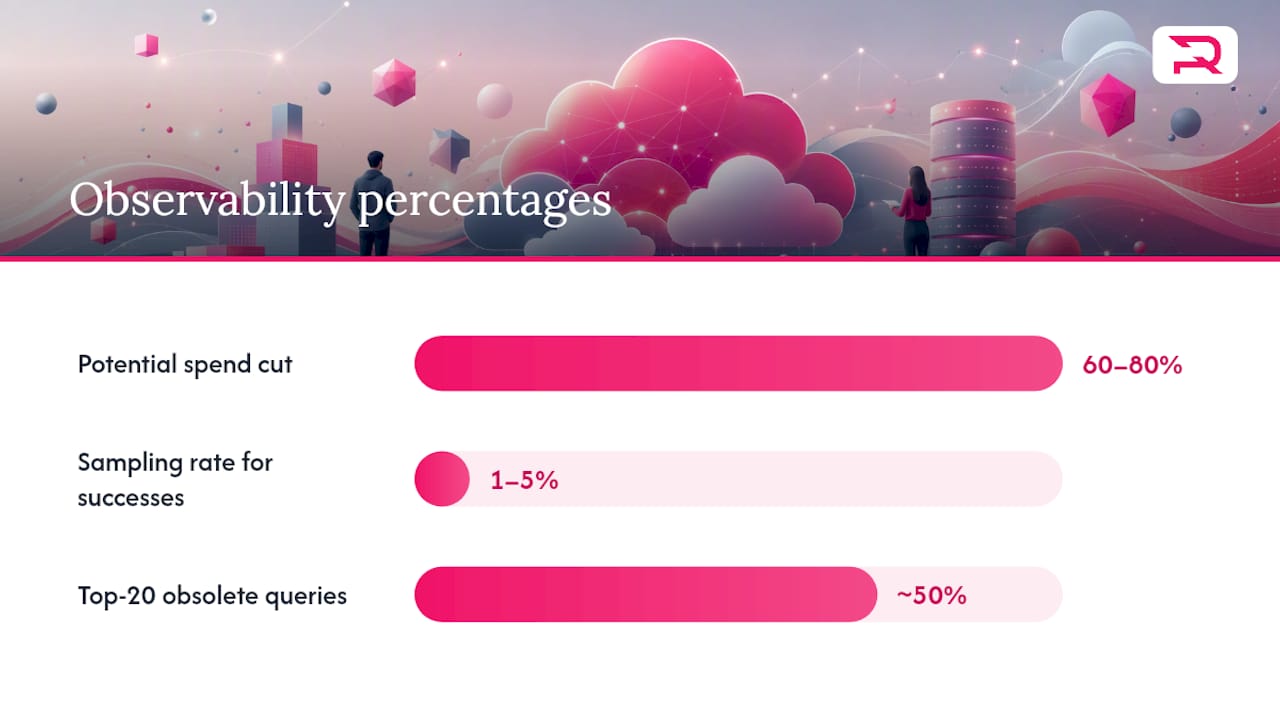
Tuning log retention and sampling is where the fastest wins live. Careful sampling and retention tuning can cut observability spend by 60 to 80% with minimal loss of diagnostic signal, because most of what gets logged at full volume is routine, successful requests that nobody will ever query.
- Sample high-volume, successful operations at a low rate (1 to 5%) while keeping error and exception paths at full capture.
- Reduce metric cardinality by replacing high-cardinality labels like user_id with bucketed alternatives such as user_tier, which can cut time-series volume dramatically without losing the ability to spot trends.
- Cap custom metrics per service and review the list quarterly. Dashboards built for a launch two years ago rarely get decommissioned.
- Audit every SaaS subscription tied to infrastructure (monitoring, error tracking, feature flags) and set a usage threshold below which the tool gets renegotiated or replaced.
Pro Tip: Pull a report of your top 20 most expensive log queries or dashboards from the last quarter. If half of them were built for an incident that closed months ago, you've found your first round of cuts.
How Does FinOps Turn One-Time Savings Into a Habit?
Cost optimization sprints deliver a spike of savings and then erode over six to twelve months if nobody owns the follow-through. This is where most organizations lose the gains they fought hard to get in the first place.
The FinOps Foundation frames this as a repeating cycle: inform, optimize, operate. Inform means everyone can see accurate cost data. Optimize means acting on what that data shows. Operate means the process repeats without a champion having to relaunch it every quarter.
- Assign roles. A FinOps lead or cost owner, engineering leads accountable for their team's spend, and a finance partner who translates cloud invoices into budget language everyone understands.
- Run a weekly loop. Anomaly alerts get triaged Monday, actions get assigned by Wednesday, and results get verified by Friday. This weekly cadence is what keeps savings from eroding over the following two quarters.
- Track four KPIs consistently. Unit cost (cost per customer, transaction, or workload), forecast-to-actual variance, tag coverage percentage, and commitment utilization rate.
- Map the 30-day sprint to owners. Days 1 to 10 (visibility and cleanup) sit with platform engineering. Days 10 to 24 (rightsizing and storage) sit with the teams that own those services. Days 24 to 30 (commitments and governance) sit with the FinOps lead and finance together.
Statistic Callout: Accounts that follow this sequenced approach see 30 to 50% savings in audited environments, and the gap between a one-time sprint and a durable program is almost always the weekly loop, not the initial cleanup.
Which Tools and Automation Should You Trust With Production?
Tool selection matters less than most vendors want you to believe. What matters is matching the automation's risk level to the resource it touches.
Cloud cost tools generally fall into three categories: native provider cost tools built into AWS, Azure, or Google Cloud consoles; cost intelligence platforms that unify multi-cloud spend and attribute it to teams or products; and automation engines that act on recommendations rather than just displaying them.
- Automate low-risk cleanup fully: deleting resources with zero traffic for 30-plus days, expiring unused snapshots, and shutting down scheduled dev/test environments overnight.
- Require human approval for anything touching production rightsizing. An automated script that resizes a database instance at 2 a.m. without a rollback plan is how cost optimization programs lose executive trust permanently.
- Build the integration pattern as a pipeline: cost exports feed an analytics layer, which feeds a ticketing or action system, which triggers verification once a change ships.
- Evaluate any vendor on four criteria: multi-cloud support if you run more than one provider, API depth for programmatic access, whether recommendations are actionable or just informational, and native integration with your policy-as-code enforcement.
The growing complexity of AI workloads makes this categorization more urgent, not less. GPU instances and inference endpoints are expensive enough that a manual quarterly review is too slow to catch drift.
Requestum's Perspective: Cost Discipline Starts in the Build
Most cloud cost problems get diagnosed in finance and solved in engineering, but the cheapest fix is the one that never gets built. Requirements gathering and infrastructure-as-code decisions made in week one of a project shape the cost curve for years, and by the time a FinOps team is running audits, the expensive architecture decisions are already baked in.
Requestum has built that cost-awareness into how it approaches infrastructure from the start. Design choices around AI workload architecture, covered in Requestum's AI and data science case work, directly influence whether a client ends up with an inference pipeline that scales its cost with usage or one that scales it with peak provisioning. The demand forecasting solution built for transportation services is a useful example: forecasting workloads are naturally bursty, and designing for that from day one avoids the trap of provisioning for peak load year-round.
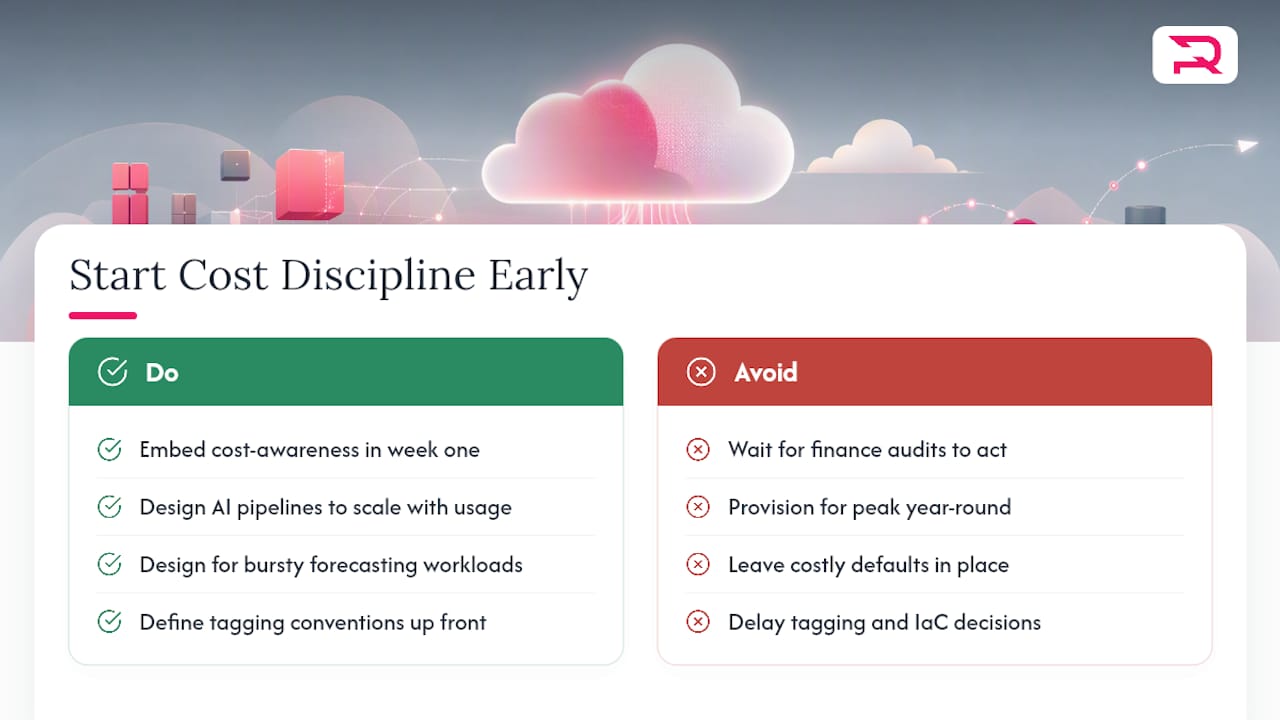
Tagging conventions, autoscaling defaults, and IaC modules with cost-safe defaults are all decisions a development team makes before a single dollar shows up on an invoice. Getting them wrong is far more expensive to unwind later than getting them right the first time.
When does it make sense to call in outside engineering help rather than run this internally? Usually when the team lacks bandwidth to own both feature delivery and infrastructure hygiene, or when an AI workload's cost profile is unfamiliar territory for an in-house team more used to conventional web hosting patterns. Whether that means running the sprint yourself or bringing in a partner to build the guardrails alongside your team, the earlier cost thinking enters the development process, the less painful the cleanup later.
— Dmitry
Sources
Validating a cost optimization program against primary documentation matters more than trusting any single blog post, including this one. These four sources cover the core ground.
The FinOps Foundation publishes the operating framework behind the inform, optimize, operate cycle referenced throughout this guide, along with role definitions and maturity assessments for building a program from scratch.
Microsoft Learn's cost management best practices documents the mechanics of billing exports, Cost Management APIs, and reservation purchasing that make programmatic optimization possible.
Azure's blog on cost optimization principles addresses why cost optimization stays a continuous discipline rather than a project with an end date, particularly as AI workloads change consumption patterns.
IBM's overview of cloud cost optimization quantifies the scale of typical cloud waste and the realistic savings range organizations can expect from a structured effort.
If your team is weighing whether to build this program internally or bring in engineering support to design cost-aware infrastructure from the ground up, Requestum's web development and SaaS development teams build tagging, autoscaling, and IaC defaults into projects from day one rather than retrofitting them after the first painful invoice.
FAQ
What Is Cloud Cost Optimization?
Cloud cost optimization is the continuous practice of matching cloud spend to actual business value through visibility, rightsizing, commitment discounts, and governance, rather than a single round of cuts.
How Can Cloud Computing Reduce Costs Compared to On-Premises Infrastructure?
Cloud computing lets you pay for capacity as you use it instead of provisioning hardware for peak demand year-round, and autoscaling combined with rightsizing keeps that pay-as-you-go model efficient rather than just theoretically cheaper.
How Can Serverless or Managed Compute Services Reduce Costs?
Managed and serverless compute services like AWS Lambda or Cloud Run bill based on actual execution rather than reserved capacity, which cuts costs for workloads with variable or unpredictable traffic when combined with proper concurrency limits and cold-start tuning.
What Is the Difference Between Cost Management and Cost Optimization in Cloud Computing?
Cost management is the reporting and tracking layer, tagging, billing exports, and dashboards, while cost optimization is the action layer built on top of it: rightsizing, cleanup, commitments, and lifecycle policies that actually reduce the bill.
How Much Can a Structured Optimization Sprint Actually Save?
Organizations typically waste about 32% of cloud spend, and a sequenced 30-day sprint following visibility, cleanup, rightsizing, and commitment steps commonly recovers 30 to 50% of that waste without re-architecting workloads.