
A data migration plan is a versioned, auditable runbook that maps every field, rehearses failure before it happens live, and defines exactly who signs off on go or no-go. Success means reconciled counts, a tested rollback path, and a named owner who can call the decision under pressure. Skip any of those elements and the migration is a gamble dressed up as a project.
TL;DR:
- Choosing the right migration type depends on whether you're transferring storage, databases, applications, cloud infrastructure, or entire workflows, often combining several in one project.
- The preferred strategy varies by risk tolerance and downtime needs: big-bang for quick, low-cost projects; phased or hybrid for complex, high-availability scenarios; and trickle for minimal downtime when infrastructure allows.
- A comprehensive migration plan must include detailed inventory, field mapping with version control, pilot testing, rehearse rollback, and a named decision owner with measurable triggers.
- Validation relies on matching record counts, run checksums, and verifying aggregate balances to confirm data integrity before cutover.
- Automation tools for extraction, transformation, validation, and reconciliation significantly reduce manual errors, especially in large or complex data moves.
Table of Contents
- What Is a Data Migration Plan, and Why Does It Matter?
- What Are the Different Types of Data Migration?
- Which Migration Strategy Fits Your Timeline and Risk Tolerance?
- What Are the Steps in a Data Migration Process?
- How Do You Handle Field Mapping and Reconciliation?
- How Do You Test and Rehearse a Migration Before Cutover?
- What Security and Compliance Steps Belong in a Migration Plan?
- What Tools and Automation Should You Use for Migration?
- What Should a Practical Migration Checklist Include?
- How Does Requestum Approach Data Migration in Practice?
- What Governance Habits Actually Prevent Migration Failures?
- How Requestum Can Support Your Migration Plan
- Where Can You Read More on Migration Standards and Guidance?
- Sources
- FAQ
What Is a Data Migration Plan, and Why Does It Matter?
A data migration plan documents how data moves from source to target: what gets mapped, who tests it, and how the team proves the result matches before anyone deletes the old system. AWS defines data migration as moving data between locations, formats, or applications, and stresses that planning around the destination, the transformation logic, and the actual use cases matters more than the transfer mechanics themselves. Most failures don't happen during the copy. They happen because nobody wrote down what "correct" looks like before the switch got thrown.
A documented plan mitigates specific, recurring risks:
- Silent data loss from unmapped or mistyped fields that pass a basic row count but fail downstream reporting.
- Extended downtime because nobody rehearsed the cutover sequence before doing it live.
- Compliance exposure when regulated records move through unsecured staging environments.
- Finger pointing during an outage, because no one was named as the decision owner.
A written plan also changes accountability. Instead of "the database team handles it," a plan assigns a specific person to each mapping, each test, and each go/no-go call, which turns a vague hope into a chain of individually verifiable claims.
What Are the Different Types of Data Migration?
The type of migration you're running determines how much mapping effort, downtime tolerance, and rollback complexity you should plan for. Four categories cover most projects, and many real-world moves combine more than one.
- Storage migration moves data between physical or virtual storage systems (disk to SSD, on-premises to cloud storage) with minimal transformation, usually the lowest-risk category.
- Database migration shifts data between database engines or schema versions, often requiring field-level mapping when data types or structures differ.
- Application data migration transfers records tied to a specific application, such as moving CRM records into a new platform, and typically demands the heaviest transformation work because field structures rarely match one to one.
- Cloud migration moves on-premises systems into cloud infrastructure, adding network transfer time, security configuration, and often a full architecture redesign to the mix.
- Business-process migration relocates entire workflows, including the data, rules, and application logic that support them, and carries the highest coordination overhead.
Treat a project as hybrid the moment two of these overlap, which is common. Migrating a legacy CRM to a cloud-hosted platform is simultaneously an application migration and a cloud migration, and it needs both playbooks running in parallel, not one borrowed from the other.
Which Migration Strategy Fits Your Timeline and Risk Tolerance?
Four strategies cover nearly every enterprise scenario, and the right one depends on how tightly your systems are coupled and how much downtime the business will tolerate.
- Big-bang migration moves all data in a single event, usually over a weekend or maintenance window. It's fast and simple to plan but concentrates all the risk into one narrow window, and a failed cutover means a full rollback under time pressure.
- Phased migration moves data in stages, by module, region, or business unit, with independent testing gates between each phase. It takes longer overall but limits the blast radius of any single failure, since each phase gets its own reconciliation and rollback unit.
- Trickle (or replication) migration runs old and new systems in parallel, syncing data continuously until the new system is verified stable, then cutting over with near-zero downtime. It demands more infrastructure and longer project timelines to maintain dual systems.
- Hybrid migration blends phased and trickle approaches, often running trickle sync for critical, high-availability systems while handling lower-risk data in a phased sweep.
For a small CRM with a tolerant downtime window, big-bang usually wins on cost. For an ERP migration touching finance and inventory simultaneously, phased or hybrid is close to mandatory.
What Are the Steps in a Data Migration Process?
A migration plan only earns its name once it becomes a sequence of testable, owned steps. Here's the operational order that holds up under audit.
- Assess and inventory. Catalog every source system, data volume, dependency, and system owner before writing a single mapping rule. Skipping this step is one of the leading causes of migration failure, because teams discover undocumented dependencies mid-cutover instead of during planning.
- Map and version transformations. Every field needs a documented source name, target name, transformation logic, a version number, and an assigned owner. Deterministic transforms (the same input always produces the same output) are non-negotiable; anything probabilistic or manually adjusted becomes untestable.
- Cleanse and prepare. Profile the source data to understand distributions, nulls, and outliers before you migrate them somewhere new. Gartner recommends profiling as the starting point for any data quality initiative, and migration is exactly the moment to catch duplicate records, mask sensitive fields, and retire data nobody actually uses anymore.
- Run pilots and dry runs. Migrate a representative subset, not a cherry-picked easy one, and log every failure without deleting the evidence. A dry run that only tests clean records tells you nothing about the messy 5% that breaks in production.
- Transfer and transform. Execute the scripted ETL, ELT, or change-data-capture process with logging at every stage, so a failure at 2 a.m. leaves a trail instead of a mystery.
- Validate and reconcile. Compare source and target counts, run checksums, verify relationship balances (does every order still point to a valid customer?), and run functional tests against real business logic.
- Cutover and rollback readiness. Freeze writes to the source system, run the final sync, and route the go/no-go decision through one named owner with measurable rollback triggers defined in advance, not improvised in the moment.
- Post-migration audit. Monitor the new system under real load, run user acceptance testing, and only then decide on decommissioning timelines and data retention for the old environment.
Pro Tip: Never delete a failed dry run's logs after you fix the bug. Keep the failure, the fix, and the re-run result as one linked record. When a reviewer asks "how do you know this works," that chain is your answer.
Requestum's business analysis services exist largely to handle steps one and two properly, since a migration plan built on an incomplete inventory tends to fail quietly rather than loudly.
How Do You Handle Field Mapping and Reconciliation?
A mapping document is worthless if it can't be replayed and audited later. Each row needs six things: source field name, target field name, the transformation expression, a version number, an owner, and a privacy classification if the field touches personal or health data.
Two practices separate a working mapping sheet from a liability:
- Document every edge case explicitly: what happens to a null value, a value outside expected range, or a duplicate key. Silent defaults are where data quietly goes wrong.
- Keep every failed test run and its fix as permanent evidence rather than overwriting it, so a reviewer can reconstruct exactly what broke and how it was resolved.
Reconciliation isn't optional; it's the proof. A practical migration template records field-level mappings with versions, reconciliation checks, trial-run results, and failure logs specifically so the go/no-go decision is auditable after the fact, not just trusted in the moment.
Reconciliation itself runs on three checks: row counts matching between source and target, checksums confirming byte-level integrity on critical fields, and balance equations verifying that aggregates (total revenue, total inventory units) match across systems. A migration that passes row counts but fails a balance check has almost certainly lost or duplicated data somewhere in the transformation layer.
How Do You Test and Rehearse a Migration Before Cutover?
A dry run only proves something if the sample data is genuinely representative, not the cleanest 500 rows someone could find. Pull a pilot set that includes edge cases, duplicates, and known problem records, sized large enough to surface pattern-level failures rather than one-off anomalies.
Validation should run in layers, and skipping a layer is how bugs reach production:
- Field-level checks confirm individual values transformed correctly against the mapping sheet.
- Row-level checks confirm entire records reconciled without silent drops.
- Functional checks confirm the application actually behaves correctly against the migrated data.
- Downstream checks confirm reports, integrations, and dependent systems still produce correct output.
Rollback needs the same rigor as the forward migration: scripted steps, defined pass/fail criteria, and a rehearsal run before the real cutover date, not just a plan written on paper.
Pro Tip: Rehearse the rollback at least once before cutover day, on a copy of production data, with the same team that will execute it live. A rollback plan nobody has actually run is a hypothesis, not a procedure.
What Security and Compliance Steps Belong in a Migration Plan?
Regulated data needs its own line items in the plan, not an assumption that "the usual security" covers it. If the migration touches health records, HIPAA requires covered entities to implement administrative, physical, and technical safeguards for protected health information, and those safeguards apply during a migration exactly as they do in steady-state operations.
Four items belong in every regulated migration plan:
- Classify data by sensitivity before migration and minimize scope, since retiring obsolete data reduces both migration cost and compliance exposure at once.
- Encrypt data in transit and lock down staging environments with the same access controls as production.
- Mask or synthesize test data for pilots and dry runs, never copy real records into a lower-security test environment.
- Document retention, disposition, and named access owners for sensitive records once the migration completes.
What Tools and Automation Should You Use for Migration?
Four broad tool categories cover most migration needs, and picking the right category matters more than picking a specific vendor.
- Cloud data migration services handle bulk transfer into cloud infrastructure, often with built-in throttling and resumability for large datasets.
- ETL/ELT platforms manage extraction, transformation, and loading logic, particularly useful when transformation rules are complex or numerous.
- Change-data-capture and streaming tools support trickle migrations by continuously syncing changes between old and new systems.
- Validation and reconciliation tools automate the count, checksum, and balance checks that would otherwise eat hours of manual QA time.
When evaluating any tool, weigh replayability (can you rerun a failed batch without side effects), observability (can you see exactly where a failure occurred), scale, and schema evolution support. Automating validation and reconciliation reduces manual error and surfaces problems earlier than a manual spot check would. Custom scripts still make sense for narrow, well-understood transformations, but automation earns its cost the moment volume or complexity climbs past what a two-person team can manually verify.
What Should a Practical Migration Checklist Include?
A runbook-ready checklist needs gates, not just tasks. Here's a compact version worth copying directly into your project documentation.
- Inventory complete: sources, volumes, owners, and dependencies documented and signed off.
- Mapping sheet complete: every field has a version, owner, and privacy classification.
- Dry run passed: reconciliation counts, checksums, and balance checks all within defined tolerance.
- Rollback rehearsed: scripted steps tested against a copy of production data.
- Go/no-go owner named, with rollback triggers defined as measurable thresholds, not judgment calls.
- Post-migration audit scheduled: monitoring, user acceptance testing, and decommissioning timeline agreed.
| Migration size | Typical timeline | Key acceptance criteria |
|---|---|---|
| Small (single application, one team) | Several weeks or more | Reconciled counts, functional tests passed, rollback rehearsed once |
| Medium (multi-system, one department) | Several months | Phased reconciliation per gate, layered validation, audited mapping sheet |
| Large (cross-department or cloud migration) | Several months or longer | Per-phase go/no-go sign-off, continuous monitoring, staged decommissioning |
Planning, mapping, testing, and validation consume most of that timeline. The actual data transfer is usually the fastest part of the whole project.
How Does Requestum Approach Data Migration in Practice?
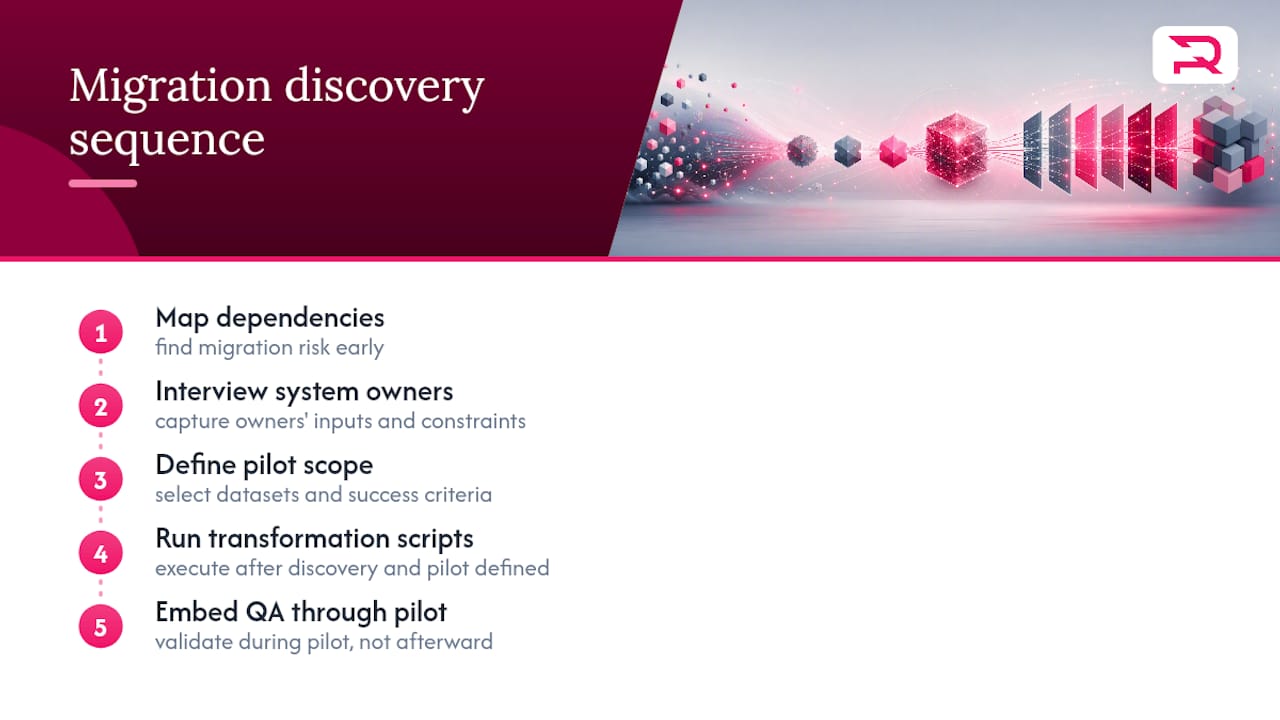
Discovery is treated as the phase where most migration risk actually gets found, not a formality before the real work starts. That means mapping dependencies, interviewing system owners, and defining pilot scope before a single transformation script runs, with QA embedded through the pilot rather than bolted on afterward.
The xScale logistics management engagement involved consolidating fragmented operational data into a unified platform, where mapping accuracy directly determined reporting reliability downstream. A separate demand forecasting project required reconciling historical data from multiple sources before any predictive model could trust its inputs, a reminder that migration quality caps model quality.
If your team needs support scoping a migration or running the QA layer, Requestum's discovery and QA services cover both ends of that work.
What Governance Habits Actually Prevent Migration Failures?
The most common governance mistake isn't a missing tool. It's a missing name. Teams write detailed mapping sheets and then leave the go/no-go call to "whoever's on the bridge call," which means the decision gets made under pressure by whoever's loudest, not whoever's accountable.
Fix it early: name the go/no-go owner in the plan document itself, weeks before cutover, and give them measurable rollback triggers instead of a gut check. Keep every failed dry run as evidence rather than tidying it away. The first pilot you run should be treated as a rehearsal for the decision-making process, not just the data.
— Dmitry
How Requestum Can Support Your Migration Plan
Requestum is the alternative to hiring and training an internal migration team from scratch: you get discovery, mapping, QA, and execution support from people who have already run these playbooks under deadline pressure. That matters most in the phases this article just walked through, where undocumented dependencies and skipped dry runs cause the failures nobody budgeted time to fix.
A short engagement typically starts with a discovery call to scope your source systems, data volumes, and risk areas, followed by a pilot phase where Requestum's business analysis team builds the mapping sheet and your team validates it together. From there, QA and testing support carries the dry run and reconciliation work through to a rehearsed rollback plan, so cutover day has no surprises left in it. If your migration touches a legacy application that needs modernizing alongside the data move, Requestum's custom web application team can scope that in parallel. Start with a discovery conversation and get a scoped plan instead of a guess.
Where Can You Read More on Migration Standards and Guidance?
- HHS's HIPAA Security Rule guidance defines the safeguards regulated data needs during any system transition.
- Gartner's data quality guidance explains why profiling before migration catches problems cleanup after migration can't.
- AWS's data migration overview lays out the planning fundamentals behind destination, transformation, and use-case decisions.
- If your migration coincides with a website or CMS move, SEO-aware site migration guidance covers URL mapping and ranking preservation, a piece plenty of data migration plans overlook entirely.
Sources
- HHS — HIPAA Security Rule and Related Laws & Regulations
- Gartner — How to improve your data quality
- AWS — What is Data Migration?
- Playcode — Data migration plan template
FAQ
What Are the Four Types of Data Migration?
The four core types are storage migration, database migration, application data migration, and cloud migration, with business-process migration sometimes treated as a fifth category. Most real projects combine at least two, especially when a legacy application moves into cloud infrastructure at the same time.
What Are the Best Tools for Data Migration?
Rather than one universal tool, the right category depends on your scenario: cloud migration services for bulk transfer, ETL/ELT platforms for complex transformations, change-data-capture tools for near-zero-downtime trickle migrations, and dedicated reconciliation tools for validation. Automating validation and reconciliation cuts manual error significantly compared to spot-checking by hand.
What Is an Example of Data Migration?
A common example is moving customer records from an aging on-premises CRM into a cloud-based platform, which requires mapping every field, transforming data formats, and reconciling record counts before the old system is retired. Requestum's unified fan data platform case is a real instance of consolidating fragmented data sources into one system with validated downstream reporting.
What Are the Main Data Migration Strategies?
The primary strategies are big-bang, phased, trickle (replication), and hybrid migrations, each trading speed against risk differently. Big-bang moves everything in one event, phased breaks the move into independently tested gates, trickle runs both systems in parallel until the new one is verified, and hybrid combines phased and trickle depending on system criticality.