
Legacy system modernization means updating outdated software, infrastructure, or platforms so they support current business needs without the cost, risk, and fragility of the old stack. The recommended approach is sequential, not heroic: assess the estate, choose a strategy per system, and deliver in phases rather than one large rewrite. AI now accelerates the assessment and migration work considerably, but it does not replace disciplined planning.
TL;DR:
- Modernization efforts should prioritize systems with high business value and rising operational risk, rather than strictly based on age.
- Rehosting offers quick cloud migration but inherits architectural limitations, whereas refactoring and re-architecting provide long-term benefits for maintainability and scalability.
- Clear success metrics like deployment frequency and operational costs must be defined upfront, as they significantly influence modernization outcomes.
- AI tools for reverse engineering can compress assessment timelines, but strategy selection still depends on careful analysis of each system's value and risk profile.
- Ongoing governance, phased delivery, and regular system reviews are crucial to prevent technical debt accumulation and ensure sustained modernization success.
Table of Contents
- What Legacy System Modernization Means for Your Business
- What Are the Common Types of Legacy Systems?
- What Business Benefits Justify Modernization Investment?
- Which Modernization Strategy Fits Your System?
- What Challenges Slow Down Modernization Projects?
- How Do You Plan and Govern a Modernization Program?
- What Tools and AI Capabilities Matter Most Right Now?
- What Do Real Modernization Projects Look Like?
- Your 90-Day Modernization Checklist
- How Do You Maintain a Modernized System Long Term?
- How Does Modernization Affect Your Organization and Teams?
- What Compliance and Regulatory Factors Should You Plan For?
- The Conventional Modernization Advice Gets the Sequencing Wrong
- Get Expert Help Modernizing Your Legacy Systems
- Sources
- FAQ
What Legacy System Modernization Means for Your Business
Legacy system modernization is a technical and business exercise: you take an aging application, database, or infrastructure layer and bring it up to a standard that supports current operations, security requirements, and integration needs. It is narrower than digital transformation, which reimagines entire business processes and customer experiences. You can modernize a COBOL billing engine without transforming how your company sells anything. The two efforts often overlap, but conflating them is how projects lose focus and budget.
Four drivers push most organizations toward modernization work:
- Cost control. Mainframe licensing, specialized hardware maintenance, and scarce COBOL or RPG talent get more expensive every year.
- Speed to market. Monolithic codebases make even small feature changes slow, because every change risks breaking something unrelated.
- Security exposure. Unsupported operating systems and unpatched middleware are the easiest entry points for attackers.
- Customer experience. Legacy systems rarely expose the APIs or real-time data that modern mobile apps and self-service portals need.
Not every legacy system needs modernizing right now. A stable back-office batch job with no security exposure and no growth pressure can often be left alone for another budget cycle. The systems worth prioritizing are the ones sitting at the intersection of high business value and rising operational risk. That framing, not raw age, should drive your roadmap.
What Are the Common Types of Legacy Systems?
Most enterprise estates fall into a handful of recognizable buckets, and each one carries different modernization implications.
- Mainframe and COBOL workloads. Still running core banking, insurance, and government processes because they are stable and because rewriting decades of embedded business logic is genuinely hard.
- Monolithic applications. Single deployable codebases where the billing module, the reporting module, and the customer module are tightly coupled, so a change anywhere risks breaking everything.
- Client-server and desktop-bound systems. Applications built around a local database and thick desktop client, often tied to a specific operating system version or a vendor that stopped active development years ago.
- Unsupported or end-of-life stacks. Systems running on operating systems past their support window, similar in principle to Windows Server end-of-life cycles, where the vendor stops shipping security patches entirely.
The practical implication varies by type. A mainframe workload usually calls for rehosting or gradual decomposition rather than a rewrite. A monolith is often a refactoring or re-architecting candidate. A desktop-bound proprietary system frequently needs full replacement because the vendor itself is disappearing.
What Business Benefits Justify Modernization Investment?
The business case for modernizing legacy applications rests on outcomes a finance committee can actually verify, not vague promises of agility.
- Lower maintenance and licensing costs. Retiring mainframe cycles or proprietary licenses in favor of cloud consumption pricing shifts fixed cost into variable cost.
- Faster feature delivery. Decoupled, well-tested codebases let teams ship changes weekly instead of quarterly.
- Stronger security posture. Modern platforms support automated patching, current encryption standards, and centralized access control.
- Better observability. Cloud-native monitoring surfaces problems before customers notice them, instead of after a support ticket arrives.
Organizations that track outcomes typically watch deployment frequency, mean time to recovery, and cost-to-run as the core metrics of a successful program. Microsoft's own internal migration to Azure, moving nearly all its systems from on-premises infrastructure to a cloud-native operating model, produced measurable gains in observability, automated patching, and operational efficiency once the shift moved past simple lift-and-shift and into platform services.
Pro Tip: Pick two or three KPIs before the project starts, not after. Teams that define success metrics retroactively almost always cherry-pick numbers that flatter the outcome.
Which Modernization Strategy Fits Your System?
Five established strategies cover most legacy system modernization decisions, and picking the wrong one for a given system is the single most common cause of budget overruns.
- Rehost (lift-and-shift). Move the application to cloud infrastructure with minimal code changes. Fast and low risk in the short term, but you inherit the same architectural limitations you started with. Good for buying time on a system you plan to retire later.
- Replatform. Make targeted changes, such as swapping a database engine or moving to a managed service, without touching core application logic. This delivers real cloud economics (autoscaling, managed backups) with moderate effort.
- Refactor. Restructure the codebase to improve maintainability and reduce technical debt while preserving external behavior. This is the right call when the system's logic is sound but the implementation has decayed.
- Re-architect or decompose into microservices. Break a monolith into independently deployable services. This is the most effort-intensive path but pays off when you need independent scaling, faster release cycles, or the ability to swap components later.
- Replace. Retire the system entirely and adopt a new platform, often a SaaS product or a purpose-built custom application. Appropriate when the underlying business process itself has changed enough that patching the old system no longer makes sense.
Academic surveys of modernization approaches catalog established techniques like screen scraping, database gateways, and encapsulation for exactly this kind of decision, and the lesson holds up: there is rarely one universally right answer, only a right answer for a given system's constraints.
Four decision cues determine which strategy applies: expected return-on-investment horizon, risk tolerance, regulatory exposure, and whether your team has the skills to execute the chosen path. A system generating steady revenue with low compliance risk is a rehosting or replatforming candidate. A system tied to a regulated process that keeps failing audits is a stronger case for re-architecting or replacing outright. Deloitte's guidance on AI-enabled estate modernization recommends prioritizing based on whether a given part of the estate enables core operations or drives product capabilities, since those two categories usually deserve different levels of investment.
What Challenges Slow Down Modernization Projects?
Technical debt, data migration, security gaps, and skills shortages account for most schedule slippage in modernization programs, and each has a fairly specific mitigation.
- Unknown technical debt. Static analysis tools and AI-assisted reverse engineering surface undocumented dependencies before they cause mid-project surprises, rather than after.
- Data migration risk. Shadow tables, parallel-run reconciliations, and phased cutover schedules catch data integrity issues while the old system is still available as a fallback.
- Security during transition. Building modernization work into CI/CD pipelines with standard security policies applied from day one avoids bolting security on after launch.
- Skills gaps. Few internal teams have both deep COBOL knowledge and modern cloud architecture experience, so hybrid team models pairing in-house domain knowledge with a vetted external partner tend to outperform either extreme.
Preserving business rules deserves particular attention during reverse engineering. Extracting the rule sets embedded in old code and mapping them to a canonical model before re-implementation prevents the quiet functional regressions that surface months after go-live, when nobody remembers why the old system handled a specific edge case the way it did.
How Do You Plan and Govern a Modernization Program?
A modernization roadmap needs concrete artifacts, not just intentions. Here is the sequence that keeps programs on schedule:
- Build an inventory and dependency map. Catalog every application, its data dependencies, integration points, and the business processes it supports.
- Score each system for value and risk. A prioritization model that weighs business value against modernization risk produces a faster path to ROI than modernizing whatever seems most urgent that quarter.
- Design a pilot with explicit success criteria. Choose a system with real business value but contained blast radius, and define what "success" looks like before you start.
- Establish governance. A steering group, defined rollout waves, and risk gates between phases keep a multi-year program from drifting.
- Sequence rollout waves by lessons learned. Each wave should incorporate what the previous one taught you about timelines, vendor behavior, and team capacity.
Governance structure matters as much as technical sequencing. Programs that skip a steering group tend to see scope creep the moment a department head requests "just one more feature" mid-migration. A software architect or equivalent technical lead should own the dependency map and sign off on each wave before it proceeds.
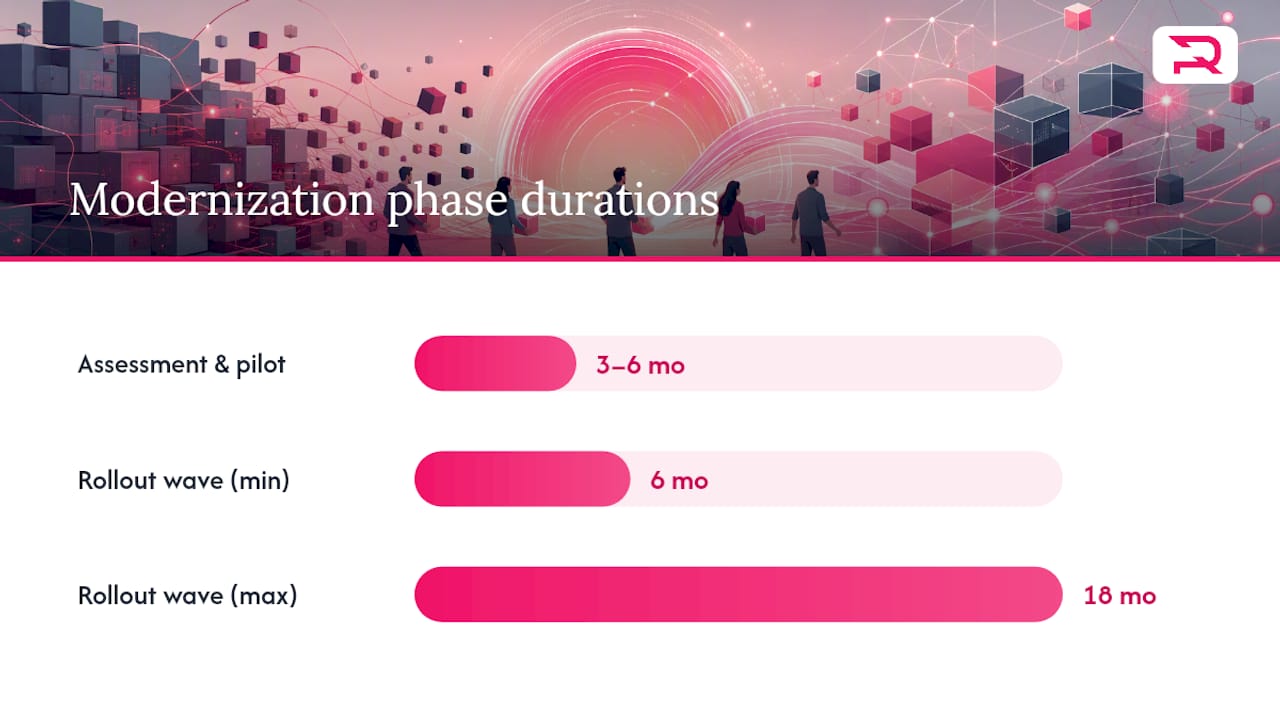
Typical modernization timelines run in phases: three to six months for assessment and pilot, then six to eighteen months per wave depending on system complexity and organizational readiness. Budget conversations should account for parallel-running costs, since you will often pay for the old and new systems simultaneously during a cutover window. Hybrid, phased approaches consistently outperform big-bang rewrites because they let the business capture value earlier and correct course before a full year of investment is at risk.
What Tools and AI Capabilities Matter Most Right Now?
Cloud migration typically follows a three-stage pattern: lift-and-shift to infrastructure-as-a-service, replatform onto managed services, then move toward cloud-native patterns using platform-as-a-service or serverless compute. Each stage reduces operational burden a bit further, and skipping stages is possible but riskier.
- Containers and orchestration. Kubernetes gives you portability and scaling flexibility, but it adds operational complexity that smaller teams should weigh carefully before adopting.
- Observability and CI/CD. Automated testing, deployment pipelines, and monitoring dashboards are what let a modernized stack stay reliable after launch, not just at go-live.
- AI-assisted reverse engineering. Tools that parse legacy codebases and generate documentation or test cases compress work that used to take analysts weeks.
The economics here are shifting fast. One case involving AI-assisted reverse engineering combined with forward reengineering delivered a transformation significantly faster than a comparable pre-AI program. That is a meaningful gain, but it depends on clear business outcomes and governance guiding the AI tooling, not the other way around. Deloitte's framework for AI-enabled modernization breaks the opportunity into three approaches: rethinking processes with generative AI, reengineering the digital core, and reimagining how new capabilities get built, with the recommendation to prioritize based on operational versus product impact.
Platform engineering investment makes sense once you have multiple modernization waves running in parallel and need shared tooling across teams. For a single system or an early pilot, point solutions, like a dedicated automated testing suite or a targeted migration plugin such as those covered in this Strapi migration plugin roundup, usually deliver value faster than building a platform team from scratch.
What Do Real Modernization Projects Look Like?
Case studies matter here because modernization playbooks that look clean on a whiteboard often behave differently against fifteen-year-old production code. Requestum's engagement building the xScale logistics management platform involved moving core scheduling and tracking logic to a cloud-native architecture built for scale, replacing a system that could not handle the client's growing shipment volume. The home services management platform engagement shows a similar pattern: phased delivery that preserved existing business rules for scheduling and dispatch while layering in modern web infrastructure underneath.
Requestum runs modernization engagements through a consistent structure: assessment first, then a scoped pilot, then phased delivery, with quality assurance and observability built in throughout rather than bolted on at the end. That sequencing mirrors the governance approach outlined earlier in this article, and it exists specifically because skipping the pilot stage is where most legacy application modernization budgets go sideways.
A few reusable artifacts worth borrowing regardless of who executes your program:
- A value-risk scoring rubric for ranking which systems to tackle first.
- A pilot scope checklist that defines success criteria before any code changes.
- A lightweight governance template covering steering group cadence and risk gate checkpoints.
Your 90-Day Modernization Checklist
- Weeks 1 through 4: Build the system inventory and map dependencies across applications, data stores, and integrations.
- Weeks 4 through 8: Select one system for a quick-value pilot, define measurable success criteria, and execute.
- Weeks 8 through 12: Establish governance structure and decide on your team model, whether in-house, hybrid, or an external partner, for the next wave.
Momentum matters more than perfection in this window. A completed, modest pilot beats an unfinished ambitious one every time.
How Do You Maintain a Modernized System Long Term?
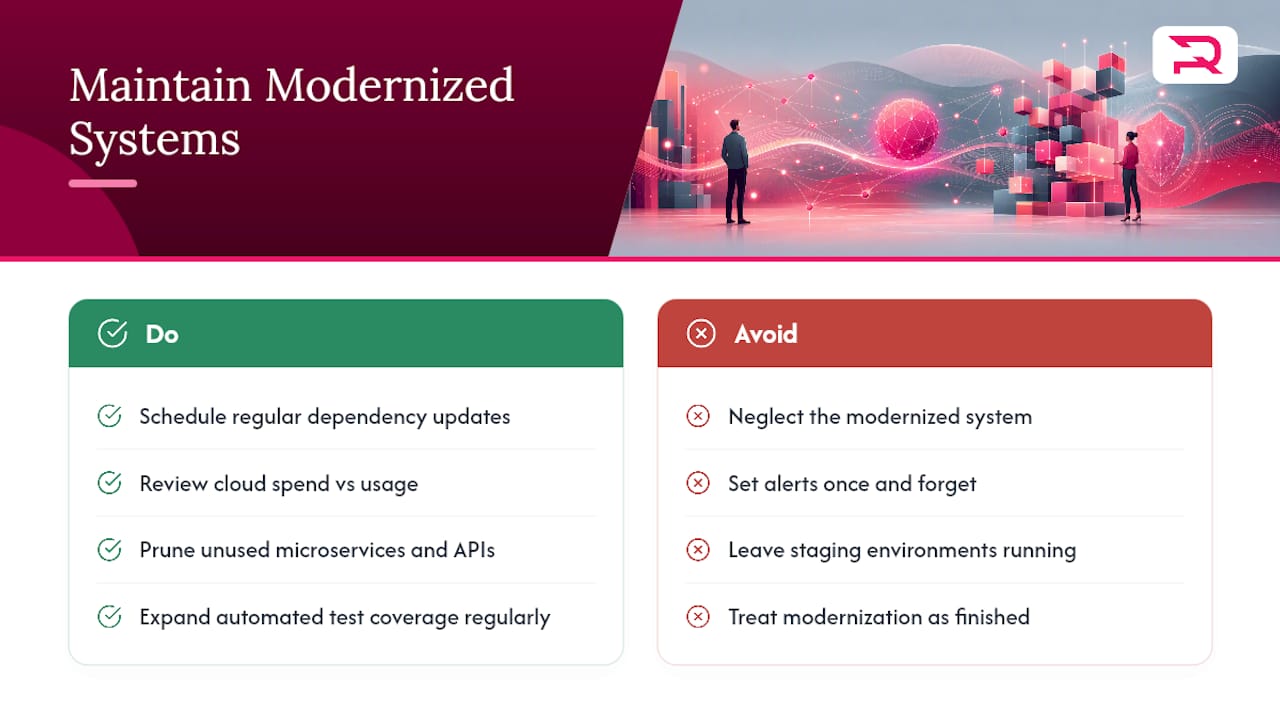
Modernization is not a one-time event you finish and forget. Systems that get modernized and then neglected tend to accumulate the same technical debt patterns within a few years, just on newer infrastructure.
Post-launch, the priority shifts to keeping the new stack lean. That means regular dependency updates, scheduled reviews of cloud spend against actual usage, and pruning unused microservices or API endpoints before they become tomorrow's undocumented legacy code. Automated testing suites need to grow alongside the application rather than staying frozen at launch-day coverage levels.
Observability dashboards set up during modernization should keep evolving too. The alerts that mattered during cutover, like elevated error rates from data reconciliation, usually aren't the alerts that matter a year later, once the system has settled into steady-state traffic patterns. Teams that revisit their monitoring thresholds quarterly catch performance regressions earlier than teams that set alerts once and move on.
Cost optimization deserves its own recurring review. Cloud consumption pricing is efficient, but only if someone is actually watching it. Rightsizing compute instances, adjusting autoscaling thresholds, and retiring unused environments (staging environments left running months after a project ends are a common culprit) keeps the "faster and cheaper" argument for modernization intact well past the launch date. Treat the modernized system the way you'd treat any product with a roadmap, not a finished project you can walk away from.
How Does Modernization Affect Your Organization and Teams?
Legacy system modernization changes how people work, not just how systems run, and underestimating that is one of the more common ways programs stall even when the technical execution goes well.
Developers who have spent years maintaining a mainframe system often have deep, undocumented knowledge of business rules baked into that code. Losing that knowledge during a rushed transition creates functional gaps nobody notices until a customer complaint surfaces months later. Involving those team members early, not just as reviewers but as active contributors to the reverse engineering process, protects institutional knowledge that no documentation fully captures.
Operational teams outside IT also feel the shift. Customer support staff, finance teams reconciling reports, and compliance officers all interact with the outputs of these systems daily. Communicating timelines, training on new interfaces, and running a parallel period where both old and new systems are available reduces the disruption that otherwise shows up as a spike in support tickets right after go-live.
Resistance to change is predictable, not a sign something is going wrong. Staff who have built workarounds for a clunky legacy system over a decade have legitimate reasons to be skeptical that the new system will actually be better. Addressing that skepticism with a working pilot, rather than a slide deck promising future improvements, tends to convert skeptics faster than any amount of messaging.
What Compliance and Regulatory Factors Should You Plan For?
Regulatory exposure shapes both the urgency and the sequencing of a modernization program, particularly in finance, healthcare, and insurance, where legacy systems often predate current data protection standards entirely.
Data residency and retention requirements need to be mapped before migration begins, not discovered during it. A system moving from on-premises infrastructure to a cloud provider needs its data handling reviewed against whatever regulatory framework governs the business, since cloud provider defaults do not automatically satisfy sector-specific rules.
Audit trails matter more during modernization than at almost any other point in a system's life. Regulators and internal auditors alike want to see that data integrity was preserved through the transition, which is exactly what phased cutover strategies with reconciliation checkpoints are designed to demonstrate. Skipping that documentation to save time on a tight schedule tends to cost far more time later, when an audit asks for evidence that no records were altered or lost.
Security certifications and compliance attestations tied to the old system, such as industry-specific standards or data protection certifications, typically need to be re-established for the new platform. Treat that recertification as part of the project timeline, not an afterthought handled after launch. Legal and compliance teams should sit in the governance steering group described earlier, not review the project after the fact.
The Conventional Modernization Advice Gets the Sequencing Wrong
Most modernization guidance treats AI as an accelerant bolted onto an otherwise unchanged process: same assessment phase, same pilot, just faster typing. That undersells what is actually available. AI-assisted reverse engineering changes what belongs in the assessment phase itself, because a static analysis tool can now surface undocumented dependencies and buried business rules in days rather than the weeks a manual code review used to take. The programs that benefit most from AI are the ones that restructure their assessment phase around that capability, not the ones that keep the old assessment timeline and add AI as a bonus.
The bigger blind spot in conventional advice is treating strategy selection as a one-time decision. Real estates need different strategies for different systems, sometimes revised mid-program as pilot results come in. If your roadmap assigns one strategy to your entire application portfolio, that is usually a sign the assessment phase was too shallow. Prioritize the systems where business value and risk intersect, run a real pilot before committing to a wave-wide approach, and let AI compress your discovery timeline rather than your due diligence.
— Dmitry
Get Expert Help Modernizing Your Legacy Systems
Custom software companies that embrace a phased delivery model focuses on executing assessment, scoping a pilot, and delivering in governed waves, not just diagramming the process. That means a team that runs the assessment, scopes a real pilot, and delivers in governed waves, backed by AI development capabilities that speed up reverse engineering and testing without skipping the due diligence that protects your business rules.
Whether your roadmap points toward a full web development rebuild, a new SaaS platform replacing a retiring legacy system, or targeted QA and testing support during a cutover window, the right next step is a conversation about your specific estate, not a generic proposal. Reach out to Requestum to scope your first pilot and get a realistic timeline before you commit budget to a full-scale program.
Sources
- What is legacy modernization? | Google Cloud
- Modernizing IT infrastructure at Microsoft: A cloud-native journey with Azure
- Making the AI-powered case for legacy modernization | MIT Technology Review
- Legacy system modernization | Deloitte Insights
FAQ
What Is an Example of Legacy Modernization?
Migrating a COBOL-based mainframe billing system to a cloud-native microservices architecture, while preserving the original business rules, is a common example of legacy modernization in the financial services sector.
What Is an Example of a Legacy System?
A mainframe application running COBOL code, a monolithic desktop-bound ERP tied to an unsupported operating system, or a proprietary client-server database platform without an active vendor are all typical legacy systems.
How Do You Modernize a Legacy Application?
Start with an inventory and dependency map, score each system for business value and risk, then choose a strategy such as rehosting, replatforming, refactoring, re-architecting, or replacing, and deliver through a phased pilot rather than a single rewrite. Partners like Requestum typically run this as assessment, pilot, then phased delivery with QA built in throughout.
What Is the Difference Between Legacy Modernization and Digital Transformation?
Legacy modernization is a technical and business process focused on updating specific systems, while digital transformation is a broader initiative that reimagines entire business processes and customer experiences, often using modernized systems as a foundation.
How Long Does a Typical Modernization Program Take?
Assessment and pilot phases usually run three to six months, with each subsequent rollout wave taking six to eighteen months depending on system complexity, though AI-assisted reverse engineering can meaningfully compress the assessment stage.