
Building a large language model app means composing a model, a retrieval layer, tools, and workflow logic into something that behaves reliably in production, not just in a demo. Get three things right before you write a line of orchestration code: scope the MVP to two or three AI features, decide early whether you need retrieval-augmented generation (RAG) or fine-tuning, and wire automated evals into your pipeline from day one. Pick one architectural pattern, ship a small measurable experiment, and iterate from there.
TL;DR:
- The choice between retrieval-augmented generation and fine-tuning hinges on how often source data updates; RAG suits weekly updates, while fine-tuning is better for consistent domain-specific reasoning.
- Building reliable production LLM applications requires focusing on model selection, retrieval infrastructure, and orchestration, with prompt versioning and CI/CD testing being crucial to manage non-deterministic outputs.
- Monitoring in production must include continuous evals, scoring, and quick rollback plans for model or prompt changes, with detailed logging of prompt and model versions to trace regressions.
- Cost and latency are controlled through model routing, caching, distillation, and choosing self-hosted or managed endpoints based on infrastructure capacity and needs.
- Implementing strong guardrails involves input/output filtering, access controls at retrieval level, and thorough logging to ensure data privacy and compliance.
Table of Contents
- What Are the Main Categories of LLM Apps?
- Which Architecture Choices Actually Matter?
- How Do You Move an LLM Feature From Prototype to Production?
- How Do You Test Something That Doesn't Give the Same Answer Twice?
- What Infrastructure Choices Control Cost and Latency?
- What Guardrails Do LLM Apps Actually Need?
- Which Frameworks Actually Speed Up Development?
- Requestum's Practical Playbook for Delivering LLM Apps
- How Do LLM Apps Fit Into Systems You Already Have?
- What Makes an LLM App Feel Good to Use?
- What Data Privacy Rules Apply to LLM Apps?
- How Do You Keep an LLM App Healthy After Launch?
- An Engineer's Honest Take on Where Teams Go Wrong
- Ready to Move Your LLM App From Prototype to Production?
- Sources
- FAQ
What Are the Main Categories of LLM Apps?
Most production systems fall into a handful of recognizable patterns, and picking the wrong one early costs weeks of rework later. Each category solves a different problem, and each comes with its own cost, latency, and complexity profile.
-
Copilots and assistants sit inside an existing workflow (an IDE, a CRM, a support console) and generate suggestions or drafts a human reviews before acting. Developers use these for code completion, email drafting, and internal knowledge lookup.
-
RAG-based question answering retrieves relevant documents at query time and grounds the model's answer in that content, rather than relying on what the model memorized during training. This is the default choice when your data changes often or when hallucination risk is unacceptable, such as legal or medical reference tools.
-
Agentic workflows let the model plan multi-step actions, call tools, and decide what to do next based on intermediate results. They shine for tasks with variable paths, like a research agent that decides which sources to check, but they add real complexity: more failure modes, more latency, and much harder debugging.
-
Document processors extract, classify, or summarize structured and unstructured content at scale, often as a batch job rather than a live chat interface.
-
On-device LLMs run smaller, quantized models locally for privacy-sensitive or offline use cases, trading raw capability for latency and data control.
The decision between RAG and fine-tuning usually comes down to how often your source data changes. If your knowledge base updates weekly, RAG keeps answers current without retraining. Fine-tuning makes more sense when you need consistent tone, domain-specific reasoning patterns, or behavior that retrieval alone can't teach. As Databricks notes, production LLM apps typically combine models with retrieval, tools, and orchestration rather than relying on any single technique. Agentic designs earn their complexity only when the task genuinely requires branching decisions. A simple FAQ bot rarely needs an agent; a workflow that has to search, compare, and synthesize across multiple systems often does.
Which Architecture Choices Actually Matter?
The building blocks of any LLM app development project are the same regardless of use case: a model, a retrieval layer, a set of tools, a memory strategy, and an orchestration layer that ties them together. Get the fundamentals wrong here and no amount of prompt tweaking fixes it later.
Model selection comes down to four tradeoffs: latency, cost per token, context window size, and raw capability. A customer support triage bot might do fine with a fast, cheap model with a short context window. A contract analysis tool that needs to reason over 50-page documents needs a large context window and can tolerate higher latency. Fine-tuning only pays off when prompting alone can't reliably produce the tone, format, or domain reasoning you need. Databricks frames this as one of the core building blocks of production LLM apps, alongside retrieval infrastructure and orchestration.
RAG pipelines involve more moving parts than most teams expect going in:
- Chunking your source documents into segments small enough to embed meaningfully but large enough to preserve context.
- Embedding those chunks with a model matched to your domain (general-purpose embeddings underperform on specialized vocabulary like legal or medical text).
- Indexing in a vector database, choosing between managed options and self-hosted stores based on query volume and latency requirements.
- Retrieval tuning, including re-ranking retrieved chunks by relevance before they reach the model, which materially improves answer quality.
- Freshness checks, since stale embeddings silently degrade answer accuracy over time. RAG requires ongoing re-ranking and freshness management to keep results aligned with current source data.
Tool and function-calling patterns let the model request structured actions instead of free text. Enforcing JSON schema on outputs, rather than trusting the model to format things correctly, cuts downstream parsing errors dramatically. Most modern SDKs support native function-calling, and you should use it instead of asking the model to "return valid JSON" in plain prompt text.
Memory strategy depends on the product. A single-turn Q&A tool needs no persistence. A multi-turn assistant needs session memory, and some products need long-term memory across sessions, which raises real data retention questions covered later in this article.
Orchestration is where chains, retries, and error handling live. Model calls fail, time out, or return malformed output more often than developers expect, and an orchestration layer that doesn't handle retries gracefully will produce a brittle app no matter how good your prompts are.
Pro Tip: Build your re-ranking step before you optimize your embedding model. A mediocre embedding model with good re-ranking usually beats a great embedding model with none.
How Do You Move an LLM Feature From Prototype to Production?
Ship small, measure constantly, and treat every prompt like source code that needs version control and review. That's the entire philosophy behind moving LLM features out of a notebook and into a real product.
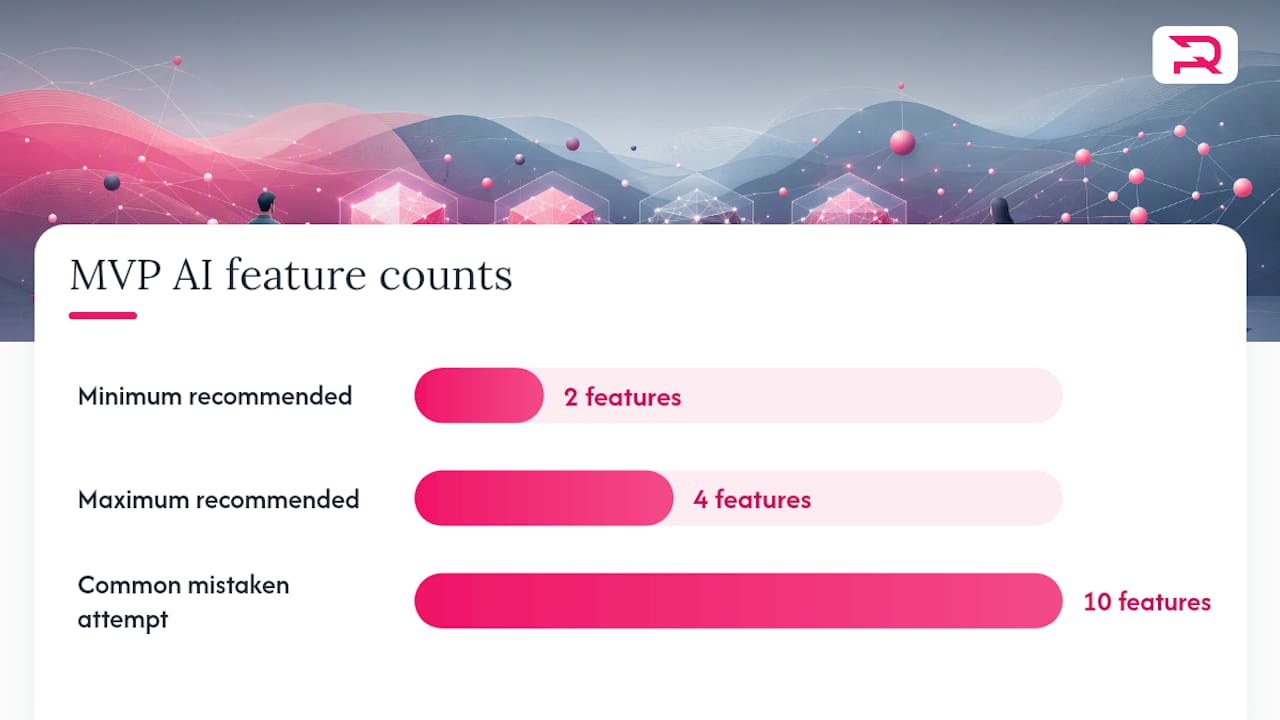
Start by limiting your MVP to two to four AI features with a clearly defined success metric for each. Teams that try to ship ten AI-powered features at once almost always end up debugging cross-feature interactions instead of shipping anything. Pick the two features that matter most to your users, define what "working" means numerically (accuracy against a labeled set, latency under a threshold, cost per query under a target), and build only those first.
The experimentation loop that works looks like this:
- Prototype fast with a notebook or lightweight script, not your production framework.
- Define a metric before you start iterating, not after you see the first output.
- Run small, frequent tests against a fixed evaluation set so you can actually tell if a prompt change helped or hurt.
- Cut anything that doesn't move the metric, even if it "feels" better in casual testing.
Prompt management deserves the same discipline as application code. Martin Fowler's engineering practices guide argues that teams should treat prompts as code, versioning them in the same repository as the application logic and reviewing changes through normal pull requests. This matters more than it sounds: prompt technical debt accumulates fast, and a prompt that's been patched a dozen times by different engineers without refactoring becomes nearly impossible to reason about. Schedule deliberate prompt refactors the same way you'd schedule a code cleanup sprint, and keep prompts modular rather than one giant block of instructions.
CI/CD for LLM features needs checkpoints that don't exist in traditional software pipelines. Before any prompt or model change ships, run it against your evaluation set and compare scores to the previous baseline. Stage rollouts to a small percentage of traffic first, and have a rollback plan ready that reverts to the last known-good prompt version, not just the last known-good code deploy. Because model behavior can shift even when your code doesn't (a provider updates a model version, for instance), your rollback plan needs to cover model version pinning, not just application code.
How Do You Test Something That Doesn't Give the Same Answer Twice?
Equality-style unit tests, the kind that check output == expected_string, fail almost immediately against LLM outputs, because the same prompt can produce different phrasing on every run. You need testing strategies built for non-deterministic systems, and there are three that actually work in practice.
- Example-based tests check whether an output contains required elements (a specific fact, a citation, a required field) rather than matching text exactly. These catch obvious regressions cheaply.
- Auto-evaluator tests use a second LLM call to score the primary model's output against a rubric, converting a subjective judgment ("is this answer helpful and accurate?") into a machine-checkable metric that can run in CI. This pattern, described in detail by Martin Fowler, lets teams run systematic quality checks across hundreds of test cases without a human reviewing each one.
- Adversarial tests deliberately try to break the system: prompt injection attempts, edge-case inputs, and queries designed to trigger hallucination. These matter more the closer your app gets to a public-facing surface.
Building a real evaluation set means collecting labeled examples that represent your actual traffic distribution, not just the happy path you tested manually. Attach a rubric to each category of question, and set a pass threshold before you start, not after you see how a model performs. Standard unit testing fails for LLM outputs precisely because it demands exact matches; property-based and auto-evaluator approaches check for intent and coherence instead.
Why evals matter more than they seem to: OpenAI's own developer guidance treats evals as the central mechanism for measuring and improving AI app behavior across model versions, not an optional QA afterthought. Tools like the Evals API exist specifically because manual review doesn't scale past a handful of test cases.
Integrate evals directly into your CI pipeline so every pull request that touches a prompt or model configuration runs against your labeled set automatically. Pair that with continuous monitoring in production: sample live traffic, run it through your auto-evaluator on a rolling basis, and alert when scores drift below your threshold. A tool like BabyLoveGrowth's multi-model audit can help you compare how different models score against the same rubric before you commit to one provider.
What Infrastructure Choices Control Cost and Latency?
Managed endpoints get you to production faster and remove infrastructure maintenance from your plate, but you pay for that convenience per token and have less control over latency spikes during provider outages. Self-hosting gives you predictable costs at scale and full control over hardware, but demands real MLOps investment: GPU provisioning, model serving infrastructure, and a team that can debug inference performance issues.
Cost controls that actually move the needle:
- Model routing sends simple queries to a cheaper, faster model and reserves your most capable (and expensive) model for queries that genuinely need it.
- Prompt and response caching avoids paying for identical or near-identical queries twice, which matters enormously for high-traffic support or FAQ-style features.
- Distillation and smaller fine-tuned models can replace a large general-purpose model for narrow, repetitive tasks at a fraction of the inference cost.
Observability for LLM apps needs metrics that don't show up in a typical application dashboard. Track latency per model call, hallucination rate against your labeled eval set, and retrieval accuracy for any RAG component specifically, since a silent drop in retrieval quality often shows up as vague "the answers got worse" complaints before anyone identifies the actual cause.
Rollout strategy should mirror what you already know from traditional deployments, adapted for model behavior: canary a new prompt or model version to a small percentage of traffic, compare eval scores against the baseline, and only promote to full traffic once the numbers hold. Keep the previous model version and prompt pinned and ready for instant rollback, since a bad model update can degrade quality across your entire user base within minutes if you're not watching.
Pro Tip: Log the exact prompt version and model version alongside every production response. When quality drops and you're debugging at 2 a.m., that pairing is the only thing that tells you whether it was a prompt regression or a provider-side model change.
For teams that don't want to build this monitoring and rollback tooling from scratch, MLOps services built specifically for scalable ML deployment can shortcut months of infrastructure work.
What Guardrails Do LLM Apps Actually Need?
Input sanitization comes first: run incoming user text through a moderation gate before it ever reaches your primary model, catching obvious abuse, prompt injection attempts, and policy violations early. Output filtering does the same job on the other end, checking generated content against your policy before it reaches the user, and schema enforcement (requiring structured JSON rather than free text for anything downstream systems will parse) closes off an entire category of injection and formatting failures.
- Minimize what data your RAG pipeline actually needs to retrieve, rather than indexing entire databases by default.
- Apply access control at the retrieval layer, so a query from one user's session can't surface another user's private documents.
- Threat model specifically for prompt injection (malicious instructions hidden in retrieved content), data poisoning (corrupted source documents), and PII leakage through model outputs.
- Log every prompt, retrieval result, and model response with enough detail to reconstruct what happened during an incident review.
- Build an incident response process before you need one, including how you'll roll back a compromised prompt or retrieval source.
Data minimization matters especially for RAG systems pulling from internal knowledge bases. If your retrieval index includes documents with customer PII, that data can surface in a completely unrelated query if your access controls aren't scoped tightly. Auditing needs to cover not just what the model said, but what it retrieved and why, since a hallucination traced back to a bad retrieval result is a different bug than a hallucination the model invented outright.
Which Frameworks Actually Speed Up Development?
LangChain remains the most widely taught framework for structuring LLM apps, and its core abstractions map directly onto the architecture patterns covered earlier: chains for sequential logic, agents for multi-step decision making, and memory modules for session state. Developer courses built around LangChain cover these patterns specifically because they show up in nearly every production app, from retrieval over proprietary data to multi-tool agent workflows. Use chains when your logic is linear and predictable; reach for agents only when the task genuinely requires the model to decide its own next step.
Platform builders solve a different problem: speed to first prototype. Google AI Studio's Build mode generates full-stack app scaffolding directly from a prompt, complete with secrets management and Cloud Run deployment, which makes it genuinely useful for spinning up a working demo in an afternoon. AWS App Studio takes a similar approach for multi-page business apps built from natural language descriptions, aimed at teams that need something functional without deep custom engineering.
The tradeoff with both: platform builders can create vendor lock-in, and teams that prototype exclusively inside a proprietary builder often hit a wall when they need custom orchestration logic the platform doesn't support. Favor tools that let you export code and plug into your own CI/CD pipeline rather than staying permanently inside a walled garden.
- Use LangChain (or a comparable orchestration library) for anything going to production long-term.
- Use platform builders like AI Studio or App Studio for internal proof-of-concepts and stakeholder demos.
- Use dedicated eval tooling, like OpenAI's Evals API, to run systematic quality checks across model versions rather than relying on manual spot checks.
- Mix managed platforms with a custom stack deliberately: prototype on the platform, then rebuild the parts that need to scale in your own infrastructure.
Requestum's Practical Playbook for Delivering LLM Apps
A working delivery process for LLM app development runs through four stages: discovery to scope the right use case, a prototype to validate the approach against real data, an evaluation phase to prove reliability against labeled test sets, and a production handoff with monitoring in place. The process runs across cross-functional teams: product owners defining success metrics, data specialists building RAG pipelines, ML and LLM engineers handling model selection and prompt architecture, and QA validating outputs against rubrics before anything ships.
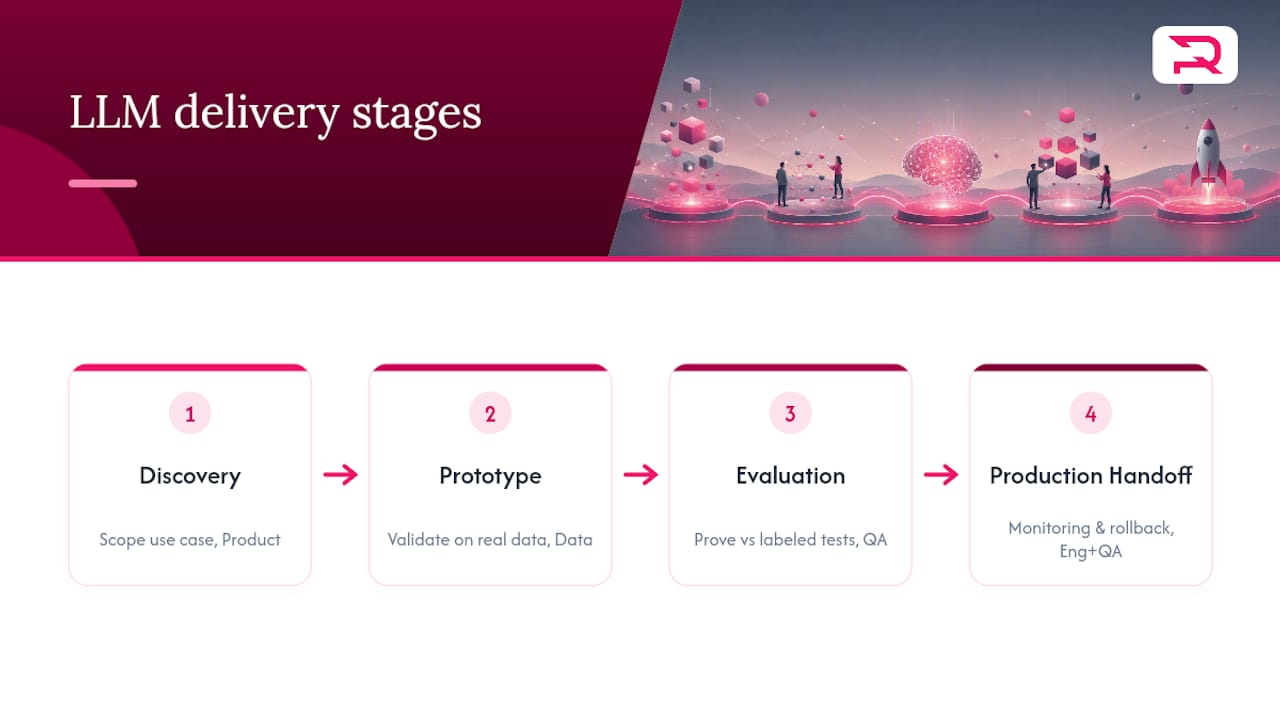
A checklist worth reusing on any project: version every prompt in source control, run evals as a CI gate on every change, schedule RAG freshness checks on a fixed cadence, and define rollback controls before the first production deploy, not after an incident forces the issue.
How Do LLM Apps Fit Into Systems You Already Have?
Most LLM app development work doesn't happen in a vacuum. It happens inside a CRM that already has customer records, an internal tool that already talks to five other services, or a support platform with years of ticket history. Integration usually means exposing your LLM feature through a REST or GraphQL API that your existing services call, rather than building the AI feature as a standalone silo nobody else's code can reach.
Authentication and authorization need to flow through the same system your other services already use. Don't build a separate auth layer for your LLM feature just because it's new. Reusing existing identity infrastructure keeps access control consistent and avoids a second system to audit later.
Legacy systems often lack a clean API surface, and that's usually where the real integration work lives. A 15-year-old ERP system might expose data through a batch export rather than a live endpoint, which forces you to build a sync layer that keeps your retrieval index current without real-time access to source data. Plan for that lag explicitly rather than assuming live data everywhere.
Webhooks and event-driven triggers work well for AI features that respond to something happening elsewhere in your stack, like generating a summary the moment a support ticket closes. Polling works when a real-time trigger isn't available, but it costs more in both latency and unnecessary API calls. For teams building this integration layer without in-house bandwidth, custom web application development that wires new AI features into existing systems can close the gap faster than a from-scratch rebuild.
What Makes an LLM App Feel Good to Use?
The biggest UX mistake in LLM app development is treating the chat window as the default interface for everything. A chat box works for open-ended questions. It's a poor fit for structured tasks where a form, a dropdown, or a button would get the user to their goal in one interaction instead of three rounds of clarifying text.
Latency shapes perceived quality more than raw accuracy does in many products. A response that takes eight seconds feels broken even if it's correct, so streaming partial output token by token, rather than waiting for the full response, makes a genuinely slow model feel responsive. Show a visible "thinking" or progress state during retrieval and tool calls, since silence during a multi-second wait reads as a bug to most users.
Error states need real design attention, not a generic "something went wrong" message. When retrieval comes back empty, or the model can't answer confidently, say so plainly and offer a fallback path, like escalating to a human or rephrasing the query, instead of letting the model guess and risk a confident-sounding wrong answer.
Trust cues matter more for AI features than for typical software. Show citations when an answer comes from retrieved documents, so a user can verify a claim instead of taking it on faith. Let users flag a bad answer easily, and make sure that feedback actually flows somewhere your team reviews, because that flagged data becomes some of your best future eval examples. For features where the interface itself needs real design work, UI/UX design services built around AI-specific interaction patterns handle these details better than a generic design pass would.
What Data Privacy Rules Apply to LLM Apps?
Any LLM app that touches personal data has to answer a basic question before writing a single retrieval query: where does that data live, and who can see it? RAG systems built on internal knowledge bases are the most common place this goes wrong, because it's easy to index an entire document store without checking whether every document belongs in a searchable index at all.
Data minimization means indexing only what your retrieval layer actually needs, not everything a data team happened to have on hand. If a document contains customer PII that's irrelevant to the feature you're building, leave it out of the index rather than relying on output filtering to catch it later. Filtering after the fact is a safety net, not a substitute for not indexing sensitive data in the first place.
Access control needs to be enforced at the retrieval layer itself, scoped to the requesting user's actual permissions, not applied only at the final output stage. A retrieval query that pulls a document the requesting user shouldn't see is already a leak, even if your output filter later catches part of it.
Regulatory exposure depends heavily on your industry and what data flows through the model. Healthcare and financial applications carry obligations that a general-purpose chatbot doesn't, and sending user data to a third-party model provider raises questions about data residency and retention that vary by provider and by jurisdiction. Read your model provider's data usage policy carefully, since some providers retain input data for model improvement by default unless you opt out or use an enterprise tier that guarantees otherwise. Logging strategy matters here too: log enough to debug and audit, but avoid logging raw PII in plaintext where a narrower log entry would do the job just as well.
How Do You Keep an LLM App Healthy After Launch?
Shipping the first version is the easy part. Model providers update underlying models without warning, source data drifts, and user behavior shifts in ways your original eval set never anticipated, so monitoring has to be a permanent line item, not a launch checklist you close out.
Track your eval scores continuously in production, not just during pre-release testing, by sampling live traffic and running it through your auto-evaluator on a rolling schedule. A gradual quality decline is much harder to spot from user complaints alone than from a dashboard that flags when scores drop below your threshold.
Set up alerts for the metrics that actually predict user-facing problems: retrieval accuracy dropping, latency creeping upward, and hallucination rate on your labeled set climbing above baseline. Each of these tends to precede a spike in support tickets by days or weeks, so catching them early buys real time to fix the underlying issue before users notice.
Schedule regular prompt reviews the same way you'd schedule dependency updates. A prompt that worked well against last quarter's traffic patterns can quietly degrade as your user base or use case shifts, and prompt technical debt from repeated patches without refactoring makes each new fix riskier than the last. Refresh your RAG index on a fixed cadence rather than waiting for someone to notice stale answers, and version every model and prompt change so a regression can be traced back to the exact change that caused it, not diagnosed from scratch every time.
An Engineer's Honest Take on Where Teams Go Wrong
Most teams treat their first LLM feature like a demo instead of a product, and that's where the real cost shows up later. They skip the eval set because "the model seems to work fine" in manual testing, and three months in they have no way to tell whether a prompt change actually helped or just felt different. The teams that avoid this pain build a small labeled eval set before they write their first production prompt, not after.
Two recommendations matter more than the rest: version your prompts like code from the very first commit, and pick one architectural pattern (RAG, agent, or copilot) and prove it works on a narrow slice before expanding scope. Everything else, model choice, framework choice, infrastructure choice, is easier to change later than a foundation built without either of these two habits in place.
Teams ready to move past the prototype stage usually get the most value from a structured discovery phase that stress-tests the architecture decision before a single line of production code gets written.
— Dmitry
Ready to Move Your LLM App From Prototype to Production?
A partner like Requestum can bring in the engineering discipline needed to move an LLM prototype from demo to reliable operation under real traffic. That means prompt versioning, automated evals wired into CI, and RAG pipelines built to stay accurate as data changes, not just a polished chatbot that breaks the first time a user asks something unexpected.
Requestum's AI Development Services cover the full path from architecture decisions through fine-tuning, agent design, and production hardening, backed by dedicated QA and MLOps support for teams that need the app to keep working after launch, not just at demo time. Whether you're scoping your first RAG feature or auditing an existing LLM app for reliability gaps, a focused discovery engagement is the fastest way to find out what's actually broken and what it takes to fix it. Start with a discovery phase to get a concrete assessment of your architecture, or reach out through the AI development services page to scope a pilot with your own data.
Sources
- Engineering Practices for LLM Application Development
- LLM apps: Real-world use cases, core building blocks and risks to know
- AI app development: Concept to production
FAQ
Which LLM Is Best for Building Apps?
There's no single best model. The right choice depends on your latency budget, context window needs, and cost per query. Many production teams route between multiple models, using a fast, cheap model for simple queries and a more capable one for complex reasoning, which is why production LLM apps typically combine multiple building blocks rather than relying on one model for everything.
Can ChatGPT Build Me an App?
ChatGPT can generate code snippets, scaffolding, and even working prototypes for simple apps, but it doesn't replace the engineering work of production hardening: automated evals, RAG pipeline tuning, guardrails, and MLOps. Platform builders like Google AI Studio's Build mode go further by generating full-stack scaffolding directly, but even those outputs typically need refactoring before they're production ready.
Is It Legal to Use AI to Build an App?
Yes, using AI tools and models to build software is legal in the United States, though the data you feed into a model and the model provider's terms of service both matter. Review your model provider's data usage and retention policy, especially if your app handles personal or regulated data, since obligations vary by industry and jurisdiction.
Is an LLM Actually AI?
Yes. A large language model is a specific type of artificial intelligence trained on text data to predict and generate language, and it falls under the broader category of natural language processing. LLM app development is essentially applied AI application development focused on this one model category, combined with retrieval, tools, and orchestration around it.
What Does LLM Fine-Tuning Cost?
Fine-tuning costs vary based on model size, training data volume, and infrastructure. Requestum's AI Development Services, which include LLM fine-tuning, are quoted as one-off costs in the range of 30000 to 60000 USD depending on project scope.