

A simple app typically runs $5,000 to $50,000, a mid-complexity build lands between $50,000 and $120,000, and a complex or marketplace-style app climbs to $120,000 to $300,000 or more. The single biggest swing factor isn't the platform you pick. It's how much custom backend logic and third-party integration your app needs. If you want a number you can actually plan around, the scoping section below shows you how to build one.
TL;DR:
- Custom backend logic and third-party integrations significantly influence the overall cost, often accounting for 30 to 50 percent of the project budget.
- Rushing project phases or skipping thorough discovery typically leads to higher costs during development due to rework and scope mismatches.
- Using cross-platform frameworks like React Native or Flutter can reduce costs by 40 to 60 percent compared to building separate native apps for iOS and Android.
- Budget estimates should be broken down per project phase, with development usually consuming the largest share, around 40 to 55 percent of total costs.
- Starting with an MVP, employing phased delivery, and leveraging third-party backend services are effective strategies for controlling expenses without sacrificing quality.
Table of Contents
- What Does Mobile App Development Cost by Complexity?
- How Is the Budget Split Across Project Phases?
- Native, Cross-Platform, or Hybrid: Which Costs Less?
- What Do Developers and Agencies Actually Charge?
- How Long Does It Take to Build an App, and Does Rushing Cost More?
- What Do Apps Cost to Maintain After Launch?
- How Do You Build an Accurate App Cost Estimate?
- What Are the Best Ways to Lower Your App Development Budget?
- How Requestum Estimates Cost and Controls Your Budget
- When Does an Agency Make More Sense Than an In-House Team?
- Get an Accurate Budget for Your App Idea
- Sources
- FAQ
What Does Mobile App Development Cost by Complexity?
Most people asking about mobile app development cost really want to know one thing: where does my idea fall on the price scale? The honest answer depends less on how the app looks and more on what it has to do behind the screen.
Industry benchmarks compiled across dozens of agency and freelancer quotes put the ranges at roughly $5,000 to $50,000 for simple apps, $50,000 to $120,000 for medium-complexity apps, and $120,000 to $300,000 for complex builds. A separate calibration based on more than 600 scoped projects lands in a similar band, with total mobile app cost commonly falling between $10,000 and $150,000, and cross-platform MVPs frequently starting around $8,000 to $25,000.
Here's what typically separates one tier from the next:
- Simple apps ($5,000 to $50,000): a single-purpose tool with static content, a basic form, or a calculator. Think a restaurant menu app or a personal habit tracker with no login required.
- Medium apps ($50,000 to $120,000): user accounts, a database, push notifications, and a couple of third-party integrations like payment processing or maps. Most business apps and early SaaS mobile companions live here.
- Complex apps ($120,000 to $300,000+): real-time features, custom backend logic, multiple user roles, admin dashboards, and several API integrations. Fintech apps, on-demand delivery platforms, and health tracking apps with wearable syncing tend to sit here.
- Marketplace or enterprise apps (often exceeding $300,000): these are two-sided platforms with payments, ratings, messaging, geolocation, and admin tooling, or apps built to integrate with legacy enterprise systems.
Who builds it changes the math almost as much as what you build. A skilled freelancer might quote the low end of a band, an agency will typically land in the middle to account for project management and QA, and an in-house team carries the highest fixed cost but the lowest per-feature marginal cost over time. Adding a single feature, like real-time chat or biometric login, can push a project from one band into the next faster than most people expect.
How Is the Budget Split Across Project Phases?
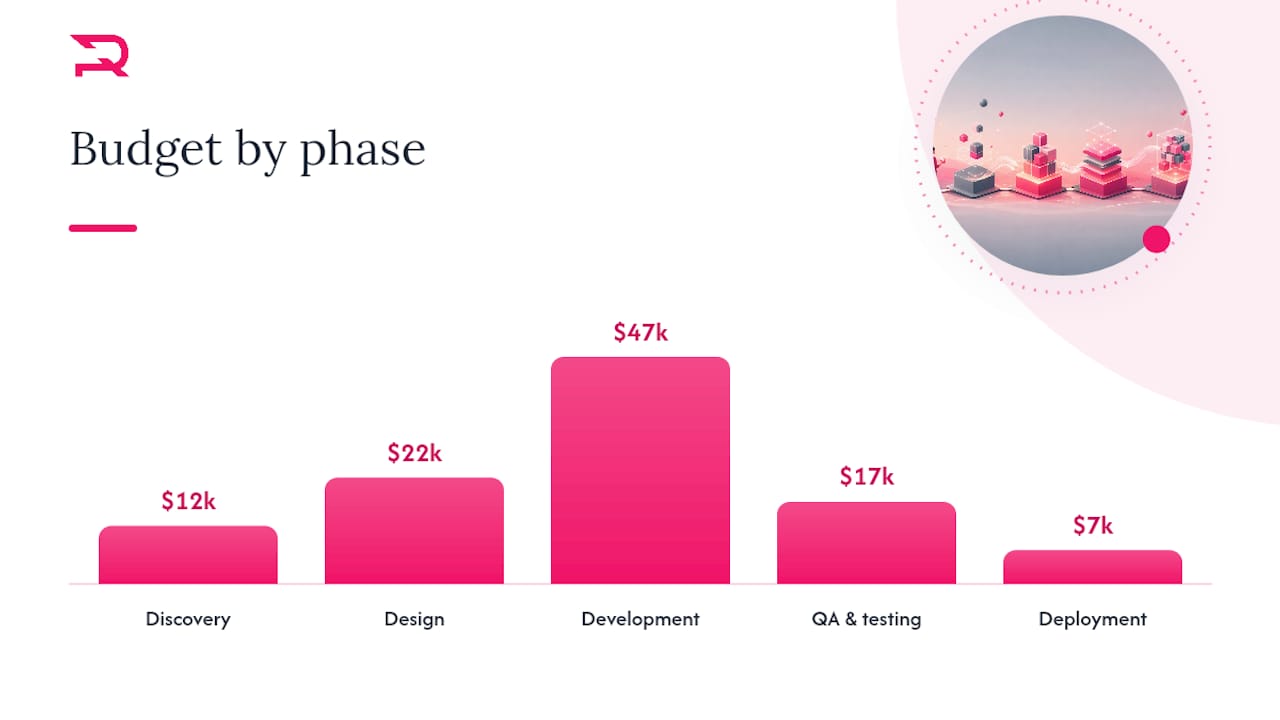
Every mobile app project moves through the same five phases, and how you allocate dollars across them tells you a lot about whether a quote is realistic. Skimping on the early phases to save money almost always costs more later in rework.
The commonly cited phase-percentage breakdown looks like this:
- Discovery (10 to 15% of budget): requirements gathering, technical architecture, and competitive analysis. This is where scope gets defined and risk gets identified before anyone writes code.
- Design (20 to 25% of budget): wireframes, user flows, high-fidelity UI screens, and a clickable prototype. Deliverables here include a design system your developers can build against without guesswork.
- Development (40 to 55% of budget): the largest chunk by far, covering front-end build, backend API work, and integration with third-party services.
- QA and testing (15 to 20% of budget): functional testing, device compatibility checks, security review, and performance testing under load.
- Deployment (5 to 10% of budget): app store submission, production environment setup, and launch monitoring.
Pro Tip: Ask any vendor for a phase-by-phase cost breakdown before signing, not just a lump sum. If discovery isn't a paid, standalone line item, you're likely paying for it indirectly through change orders during development.
On a $100,000 mid-scope project, that translates to roughly $12,000 for discovery, $22,000 for design, $47,000 for development, $17,000 for QA, and $7,000 for deployment. Those numbers shift depending on how much of the backend already exists.
Discovery alone typically runs 10 to 15% of total project cost, yet it's the phase most often cut or rushed, which is exactly why so many projects blow their budgets during development.
Each phase should end with a concrete deliverable, not a status update. Discovery ends with a signed scope document and technical architecture diagram. Design ends with an approved, clickable prototype. Development ends with a feature-complete build ready for testing. QA ends with a signed-off test report and bug log at zero critical issues. Deployment ends with a live app in the App Store and Google Play, plus monitoring in place. If a vendor can't tell you what "done" looks like at each stage, you don't have a real scope yet.
Native, Cross-Platform, or Hybrid: Which Costs Less?
Platform choice affects your mobile app development cost more than most founders assume going in, and the backend behind the app usually matters more than the front-end framework.
Building separately for iOS and Android with native code (Swift for iOS, Kotlin for Android) gives you the best performance and deepest access to device features, but it roughly doubles your front-end development cost since you're building two codebases. Cross-platform frameworks like React Native and Flutter let you write one codebase that runs on both platforms, and they commonly save 40 to 60% compared to separate native builds for most common app types. Requestum's React Native development and Flutter development teams both build on this trade-off regularly, choosing the framework based on your target devices and performance needs rather than defaulting to one.
The backend is where the real money often goes. Custom backend development, servers, databases, and APIs commonly consume 30 to 50% of total budget, especially for apps with user accounts, payments, or real-time data syncing. Backend-as-a-service platforms like Firebase or Supabase can shrink that upfront cost and speed up launch, but they can raise your operational costs later as usage scales, so the savings up front aren't always savings overall.
A quick way to think about which approach fits:
- Single native platform: best when you're targeting one user base exclusively (enterprise iOS deployment, for example) and speed to a single store matters more than reach.
- Dual native: best when performance and platform-specific features (advanced camera work, AR) are core to the product and budget allows two codebases.
- Cross-platform (React Native/Flutter): best for most consumer and business apps needing both iOS and Android without a doubled budget.
- BaaS backend: best for MVPs and apps validating a business model before committing to custom infrastructure.
- Custom backend: best once you have complex business logic, compliance requirements, or scale that off-the-shelf backends can't handle cleanly.
What Do Developers and Agencies Actually Charge?
Who builds your app changes your total mobile app development cost as much as what you build, and the differences between staffing options run deeper than the hourly rate.
Regional rate bands vary widely. Upwork's cost guidance notes that US-based senior developers typically command the highest hourly rates in the market, while development teams in Eastern Europe and Asia often deliver comparable technical quality at a lower hourly cost, which is why so many US and European companies build distributed teams.
Rough hourly bands you'll encounter when getting quotes:
- Freelancers: often the lowest hourly rate, but you absorb the project management, QA coordination, and risk of a single point of failure yourself.
- Boutique agencies: mid-range rates that include a project manager, a small dedicated team, and built-in QA, trading some cost for coordination and accountability.
- Large agencies: higher rates reflecting bigger teams, formal processes, and often specialized roles like business analysts and dedicated QA engineers.
- In-house teams: the highest fixed cost through salaries and benefits, but the lowest marginal cost per feature once the team is up and running on a long-term product.
A senior developer, a project manager, a UI/UX designer, and a QA engineer working together on a mid-scope project is a common team shape, and their combined rate is what actually shows up in your invoice, not any single role's hourly number. A hybrid pattern many businesses use successfully: hire an agency for the initial build and design system, then transition to a smaller in-house or freelance team for ongoing maintenance once the core product is stable.
How Long Does It Take to Build an App, and Does Rushing Cost More?
Timeline and mobile app pricing move together. Simple apps typically take 6 to 12 weeks from kickoff to launch. Mid-complexity apps run 12 to 22 weeks. Complex apps with custom backend architecture and multiple integrations often need 20 to 40 weeks or more.
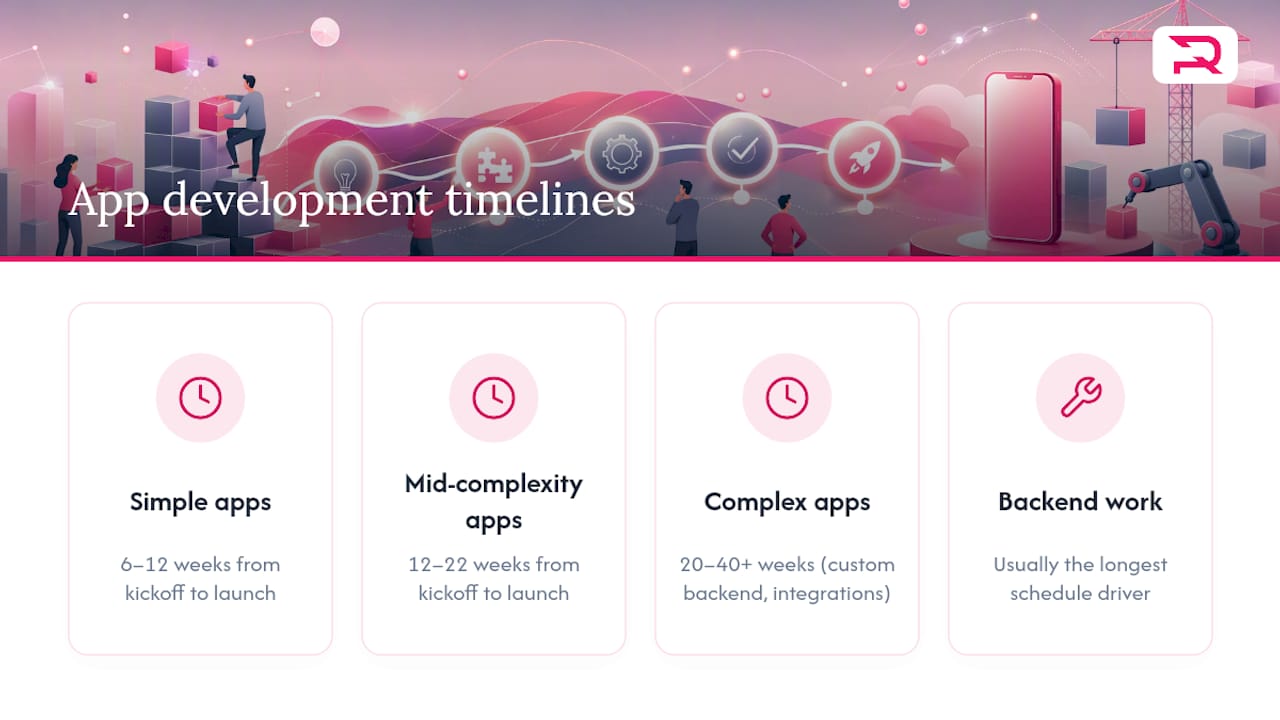
Backend work is usually the longest pole in the schedule, not the interface. Pre-scoping your backend requirements during discovery, before design even starts, can shave several weeks off the overall app development timeline because developers aren't waiting on decisions mid-sprint.
If you need to compress a timeline, expect to pay for it. Rush delivery typically means a team adds developers to run workstreams in parallel or shifts staff off other projects, and both approaches carry a premium, often quoted as a percentage markup on the standard rate rather than a flat fee. Choosing cross-platform over dual native from the start is a more sustainable way to shorten a timeline than simply asking a vendor to work faster on a native dual-codebase build.
What Do Apps Cost to Maintain After Launch?
Launch day isn't the finish line, and skipping this line item is one of the most common budgeting mistakes founders make. Annual maintenance for a mobile app typically runs 15 to 25% of the original development cost, covering bug fixes, OS compatibility updates, security patches, and minor feature refinements.
On a $100,000 build, that means budgeting roughly $15,000 to $25,000 a year just to keep the app running smoothly, before adding any new features.
Recurring monthly costs stack on top of that maintenance percentage:
- Hosting and infrastructure: cloud hosting for a moderately trafficked app commonly runs from under $100 a month for small apps to several thousand for high-traffic, data-heavy platforms.
- Third-party API fees: payment processors, mapping services, and push notification platforms often bill per transaction or per active user, so costs scale with your growth.
- Monitoring and analytics tools: crash reporting and analytics platforms typically charge based on monthly active users or event volume.
- Platform update compliance: Apple and Google update their SDKs and guidelines regularly, and staying compliant requires periodic developer time even without new features.
Budgeting 15 to 25% of your initial build cost annually for maintenance isn't optional overhead. It's the ongoing price of keeping an app secure, compliant, and functioning as operating systems evolve.
A dedicated QA and testing plan built into your maintenance retainer catches most of these issues before users do, which is usually cheaper than fielding one-star reviews about a crash after an iOS update.
How Do You Build an Accurate App Cost Estimate?
The best defense against a blown budget isn't a bigger contingency fund. It's a scope tight enough that a vendor can't misquote it. Scoping gaps are the single most common driver of budget overruns in mobile app projects, more so than a difficult feature or an unexpected bug.
Here's a checklist that works whether you're writing an RFP or estimating solo:
- List every user flow. Not just screens, but the paths a user takes: sign up, browse, checkout, receive a notification, log out. Each flow reveals hidden screens you hadn't counted.
- Count integrations by name. Stripe, Twilio, Google Maps, a specific CRM. Each integration adds development and testing hours that a vague "third-party services" line item hides.
- Flag compliance needs early. HIPAA, PCI DSS, or GDPR requirements change architecture decisions from day one, not after a legal review flags them in month three.
- Define performance expectations. How many concurrent users, how much data, what response time. These numbers determine whether a BaaS backend is enough or you need custom infrastructure.
- Separate must-have from nice-to-have. Anything not essential to your core value proposition belongs in a phase two list, not the initial build.
Once you have that checklist filled out, a working estimate is simple math: hours per feature, multiplied by the hourly rate of the role doing the work, summed across roles. A login and account system might take a senior developer 40 hours and a QA engineer 15 hours. A payment integration might take 30 developer hours and 20 QA hours. Multiply each by the relevant hourly rate, add design hours for the screens involved, and you have a defensible number instead of a guess.
Pro Tip: Pay for a standalone discovery engagement before committing to a full build quote. A few thousand dollars spent mapping flows, integrations, and architecture upfront routinely saves five to ten times that amount in avoided rework once development starts.
A vendor willing to sell you discovery as a standalone deliverable, with its own scope document at the end, is signaling they're confident enough in their process to let you evaluate it before committing further.
What Are the Best Ways to Lower Your App Development Budget?
Cutting cost without cutting quality comes down to sequencing, not corner-cutting. The businesses that launch successful apps on tight budgets tend to follow the same handful of moves.
- Build an MVP first. Define the smallest version of your app that tests your core value proposition, one primary user flow, no nice-to-have features, and launch that before building everything on your wish list.
- Use phased delivery. Ship the MVP, measure real usage data like activation rate and retention, then fund the next phase based on what users actually do rather than what you assumed they'd want.
- Default to cross-platform. Unless you have a specific technical reason to go native, React Native or Flutter gets you to both app stores for a fraction of a dual-native build.
- Start with BaaS, migrate later if needed. Firebase or Supabase gets an MVP live faster and cheaper than custom backend infrastructure, and you can rebuild the backend once you've validated demand.
- Reuse design systems and component libraries. A design system built once and reused across screens cuts both design and development hours significantly compared to bespoke screens for every flow.
None of these tactics require sacrificing the final product's quality. They just sequence spending so you're paying for validated assumptions rather than guesses.
How Requestum Estimates Cost and Controls Your Budget
Requestum is a software development agency that builds custom web and mobile applications across industries including sports, real estate, and logistics, and the agency has earned recognition including the Upwork Ukraine Award for Best Agency and multiple Clutch awards for delivery quality. That track record shapes how projects get estimated.
Every engagement starts with discovery, not a flat quote. Requestum's teams map user flows, technical architecture, and integration requirements before committing to a number, which is the same scoping discipline described throughout this guide. Business analysis runs alongside discovery to make sure the technical plan actually matches the business goal, not just a features list.
QA isn't bolted on at the end. Testing runs continuously through development, catching issues while they're still cheap to fix rather than after they've compounded into a launch-blocking bug. Requestum also applies AI and data science capabilities where they genuinely improve a product, whether that's predictive features or workflow automation, rather than adding AI as a marketing checkbox. The result is a process built to control the same overrun risks this article has walked through: unclear scope, backend surprises, and QA left too late to matter.
When Does an Agency Make More Sense Than an In-House Team?
Hiring an agency makes the most sense when you need speed, specialized expertise you don't have internally, or you're building a single product without the intention of maintaining a permanent engineering department. You get a full team, project management included, without the overhead of recruiting, benefits, or idle capacity between projects.
Building in-house earns its cost when you're running multiple products long-term, iterating constantly, and need institutional knowledge to stay inside the company rather than walking out the door when a contract ends. The break-even point usually arrives once you have more than one active product roadmap competing for the same engineering time.
Most growing companies land somewhere in between: an agency handles the initial build and early iterations, then a smaller in-house team takes over once the product stabilizes and the roadmap becomes predictable. If you're not sure which category you're in yet, that uncertainty itself is a signal to start with an agency engagement rather than a hiring spree you might have to reverse.
— Dmitry
Get an Accurate Budget for Your App Idea
Reading cost ranges only gets you so far. What actually protects your budget is a discovery engagement scoped to your specific idea, not a generic estimate pulled from industry benchmarks. Requestum runs discovery as a standalone, paid phase, mapping your user flows, integrations, and technical architecture before any development quote gets locked in.
A typical Requestum discovery engagement includes a signed scope document, wireframes for core flows, a technical architecture recommendation, and a development estimate broken down by phase, the same structure covered throughout this guide. Depending on complexity, discovery runs on a defined timeline of one to three weeks rather than dragging on indefinitely. From there, Requestum's mobile app development services team can carry the project through design, development, QA, and launch, or hand off a clear spec if you're staffing part of the build internally. For projects that pair a mobile app with a web dashboard or admin panel, Requestum's web development team scopes both in the same discovery pass so the backend architecture works for every client accessing it.
If you have an app idea and want a number you can actually plan around, start a discovery conversation with Requestum's mobile development team and get a scope document instead of a guess.
Sources
- App Development Cost (2026) - Business of Apps
- Mobile App Cost in 2026: $10K-$150K (iOS + Android)
- How Much Does It Cost To Build a Mobile App? - Upwork
FAQ
How Much Does It Cost to Develop a Mobile App?
Most mobile apps cost between $5,000 and $300,000, depending on complexity. Simple apps run $5,000 to $50,000, medium-complexity apps run $50,000 to $120,000, and complex apps with custom backends and multiple integrations run $120,000 to $300,000 or more.
How Much Does a Web App Cost Compared to a Mobile App?
Web app development cost often overlaps with mobile app pricing for similar feature sets, since both need backend logic, databases, and integrations, though a web app skips native app store submission and device-specific testing, which can lower the deployment phase's share of the budget.
Is Cross-Platform Development Cheaper Than Native?
Yes.