
A mobile app is never finished. It needs continuous maintenance, and if you can only prioritize three things, make them crash and performance monitoring, security and dependency patching, and OS or App Store compatibility checks. Budget roughly a moderate fraction of your original development cost per year for upkeep, and treat that estimate as a starting point, not a ceiling.
TL;DR:
- Maintenance costs should be about 15 to 25% of the initial development expense annually, with larger apps and complex backend systems requiring more budget.
- Regular security patches and dependency updates are urgent, especially for third-party libraries and SDKs, to mitigate breach risks and stay compliant with regulations.
- Monitoring crash rates, app responsiveness, and resource usage is the top priority, with alert thresholds set tightly to catch issues early before user complaints grow.
- Scheduled maintenance workflows, including dependency scans, bug fixes, and OS compatibility checks, are more cost-effective than reactive, emergency repairs.
- Automating regression testing, dependency management, and alert triggers minimizes manual effort and keeps maintenance scalable for apps with active user bases.
Table of Contents
- What Mobile App Maintenance Covers and Why It Matters
- Core Types of Maintenance and How to Classify Work
- Typical Costs and How to Budget for Maintenance
- Monitoring and Crash Analytics: The Investment That Comes First
- Maintenance Cadence: What to Check and When
- Best Practices and Mistakes That Inflate Maintenance Cost
- What a Real Maintenance Engagement Looks Like: Requestum and DIM9000
- Getting Started: A 30/90/180-Day Maintenance Plan
- Why Backup and Recovery Strategy Belongs in Every Maintenance Plan
- How User Feedback and App Reviews Should Shape Your Maintenance Priorities
- Automation Tools and Processes That Cut Maintenance Overhead
- Why Security Patches and Vulnerability Management Can't Wait
- Publisher Perspective: Why Monitoring-First Beats Reactive Maintenance
- How Requestum Supports Ongoing Mobile App Maintenance
- Primary Sources and Further Reading
- Sources
- FAQ
What Mobile App Maintenance Covers and Why It Matters
Mobile app maintenance is the ongoing work of keeping a live app functional, secure, and compatible with the platforms it runs on. It never stops once the app ships. It compounds: skip a quarter of patching, and you inherit a backlog that costs more to clear than it would have to prevent.
The categories are broad enough to catch most teams off guard:
- Bug fixes and stability work that keeps the app usable day to day
- Security patches covering libraries, SDKs, and authentication flows
- OS and App Store compliance updates tied to Apple and Google requirement changes
- Performance tuning for load times, memory use, and battery drain
- Feature and UX refinement based on user behavior and reviews
Neglect any of these long enough and the consequences show up fast: App Store removal for outdated SDKs, a security incident that erodes customer trust, or a slow, buggy experience that pushes users to delete the app entirely.
Core Types of Maintenance and How to Classify Work
Every maintenance ticket falls into one of four buckets, and knowing which one you're dealing with determines how urgently it needs a fix.
- Corrective maintenance fixes what's broken right now, like a crash on login or a payment flow that fails silently.
- Adaptive maintenance responds to external change, such as a new iOS release, a Google Play API level requirement, or a payment gateway updating its SDK.
- Perfective maintenance improves what already works, like shaving 300 milliseconds off a screen load or redesigning a confusing checkout step.
- Preventive maintenance heads off future problems, including dependency upgrades, code refactoring, and closing known vulnerabilities before they're exploited.
Dependency and security maintenance deserves its own mention because it's the category teams underestimate most. Third-party SDKs deprecate, credentials expire, and new CVEs (Common Vulnerabilities and Exposures) surface in libraries you didn't write but still ship. Corrective and security work tends to be reactive and urgent. Adaptive and preventive work is recurring and schedulable, which means it belongs on a calendar, not a someday list.
Typical Costs and How to Budget for Maintenance
Most teams land somewhere between $1,000 and $10,000 a month, depending on app complexity, and the DEVSFLOW maintenance playbook points to the 15 to 25% of initial development cost heuristic as a reasonable annual planning figure. A simple utility app sits at the low end. A transaction-heavy app with a custom backend and real-time features sits well above it.
Several factors push that number up or down:
- Backend complexity, since apps syncing with custom APIs or third-party integrations need more upkeep than static content apps
- User base size, because a larger, more active user base surfaces edge cases and performance issues faster
- Regulatory requirements, particularly for finance, health, or anything handling personal data under frameworks like HIPAA or GDPR
- Platform footprint, since maintaining both iOS and Android roughly doubles the compatibility workload
Three pricing models cover most engagements. A retainer gives you a fixed monthly block of hours for predictable, ongoing work, ideal once your app has stabilized. A dedicated team makes sense when maintenance volume is high enough to justify continuous staffing, common for apps with active user bases in the hundreds of thousands or more. Hourly or ticket-based work fits early-stage apps with unpredictable, low-volume needs. Pick based on ticket volume and predictability, not just headcount.
Monitoring and Crash Analytics: The Investment That Comes First
Crash monitoring and performance analytics are the single most important investment you make after launch, because you cannot maintain what you cannot see. That's not a platitude. Teams that adopt monitoring-first workflows catch critical issues before users report them, cutting both time-to-detect and time-to-fix.
Track these metrics at minimum:
- Crash-free user rate, the clearest single signal of overall stability
- Cold start time, which shapes first impressions on every app open
- Memory usage and frame rate, both tied directly to perceived smoothness
- API latency, since slow backend calls masquerade as app problems
- Battery drain, an underrated churn driver on older devices
Pro Tip: Set alert thresholds tighter than feels comfortable at first. A crash rate that creeps from 0.5% to 1.5% over two weeks is easy to miss if your alerts only fire at 5%, by which point you've already lost reviews.
Assign a specific owner to the monitoring dashboard, not "the team." Someone needs to be accountable for triaging what the alerts surface, or the dashboard becomes noise nobody reads.
Maintenance Cadence: What to Check and When
Predictable, scheduled maintenance beats emergency-driven firefighting on cost and on stress, according to the DEVSFLOW playbook. When something breaks, work through issues in this order:
- Full outages or availability failures that block core app function
- Critical crashes affecting a meaningful share of active users
- Security CVEs in dependencies, especially anything touching auth or payments
- OS or App Store compliance blockers that risk rejection or removal
- SDK deprecation warnings before they become breaking changes
- Performance regressions in load time, memory, or battery
- High-volume, low-severity bugs that erode UX over time
- General code health, including refactors and technical debt paydown
Map that priority order onto a calendar: daily crash dashboard review, weekly dependency and vulnerability scans, monthly performance audits, quarterly code health reviews, and annual OS readiness prep ahead of major Apple and Google releases. Critical items, tiers one through four, deserve a same-week fix target. Everything below that can reasonably wait for the next sprint.
Best Practices and Mistakes That Inflate Maintenance Cost
Proactive teams keep a dependency ledger, a living list of every SDK and library with its version and update status, so nothing goes stale unnoticed. Pair it with beta testing on new OS releases, CI checks that catch regressions before merge, automated regression testing for core flows, and feature flags that let you ship changes without a full release cycle.
- Maintain a dependency ledger and review it monthly, not annually
- Run automated regression tests on every build, not just before releases
- Use feature flags to decouple deployment from release risk
- Test against OS betas the moment Apple or Google publishes them
Pro Tip: Treat every deprecation warning as a deadline, not a suggestion. By the time Google or Apple enforces a requirement, you should already be compliant, not scrambling.
Reactive-only maintenance, where nothing happens until something breaks, costs more over a year than scheduled upkeep because emergency fixes carry rushed testing and higher error rates. The most common mistakes: ignoring deprecation warnings until they become blockers, shipping with no monitoring in place, and letting technical debt pile up until a routine feature request turns into a multi-week rebuild.
What a Real Maintenance Engagement Looks Like: Requestum and DIM9000
When Requestum took on the DIM9000 project, the maintenance work followed the same sequence outlined above: a full audit of the existing codebase and dependencies, crash and performance monitoring setup, a cleanup of outdated libraries flagged by security scans, and a defined cadence for ongoing review.
A practical audit and stabilization sprint should cover:
- A dependency and SDK inventory flagging anything outdated or deprecated
- Crash and performance monitoring installed if it isn't already
- A security scan for known CVEs in third-party libraries
- A triage list ranking open issues by the priority order above
- A cadence calendar assigned to a specific owner
Getting Started: A 30/90/180-Day Maintenance Plan
If you're starting from an app with little to no active maintenance, this timeline gets you to a stable cadence without trying to fix everything at once.
- Days 1 to 30: Run a full audit, install crash and performance monitoring, build a triage playbook, and fix anything actively breaking for users.
- Days 31 to 90: Upgrade outdated dependencies, address the performance issues monitoring surfaced, and add automated test coverage to your most critical flows.
- Days 91 to 180: Build a technical debt roadmap, decide whether you need a retainer or dedicated team going forward, and lock in your ongoing cadence.
By day 180, maintenance should feel like a routine part of operations, not a recurring crisis.
Why Backup and Recovery Strategy Belongs in Every Maintenance Plan
A maintenance plan without a backup strategy is a plan that assumes nothing will ever go catastrophically wrong. That assumption fails eventually, usually during a database migration, a botched dependency upgrade, or a server misconfiguration that corrupts user data mid deploy.
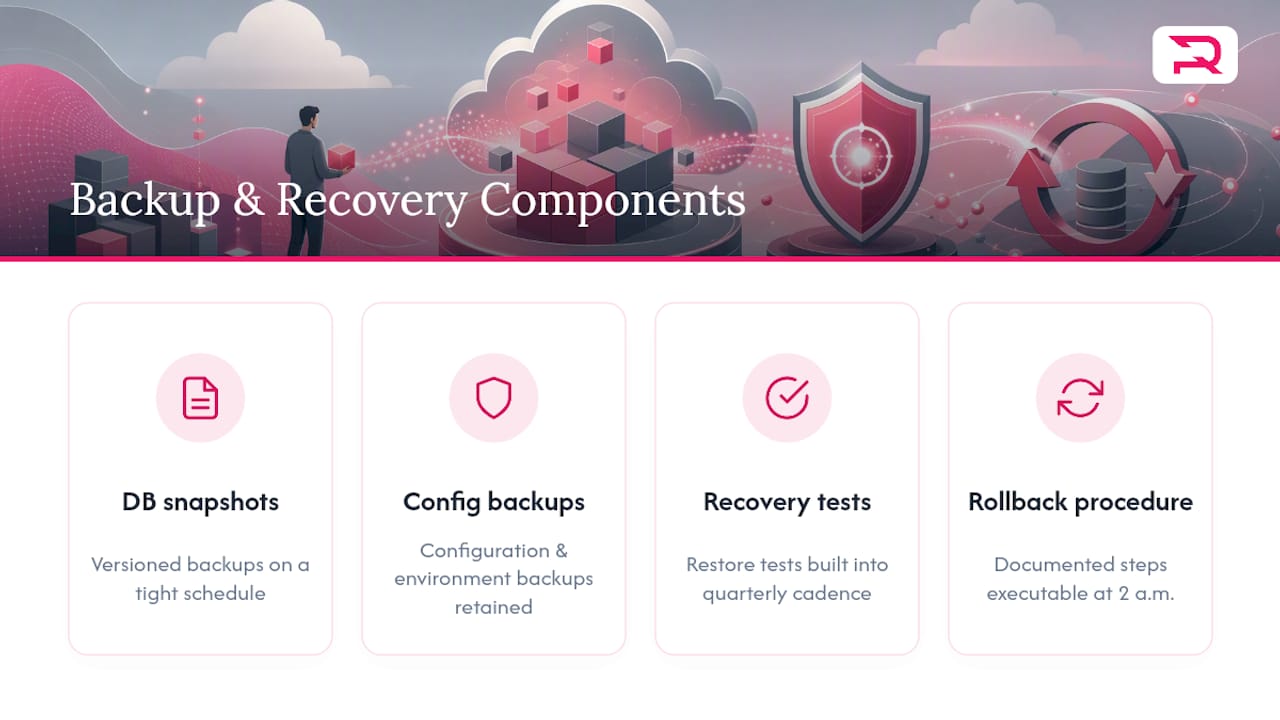
Backup and recovery covers more than database snapshots. It includes versioned backups of your backend database on a schedule tight enough that a rollback doesn't cost you days of user data. It includes configuration and environment backups, so a broken deploy can be reverted without reconstructing settings from memory. And it includes a documented recovery procedure that someone other than your lead engineer can execute at 2 a.m. if needed.
The apps that recover fastest from serious incidents share one trait: they tested their recovery process before they needed it. A backup you've never restored from is a backup you don't actually have, because you won't know it works until the moment you're relying on it, which is the worst possible time to find out it doesn't.
For regulated industries, backup and recovery isn't optional polish. Health and finance apps typically carry contractual or legal obligations around data retention and disaster recovery, and an incident without a recovery plan can turn a technical failure into a compliance failure. Build recovery testing into your quarterly maintenance cadence alongside code health reviews, not as a one-time setup task you check off and forget.
How User Feedback and App Reviews Should Shape Your Maintenance Priorities
App Store and Google Play reviews are a maintenance dashboard you didn't have to build. Users tell you exactly what's broken, often before your monitoring tools catch it, because they're experiencing edge cases and device combinations your test suite doesn't cover.

The pattern worth watching for is a cluster, not a single complaint. One review mentioning a crash on an old Android device is an anecdote. Ten reviews in a week mentioning the same crash after an update is a signal that belongs at the top of your triage list. Sort feedback by frequency and severity the same way you'd sort crash reports, because that's functionally what they are.
Reviews also surface a different category of problem that crash analytics miss entirely: friction. A feature that technically works but confuses users, a checkout flow that feels slower than it should, a notification setting buried three menus deep. These don't crash the app, so monitoring tools won't flag them, but they drive uninstalls just as effectively as a bug does.
Close the loop publicly when you can. Responding to a review that flags a real bug, and following up when it's fixed, does more for your App Store rating than almost any other single action, since it signals to future readers that the app is actively maintained rather than abandoned. Route review-sourced issues into the same triage system as your monitoring alerts instead of treating them as a separate, lower-priority feedback pile. A one star review about a login bug deserves the same urgency as the crash report describing the same failure.
Automation Tools and Processes That Cut Maintenance Overhead
Manual maintenance doesn't scale past a certain app size, and most teams hit that wall faster than they expect. Automation is what lets a small team maintain an app with a large, active user base without drowning in repetitive checks.
Continuous integration pipelines catch regressions before they ship, running your test suite automatically on every code change instead of relying on a human to remember. Automated regression testing extends that further, running scripted checks against your core user flows, like login, checkout, and search, on every build so a change in one part of the app doesn't silently break another.
Crash and performance monitoring tools, the same ones discussed earlier for tracking crash-free rate and cold start time, do their real work through automated alerting. Instead of someone checking a dashboard manually every morning, the system flags anomalies the moment they cross a threshold and routes them to the right owner.
Dependency scanning tools automate what used to be a manual, often skipped task: checking whether any library in your app has a known vulnerability or a newer version available. Running that scan on a schedule, rather than remembering to do it, is the difference between catching a CVE in a week versus catching it in a security incident report.
The teams that maintain apps efficiently at scale treat automation as infrastructure, not a nice-to-have layered on top. A dependency ledger that updates itself, tests that run without a human trigger, and alerts that reach the right person automatically turn maintenance from a full-time monitoring job into a triage job, which is a meaningfully smaller lift.
Why Security Patches and Vulnerability Management Can't Wait
Security maintenance is the category with the least room for delay, because the cost of postponing it isn't measured in user annoyance. It's measured in breach risk, and that risk compounds the longer a known vulnerability sits unpatched.
Most security exposure in a mobile app doesn't come from code your team wrote. It comes from third-party SDKs and libraries, the payment processor's package, the analytics tool, the authentication library, each of which can develop a disclosed CVE that turns your app into an easy target the moment the vulnerability becomes public. Attackers actively scan for apps running outdated, vulnerable versions of common libraries, which means an unpatched dependency isn't a hypothetical risk. It's a known, searchable one.
This is why vulnerability management needs to be a standing process, not a response to an incident. A weekly or biweekly dependency scan, checked against CVE databases, catches new disclosures close to when they're published. Pairing that scan with a defined patch window, ideally days, not weeks, for anything rated critical, keeps your exposure window short.
Authentication and payment flows deserve extra scrutiny in any patch cycle, since a vulnerability there has outsized consequences compared to one in a UI library. If your app handles health, financial, or other sensitive personal data, patch delays can also create compliance exposure on top of the security risk itself, particularly under frameworks like HIPAA or GDPR. Treat critical security patches with the same urgency as a full outage. They belong at the top of your triage order for a reason: the cost of delay isn't linear, it's exponential, and it lands hardest exactly when you're least prepared for it.
Publisher Perspective: Why Monitoring-First Beats Reactive Maintenance
Most maintenance advice treats monitoring as one line item among many. It shouldn't be. Every category in this guide, corrective fixes, security patches, performance tuning, depends on knowing something is wrong before your users tell you, and monitoring is the only mechanism that reliably delivers that.
Requestum built its award-winning track record, including the Upwork Ukraine Award for Best Agency and multiple Clutch recognitions, on treating maintenance as a discipline with a cadence, not a favor you do an app when something breaks. That's the same approach applied to projects like DIM9000: audit first, instrument second, then settle into a rhythm.
If your app's maintenance still runs on "someone will notice eventually," that's worth fixing before anything else on this list.
— Dmitry
How Requestum Supports Ongoing Mobile App Maintenance
Requestum is the alternative to piecing together maintenance from freelancers or an internal team stretched too thin. You get one team that already knows your codebase handling monitoring setup, security patching, and OS compatibility work on a defined cadence, instead of re-explaining your app to a new contractor every time something breaks.
Requestum's mobile app development team handles both new builds and ongoing maintenance for existing apps, backed by dedicated QA and testing support for automated regression coverage. If your app needs stabilization before it needs a bigger roadmap, that starts with an audit. Three engagement models fit different situations: a short stabilization sprint for apps in crisis mode, a monthly retainer for predictable ongoing upkeep, or a dedicated team once your maintenance volume justifies continuous staffing.
Reach out through the mobile development services page to scope an audit and figure out which model fits your app's current state.
Primary Sources and Further Reading
- Pendo — Mobile Analytics Glossary
- DEVSFLOW — The Mobile App Maintenance Playbook
- Android Developers Blog — Target-Level API Requirements
- Apple Developer — App Store Improvements
Sources
- Pendo — Mobile analytics glossary
- DEVSFLOW — The Mobile App Maintenance Playbook
- Apple Developer — App Store improvements
FAQ
What Is Mobile App Maintenance?
Mobile app maintenance is the ongoing work of fixing bugs, patching security vulnerabilities, and updating an app to stay compatible with new OS and App Store requirements after launch. It spans four categories: corrective, adaptive, perfective, and preventive work.
Why Is My Mobile App Not Working?
Most sudden app failures trace back to an OS update that broke compatibility, an expired dependency or SDK, or a backend API change the app wasn't updated to handle. Checking your crash monitoring dashboard and recent platform update notes usually identifies the cause quickly.
Why Do Some Apps Stop Working After OS Updates?
Apple and Google regularly change target API level and security requirements, and an app that hasn't been updated to meet the new requirement can break or get rejected from the store, as outlined in Google's target-level API policy. Testing against OS betas ahead of public release is the main defense.
How Long Does Mobile App Maintenance Take?
Routine maintenance runs continuously through daily crash checks, weekly dependency scans, and monthly performance audits, while a full stabilization audit for a neglected app typically takes 30 days to complete. Critical security or availability issues should be fixed within the same week they're found.