
Before you approve any release candidate, run this baseline: smoke-test core flows on one representative iOS and one Android device, verify install/update paths, clock launch time, confirm login and payment work end-to-end, check push notifications and deep links, review permission prompts, run an accessibility smoke pass, and lock your staged-rollout configuration. This article breaks each category into testable, pass/fail items, grounded in OWASP and WCAG standards and the release discipline Requestum applies on client engagements.
TL;DR:
- Testing on analytics-driven top devices, including older models and hardware variants, ensures coverage of at least 80% of your active user base and catches platform-specific issues.
- Automate stable, revenue-critical flows such as login, search, and checkout first, while reserving manual exploratory testing for UX friction and edge cases.
- Verify core functionalities like install, update, login, payment, and push notifications produce clear pass or fail results during the final smoke test, with no more than one P1 workaround allowed.
- Conduct a focused accessibility pass on key user flows, ensuring labels, contrast, touch targets, and screen reader navigation meet WCAG standards without performing a full audit each time.
- Use emulators for quick development checks but switch to real devices or cloud farms for hardware-specific tests involving battery, GPS, biometric, or camera features.
Table of Contents
- The Mobile App Testing Checklist for Your Final Smoke Run
- Detailed Functionality Checks for Core User Flows
- Building a Device and OS Compatibility Matrix
- Performance, Memory, and Battery Checks That Actually Matter
- Security and Privacy Checks Based on OWASP Guidance
- Accessibility and Usability Checks Before You Ship
- Testing for Network Interruptions and Lifecycle Events
- Crash Handling, Analytics, and Release Readiness
- How to Structure Automation and Manual Testing Together
- Where Most Teams Actually Get Testing Wrong
- Get Professional QA Support for Your Release
- Reference Standards and Templates Worth Bookmarking
- Sources
- FAQ
The Mobile App Testing Checklist for Your Final Smoke Run
Run this sequence in order during the last validation pass before you publish. Each step should produce a clear pass or a blocking defect, nothing in between.
- Install and uninstall on a clean device (no prior version present).
- Update path: install the previous version, then update to the release candidate and confirm data persists.
- First launch: onboarding renders correctly, permissions prompt at the right moment, no crash on cold start.
- Top three user journeys: whatever your app's primary revenue or engagement paths are (signup, search, checkout, booking).
- Login and payment: full transaction from credential entry to confirmation screen, including a failed-payment retry.
- Push notifications: a test push arrives, opens the correct screen, and deep links route to the right in-app destination.
- Performance smoke: launch time, scroll responsiveness on a list view, no visible frame drops.
- Analytics events: confirm key events fire (screen views, purchase, signup) using your analytics dashboard's live debug view.
- Staged rollout flags: verify the release percentage and kill-switch configuration are set correctly before submission.
Pro Tip: Run this smoke pass on the highest-market-share iOS device (usually the newest iPhone) and a mid-range Android device from a manufacturer like Samsung or Google, since those two combinations typically expose the widest range of layout and performance issues fastest.
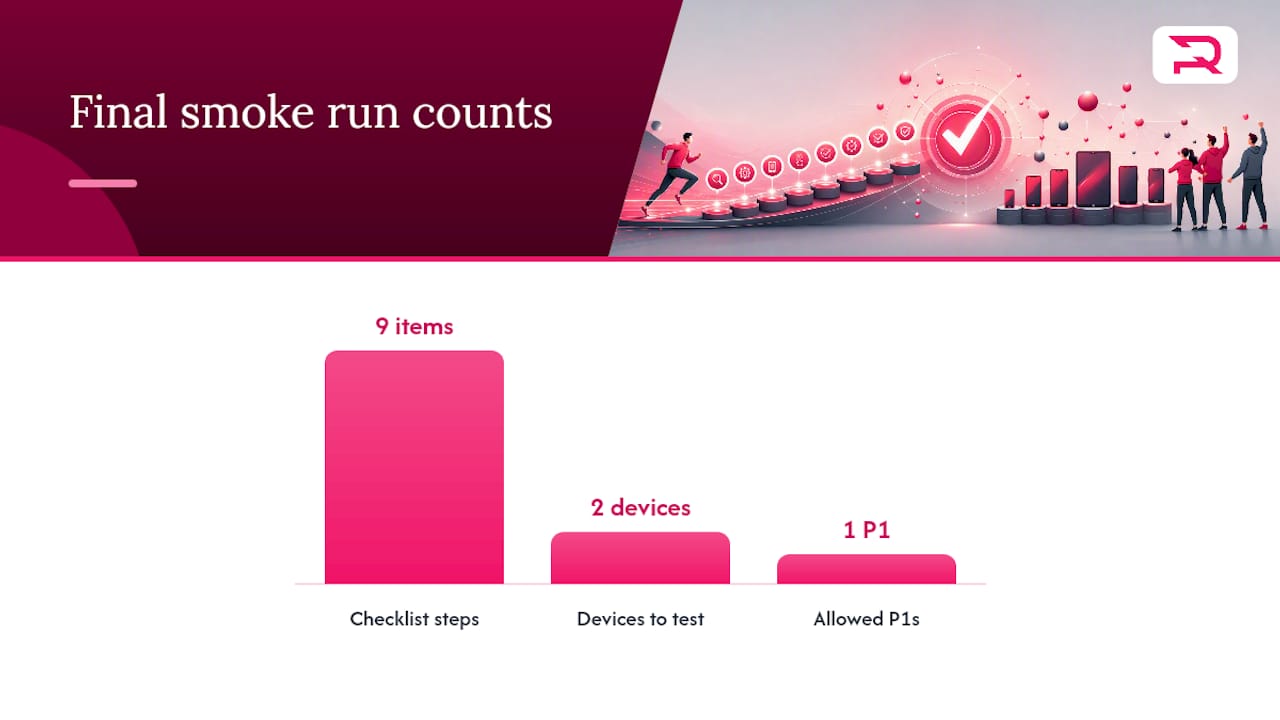
Exit criteria: zero P0 blockers, no more than one P1 with a documented workaround, and all nine steps logged with pass/fail status before sign-off.
Detailed Functionality Checks for Core User Flows
Functionality testing lives or dies on how well you've mapped critical journeys and assigned priority. A broken checkout is P0. A cosmetic misalignment on a settings screen is P2. Confusing the two wastes review cycles.
Start by walking every critical path end to end, then attack the edges:
- Test every required and optional input field with valid, invalid, boundary, and empty values, and confirm validation messages are specific, not generic.
- Verify navigation and back-button behavior on Android, especially mid-flow in multi-step forms.
- Check search and filter combinations, including zero-result states and special characters.
- Confirm session expiration logs the user out gracefully, without losing unsaved work where avoidable.
- Test biometric login (Face ID, fingerprint) alongside password fallback, and verify "remember me" persists correctly across app restarts.
- Confirm logout clears cached user data, tokens, and any locally stored personal information.
- Force a malformed API response and an artificial timeout, then confirm the app fails with a readable error instead of a blank screen or crash.
Data persistence across app restarts and version updates deserves its own pass. A surprising number of escaped defects trace back to state that silently resets after an update.
Building a Device and OS Compatibility Matrix
Your compatibility matrix should come from analytics, not from whatever devices happen to be sitting in a drawer. Pull your top devices by active-user share and build coverage around that list, since device selection driven by real usage data catches far more real-world issues than testing whatever hardware is convenient.
A workable matrix typically includes:
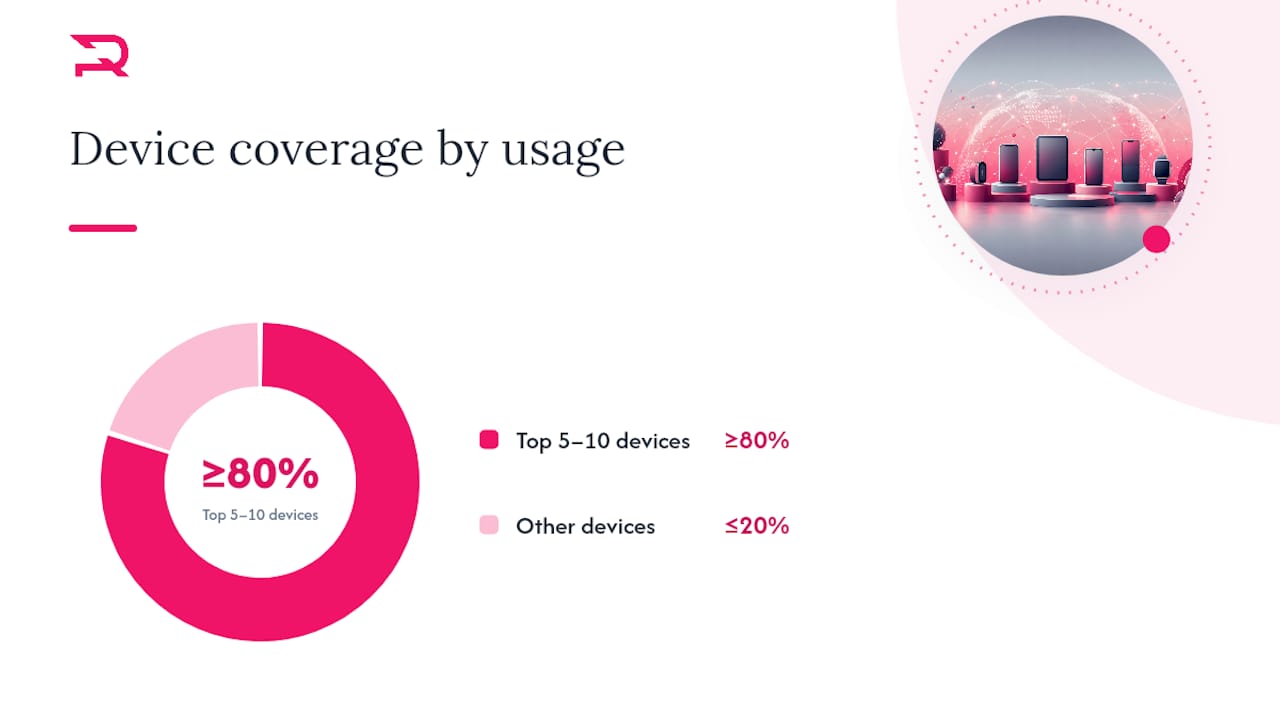
- The top 5 to 10 devices by usage share, covering at least 80% of your active base.
- One older or budget device (2 to 3 years old) to catch memory and performance ceilings.
- One foldable or tablet target if your layout supports adaptive breakpoints.
- Notch, punch hole, and safe-area layout checks on at least two screen ratios.
- OS version priority mapped to your analytics: don't skip an OS version with meaningful active share just because it's not the newest.
- Manufacturer skin differences (Samsung One UI, Xiaomi's interface) for permission dialogs and notification behavior.
Pro Tip: Use emulators for fast, cheap coverage during development, but shift to real devices or a cloud device farm for anything touching battery, camera, GPS, or biometric hardware, since emulators routinely miss OEM-specific quirks that only show up on physical hardware.
Performance, Memory, and Battery Checks That Actually Matter
Performance problems are one of the fastest ways to lose a user permanently. Statista tracks uninstall rates by app category, and categories with heavier interaction demands tend to see uninstalls climb quickly when responsiveness slips, which is exactly why performance checks belong in the pre-release gate rather than a post-launch fix list.
Set concrete targets before you test, not after:
- Cold launch under 2 to 3 seconds on a mid-range device, warm launch under 1 second, measured with Xcode Instruments on iOS and Android Profiler on Android.
- Memory budget checks under sustained use, watching for climbing baselines that signal a leak rather than normal allocation, since unaddressed memory leaks are a common root cause of crashes late in a session.
- Frame-rate monitoring during scroll-heavy screens, flagging drops below 55 to 60fps as jank.
- Battery drain over an active session, compared against a baseline build.
Statistic Callout: Statista's category-level uninstall data underscores a practical rule: the categories most sensitive to friction are the ones where a single sluggish screen can trigger a same-day uninstall.
A minimal release-candidate performance plan covers launch time, one memory stress scenario, and one battery drain test. Anything beyond that is valuable but not blocking.
Security and Privacy Checks Based on OWASP Guidance
Security testing for mobile release candidates should map to the OWASP Mobile Security Testing Guide, which organizes checks around the MASVS categories covering storage, cryptography, network communication, and platform interaction.
The essentials worth running before every release:
- Confirm sensitive data (tokens, credentials, personal information) is never stored in plaintext, and that platform-provided secure storage (Keychain, Keystore) is used correctly.
- Verify all network traffic runs over TLS, and test certificate pinning where it's implemented, including a deliberate man-in-the-middle attempt to confirm pinning actually blocks it.
- Check token expiry and refresh behavior, and confirm expired sessions can't be replayed.
- Walk through every permission request and confirm the purpose string shown to the user matches what the app actually does with that permission.
- Audit the app-store privacy label or data-safety form against the app's real data collection, since mismatches here trigger store rejections and user distrust alike.
- Run payment flows through your payment provider's sandbox environment before touching production credentials.
Accessibility and Usability Checks Before You Ship
Accessibility is not an afterthought category. It's a testable checklist with concrete pass/fail criteria drawn from WCAG 2.1, and most mobile-relevant items take a fraction of the time teams assume.
Run through these on your top three user flows, not the whole app if time is tight:
- Every interactive element has a meaningful label readable by a screen reader, not a generic "button" announcement.
- Focus order follows logical reading order, especially in forms and modals.
- Text and background color combinations meet a 4.5:1 contrast ratio for standard text.
- Touch targets are at least 44x44 points, with enough spacing to avoid mis-taps.
- Layouts hold up correctly with large-text accessibility settings enabled and in both portrait and landscape orientation.
Pro Tip: Turn on TalkBack (Android) or VoiceOver (iOS) and try to complete signup, checkout, and search using only the screen reader, no sighted navigation. If you get stuck, so will a real user.
Usability review should catch confusing onboarding copy and error messages that describe the problem without telling the user what to do next.
Testing for Network Interruptions and Lifecycle Events
Real usage happens on unreliable networks, in the background, and mid-interruption. Simulate these conditions deliberately rather than hoping they never come up in review.
- Test complete offline mode, then intermittent connectivity with random drops.
- Simulate 3G, 4G, and 5G speeds along with high latency and packet loss using your platform's network throttling tools.
- Force a reconnection after an offline session and confirm data syncs correctly, including conflict resolution when the same record changed on both client and server.
- Trigger an incoming call or notification mid-flow and confirm the app resumes cleanly.
- Put the device into low-power mode and confirm background tasks degrade gracefully instead of failing silently.
- Test every deep link both with the app installed and not installed, confirming the fallback correctly routes to the app store.
Reconnection handling deserves extra scrutiny. A sync that silently drops a user's unsaved input after a network blip is one of the most common sources of one-star reviews.
Crash Handling, Analytics, and Release Readiness
The final gate before submission covers four things: crash diagnostics, analytics accuracy, store metadata, and rollout configuration.
- Reproduce every crash and ANR (application not responding) you can, and capture device model, OS version, stack trace, and reproduction steps in the bug report.
- Confirm critical analytics events fire correctly and that no personally identifiable information leaks into event payloads.
- Verify app-store metadata: screenshots match the current build, entitlements are correctly declared, and privacy labels are accurate.
- Confirm staged rollout percentages and kill switches are configured and tested on a lower environment first.
| Release gate | What to verify | Exit criteria |
|---|---|---|
| Crash rate | No repeatable P0 crash on core flows | Zero unresolved P0 crashes |
| Analytics | Key events fire with correct payloads | All P0 events verified |
| Store metadata | Screenshots, entitlements, privacy labels current | Matches submitted build exactly |
| Rollout config | Staged percentage and kill switch tested | Verified on staging before production |
How to Structure Automation and Manual Testing Together
Layer your tests by speed and risk. Unit and integration tests run on every commit. End-to-end tests run against the release candidate. Exploratory testing runs on a fixed cadence, not just when time allows.
Automation priority should follow the money, not the calendar:
- Automate revenue-critical, stable flows first: login, checkout, core search.
- Leave exploratory testing manual, since human testers catch UX friction that scripted assertions miss entirely.
- Quarantine flaky tests immediately rather than letting them erode trust in the whole suite; flaky tests most often trace back to shared test data and non-hermetic environments, so isolate state and use fresh fixtures per run.
- Choose an automation framework that matches your stack and team skill; frameworks like Nightwatch and Appium both see wide use for mobile end-to-end coverage.
- Run real-device checks in CI where hardware behavior matters, and reserve device clouds for scale rather than every single commit.
Teams that automate the flows tied to revenue first, and keep exploratory testing as a human-led, scheduled activity rather than a leftover task, consistently escape fewer defects to production than teams that try to automate everything at once.
Requestum applies this exact layering on client engagements, pairing automated testing for regression-prone flows with hands-on QA for the parts of the app that need a human eye. Teams without in-house QA capacity often reach a point where dedicated mobile app testing closes gaps faster than building the function internally from scratch.
Where Most Teams Actually Get Testing Wrong
Three root causes account for most escaped defects I see across release cycles: teams test the happy path exhaustively and the edge cases barely at all, they treat the device matrix as a fixed list instead of an analytics-driven one, and they let staged rollout configuration become an afterthought instead of a checked release gate.
Trimming your device matrix is safe only when it's backed by usage data, not convenience.
Sign-off ownership should sit with one named person, not a committee. Set a clear threshold going in: zero P0s, one P1 maximum with a documented workaround, and no unverified rollout configuration. Anything looser turns exit criteria into a negotiation instead of a gate.
— Dmitry
Get Professional QA Support for Your Release
Running this checklist internally works right up until your release calendar gets tight or your device matrix outgrows your team's bandwidth. That's where a specialist QA partner changes the math: instead of your engineers splitting focus between building features and chasing edge cases across a dozen devices, a dedicated team runs the full pass in parallel with development.
Requestum's QA practice covers functional testing, automation, device-farm execution, and full release validation, backed by the same MASVS and WCAG standards this checklist follows. Hire Requestum when your release window is under two weeks, your device matrix has grown past what your team can cover manually, or you need automated regression coverage for revenue-critical flows without pulling engineers off feature work. Keep it in-house when your app is early-stage with a narrow device footprint and a QA-minded developer already on the team.
If your next release candidate needs a second set of expert eyes, explore Requestum's mobile app testing services and request a scope conversation for your specific app and timeline.
Reference Standards and Templates Worth Bookmarking
- OWASP Mobile Security Testing Guide: the standard reference for MASVS-aligned security checks.
- WCAG introduction: the accessibility standard behind every mobile-relevant contrast and labeling check.
- Mobile app testing checklist template: a ready-made device matrix and 30-plus check template to adapt.
- BrowserStack's mobile testing best practices: practical guidance on emulator versus real-device tradeoffs.
Sources
- OWASP Mobile Security Testing Guide
- Qa-checklist
- Best practices for mobile app testing (BrowserStack)
FAQ
How Many Devices Should a Mobile App Testing Checklist Cover?
Cover the 5 to 10 devices that represent at least 80% of your active user base, chosen from analytics rather than convenience, plus one older or budget device to catch performance ceilings.
What Should Be Automated First in a Mobile Test Plan?
Automate revenue-critical, stable flows like login, checkout, and core search before anything else, and leave exploratory testing manual since it catches UX issues automation scripts miss.
What Counts as a Blocking Defect Before Release?
A P0 defect blocks core functionality, security, or data integrity and must hit zero before sign-off; a single P1 with a documented workaround is typically the maximum acceptable exception.
Do I Need a Full Accessibility Audit Before Every Release?
No. A focused accessibility smoke pass on your top three user flows, using TalkBack or VoiceOver plus contrast and touch-target checks, covers the highest-risk WCAG items without a full audit each cycle.
Should I Use Emulators or Real Devices for Pre-Release Testing?
Use emulators for fast, broad coverage during development, and switch to real devices or a cloud device farm for anything involving battery, camera, GPS, or biometric hardware.