
The right pattern depends on two questions: what is the integration's intent, and how fast does data need to move? Favor virtualization (Salesforce Connect or Zero Copy) over replication whenever a live read will do. Use middleware for scale, and Change Data Capture for near real-time sync. Above all, assign one canonical source of truth for each data entity and enforce it through governance. That single rule prevents more integration failures than any tool choice.
TL;DR:
- Virtualization with Salesforce Connect is preferable for live data access, but replication becomes necessary when data volume is extremely large or uptime demands are high.
- Proper pattern selection relies on answering seven key questions, including data ownership, timing needs, volume growth, and governance controls, to prevent sprawl.
- Change Data Capture is ideal for near real-time record updates, while Platform Events are better for custom business signals that involve multiple objects or processes.
- Middleware like MuleSoft makes sense when the number of integrations exceeds four or five, supporting centralized transformation, routing, and error handling to avoid point-to-point chaos.
- Security best practices require using dedicated integration users with least privilege, rotating credentials regularly, and establishing automation and monitoring from the start to prevent risks and outages.
Table of Contents
- Salesforce Integration Best Practices: Patterns, Timing, and Trade-Offs
- What Questions Should Drive Your Integration Pattern Choice?
- Data Replication vs. Virtualization: Which One Should You Use?
- When Should You Use Change Data Capture Instead of Platform Events?
- How Middleware Fits Into a Salesforce Integration Strategy
- Locking Down Access: Authentication and Security Controls
- Building Integrations That Don't Become Technical Debt
- Your Salesforce Integration Rollout Checklist
- What Requestum Has Learned Building Salesforce Integrations
- Data Mapping and Transformation Best Practices
- How Do You Resolve Conflicting Data Across Systems?
- Managing Version Control and Deployment for Integrations
- Scaling Salesforce Integrations for Enterprise Volume
- Common Salesforce Integration Pitfalls and How to Avoid Them
- Performance Optimization Techniques for Salesforce Integrations
- Why Governance Matters More Than the Tools You Pick
- How Requestum Supports Salesforce Integration Projects
- Primary Sources and Reference Documents
- Sources
- FAQ
Salesforce Integration Best Practices: Patterns, Timing, and Trade-Offs
Every integration decision starts with intent. Salesforce architects generally classify integration patterns into three categories: Process, Data, and Virtual. Getting this classification right before writing a single line of code is the foundation of any sound Salesforce integration strategy.
Process patterns orchestrate a business workflow across systems in real time. A checkout eligibility check that queries an external credit system before Salesforce confirms an order is a process pattern. The user waits on the result, so latency matters and the transaction typically needs to complete or roll back as a unit.
Data patterns synchronize records between systems so each platform has the data it needs locally. A nightly ETL job that pushes order history into a financial ledger is a classic data pattern. Nobody is watching a screen waiting for it, so batch timing works fine and the operational bar is lower than a process pattern's.
Virtual patterns access external data on demand without copying it into Salesforce. A customer 360 view that pulls order status from a warehouse system in real time, without ever storing that status as a Salesforce record, is virtual. No replication, no sync jobs, no stale data problem, because there is nothing to keep in sync.
Layered on top of those three categories is timing, and this is where architects often make the wrong call. Four timing models cover almost every scenario:
- Synchronous: the caller waits for a response, used for process patterns like real-time approvals or inventory checks.
- Asynchronous: the caller fires a request and moves on, common in order processing where confirmation can arrive seconds later.
- Batch: large volumes move on a schedule, typically overnight or hourly, suited to reporting and reconciliation.
- Streaming: continuous, event-based delivery, used when downstream systems need to react to changes within seconds.
The trade-offs compound quickly. Synchronous process patterns give you immediate consistency but couple system uptime tightly. If the external credit system is down, your checkout flow is down too. Batch data patterns decouple systems beautifully but introduce staleness. A report built on last night's batch is wrong the moment someone books an order this morning. Streaming solves staleness but adds operational overhead: you now need monitoring, replay logic, and dead letter handling that a nightly batch job never required.
Platform limits shape these choices as much as architecture preference does. Salesforce API call limits, governor limits inside Apex transactions, and Bulk API row thresholds all push architects toward asynchronous or batch models for high-volume data patterns, even when a synchronous call would be architecturally simpler. Ignoring those limits is how a clean-looking design turns into a production incident during a seasonal traffic spike.
What Questions Should Drive Your Integration Pattern Choice?
Picking a pattern by gut feeling, or by whatever the last project used, is how organizations end up with a dozen point-to-point connections nobody fully understands. A repeatable framework fixes that. Before building anything, an architect should be able to answer seven questions.
1. Who owns the canonical source of truth for this entity? If Salesforce and the ERP both claim to be authoritative for customer address data, you have a conflict waiting to surface in production. Decide this before writing code, not after the first sync collision.
2. What is the timing requirement, and what does the user actually experience? A sales rep viewing a customer record needs sub-second freshness. A finance team running month-end reconciliation can tolerate a 24-hour lag. Match the pattern to the real requirement, not the most impressive-sounding one.
3. Does the operation need to be transactional? If a failure midway through must roll back cleanly, you need a process pattern with proper compensation logic, not a fire-and-forget event.
4. What data volume are you moving, and how does it grow? A pattern that handles 10,000 records a day may collapse at 10 million. Design for the volume you will have in two years, not the volume in the pilot.
5. What is the SLA, and who is accountable when it is missed? Every integration needs an owner who answers the alert at 2 a.m., not just a diagram that assumes it will always work.
6. How does the system handle retries and compensation when something fails? Idempotency and retry logic are not an afterthought; they are part of the pattern selection itself, since some patterns make retries trivial and others make them dangerous.
7. What governance controls prevent this integration from becoming an unmanaged point-to-point connection six months from now? A mature integration strategy requires canonical ownership and a governance model precisely to prevent that sprawl.
A rough mapping helps translate answers into a starting pattern:
- Real-time user-facing workflows → process pattern, synchronous or event-based
- Near-real-time system-to-system sync → event-driven pattern (CDC or platform events)
- Large, scheduled volume moves → batch pattern via ETL or Bulk API
- Read-only access to external data at scale → virtualization, Zero Copy where the platform supports it
Record every decision in an Architectural Decision Record. A minimal ADR needs just three fields: what was decided, how it will be implemented, and why the alternatives were rejected. That "why" field is the one teams skip and later regret, because six months on, nobody remembers why the batch window was set to two hours instead of one.
Data Replication vs. Virtualization: Which One Should You Use?
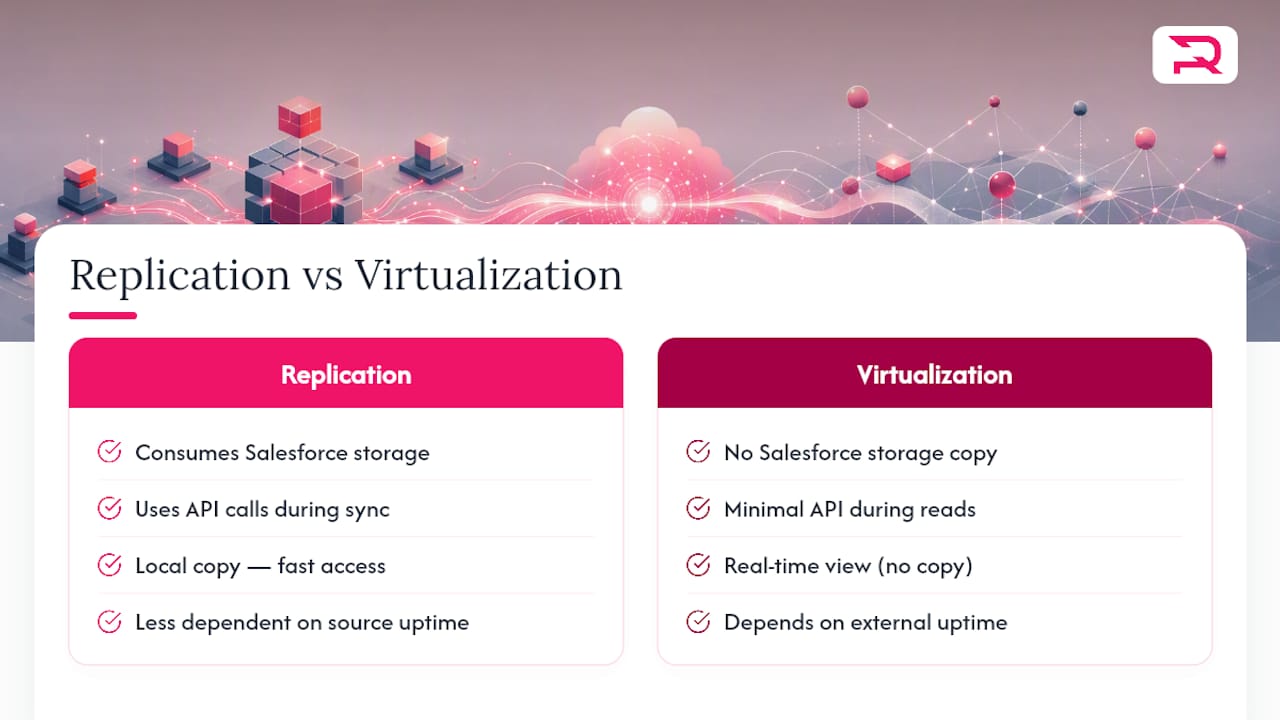
Replication has a real cost that rarely shows up in the initial project estimate. Every replicated record consumes storage, counts against API limits during sync, and creates a second copy of ownership that someone has to reconcile when the two systems disagree. Governance overhead grows with every new replicated object, because now there are two places to patch when a business rule changes.
Architects should prioritize virtualization over unnecessary replication, and Salesforce Connect is the primary tool for that. Salesforce Connect exposes external data as external objects that behave like standard objects in list views, reports, and even some automation, without ever copying the underlying rows into Salesforce storage. Zero Copy takes this further for data warehouse scenarios, letting Salesforce query data that lives in a connected data lake without a duplication step at all.
Both come with real limitations worth knowing before you commit to the approach. External objects have restricted sharing behavior compared to standard objects, and CRUD operations on them depend entirely on what the external system's API supports. If that API is read-only, your external object is read-only too, no matter what the business team wants. Some automation tools, including certain flow elements and older Apex triggers, have partial or no support for external objects, so a design that looks clean on a whiteboard can hit a wall during build.
Deep architectural guidance on large-scale scenarios suggests that when integrating very large on-premise datasets without replication, teams often front an OData provider hosted on middleware, exposing a single canonical API that Salesforce Connect queries. That middleware layer also absorbs re-sequencing logic and write semantics, which keeps the Salesforce side simple and pushes complexity to a layer built to handle it.
Replication still wins in specific situations. If a field needs to be searchable across millions of records inside Salesforce reports, or if the source system cannot guarantee the uptime and latency Salesforce Connect needs for a real-time read, replicating that data locally is the pragmatic choice. The decision comes down to whether you need the data to live in Salesforce, or whether you just need to see it there.
When replication is the right call, the ETL versus ELT question follows immediately. ETL, where transformation happens before data lands in the target, suits scenarios with strict validation rules and complex mapping logic that you want centralized in one place. ELT, where raw data lands first and transformation happens after, suits high-volume loads where speed of ingestion matters more than immediate cleanliness. For pure volume moves into or out of Salesforce, the Bulk API is the right mechanism over standard REST or SOAP calls; it is built specifically to handle large record sets efficiently and avoid the governor limits that batch REST calls run into.
Third-party ETL tools earn their cost when transformation logic is complex enough that maintaining custom pipeline code becomes its own project. A custom pipeline makes more sense for simple, high-volume, low-transformation moves, where the overhead of a full ETL platform outweighs the benefit. There is no universal answer here, only a trade-off between build cost and licensing cost that every architecture team needs to run for its own situation.
When Should You Use Change Data Capture Instead of Platform Events?
The event-driven world inside Salesforce has three main tools, and picking the wrong one is a common source of integration challenges. Change Data Capture is preferred for near real-time updates because it manages both the trigger and the payload automatically. Enable CDC on an object, and Salesforce publishes a change event every time a record is created, updated, deleted, or undeleted, with the changed fields included in the payload.
Platform Events differ in an important way: you define the event schema and the publishing logic yourself. That extra control is valuable when the event represents a business moment rather than a raw data change, something like "quote approved" that might involve logic spanning multiple objects rather than a single record's field change. Webhooks, meanwhile, sit outside Salesforce's native event architecture entirely and are typically how an external system pushes a notification into Salesforce or vice versa through a simple HTTP callout.
The practical rule: use CDC when you need to mirror record-level changes to an external system with minimal custom code. Use Platform Events when the event is a custom business signal that does not map cleanly to a single object's change. Use webhooks when the counterpart system doesn't speak Salesforce's event protocols at all, which is common with older on-premise systems and some SaaS platforms with simpler integration models.
Sequencing is where event-driven integrations quietly break. CDC events carry a changeEventHeader with metadata including the commit number and a sequence number for the transaction, which lets a well-built consumer detect out-of-order delivery. Middleware consuming these events should never assume delivery order matches commit order across high-volume objects. Re-sequencing logic, buffering events briefly and reordering by the header's sequence data before applying them downstream, belongs in the middleware layer, not scattered across Salesforce Apex triggers.
Idempotency is the second thing every event consumer needs and the thing most teams bolt on only after a production duplicate-record incident. Every event payload should carry a unique identifier the consumer can check against a processed-events log before applying it. Keep payloads minimal: send the changed fields and the record ID, not the entire object, both because it reduces bandwidth and because a smaller payload is easier to validate and log.
When Salesforce isn't the only consumer of these events, routing them through a cloud event relay like EventBridge reduces load on Salesforce and lets multiple downstream systems subscribe without each one creating its own separate Salesforce connection. That single design choice can be the difference between five lightweight subscribers and five separate strains on Salesforce API limits.
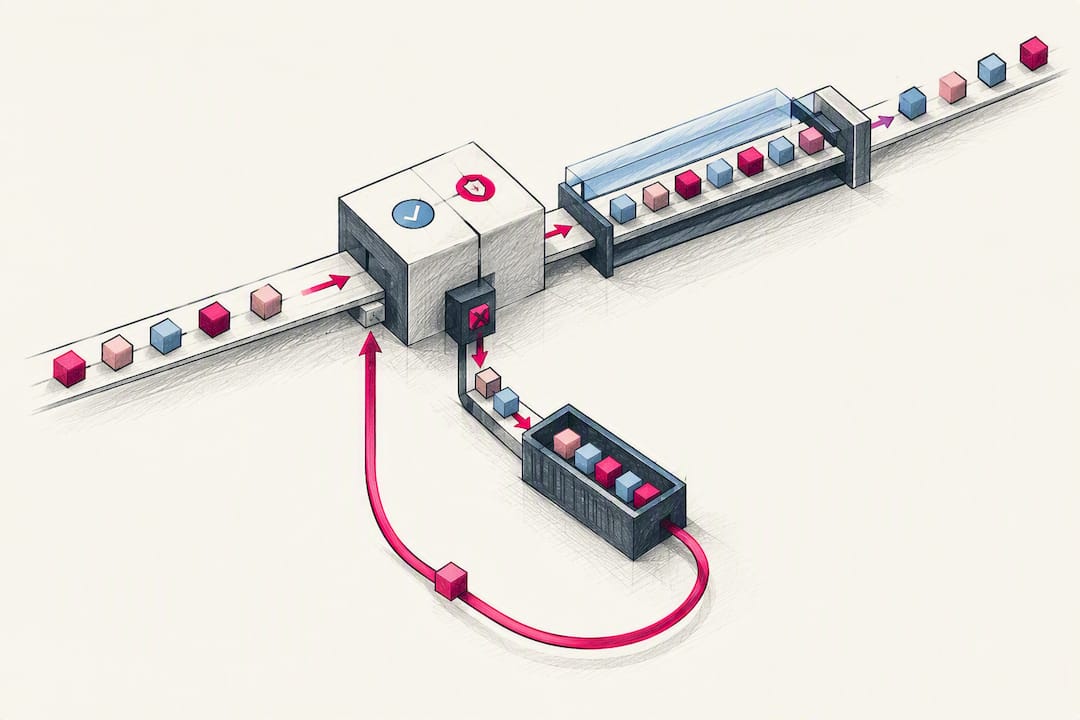
Finally, build for failure from day one. A dead letter queue catches events that fail processing after retries are exhausted, so they can be inspected and replayed rather than silently lost. Any event pipeline without a DLQ and a replay mechanism will eventually lose data during an outage, and you will not find out until someone notices the numbers don't match.
How Middleware Fits Into a Salesforce Integration Strategy
Point-to-point integrations work fine at small scale and become a liability fast. The tipping point is usually somewhere around four or five separate integrations touching the same Salesforce org, or a transformation ruleset complex enough that duplicating it across multiple connections would mean maintaining the same logic in three or four places. Past that point, middleware like MuleSoft Anypoint centralizes transformation, routing, and governance in a single layer instead of scattering integration logic across every connected system.
Middleware should own a specific set of responsibilities, and handing these off clearly prevents the classic failure mode where "the integration" means five different things to five different teams:
- Routing: deciding which downstream system receives which message, without Salesforce needing to know about every subscriber.
- Transformation: converting data formats and field mappings in one place rather than duplicating mapping logic inside Salesforce Apex and inside every external system.
- Retries and error handling: managing backoff, dead letter queues, and compensation logic centrally instead of rebuilding retry code in every integration.
- Idempotency enforcement: tracking processed message IDs so a redelivered event doesn't create a duplicate record downstream.
- Observability: providing one dashboard for integration health instead of five different logs across five different systems.
MuleSoft's API-led connectivity model organizes this work into three layers, and understanding the layering is what separates a maintainable middleware setup from one that just becomes a second messy point-to-point layer with extra infrastructure cost.
System APIs sit closest to the source systems and expose their raw capabilities as clean, reusable APIs. A System API for Salesforce might expose "get account by ID" and "create opportunity" as stable endpoints regardless of what changes inside Salesforce's data model over time.
Process APIs combine multiple System APIs to execute a business process. A "process a new customer order" API might call the Salesforce System API to create the opportunity, the inventory System API to reserve stock, and the billing System API to generate an invoice, all orchestrated in one place.
Experience APIs shape data for a specific consumer, like a mobile app or a partner portal, without that consumer needing to know anything about the underlying systems at all.
This layering is what lets a team swap out an underlying system, say, migrating from a legacy ERP to a new one, without rewriting every downstream integration. Only the System API layer changes; Process and Experience APIs stay untouched. That resilience to change is the actual argument for middleware, more than any single feature it offers on day one.
For lighter multi-step orchestration that doesn't warrant a full middleware platform, OmniStudio Integration Procedures offer a declarative alternative inside Salesforce itself. They can execute HTTP actions, DataRaptors, and multiple orchestration steps in a single server call, often without writing Apex, which makes them a solid fit when the integration is contained within Salesforce-triggered flows and doesn't need the reuse benefits a full API-led model provides.
Locking Down Access: Authentication and Security Controls
Every Salesforce integration challenge that ends in a security incident traces back to the same root cause: an integration running under the wrong identity with too much access. A dedicated integration user with an API-only profile is the baseline, not a nice-to-have. Never authenticate an integration as a named human employee's account. When that person leaves the company or their password resets, the integration breaks, and worse, the audit trail becomes impossible to interpret cleanly.
The principle of least privilege applies directly here. An integration user pulling order status should have read access to the Order object and nothing else, not a system administrator profile granted out of convenience during a rushed go-live. That convenience becomes a liability the day someone audits what that user account can actually touch.
On the authentication mechanism itself, OAuth 2.0 with Named Credentials is the modern standard for Salesforce integrations. Named Credentials store authentication details separately from your Apex code and callout configuration, so a token rotation doesn't mean redeploying code. External Client Applications are the preferred approach over legacy connected apps for new integrations, offering more granular control over scopes and policies. Certificate-based authentication adds another layer for server-to-server integrations where a shared secret alone feels too exposed.
Secrets need a rotation cadence, not a "set once and forget" policy. Rotating client credentials as part of your CI/CD pipeline rather than manually, on a schedule tied to deployments, keeps rotation from becoming the task nobody remembers to do until an audit forces it.
Monitoring token usage matters as much as issuing tokens correctly. An integration user account suddenly making ten times its normal call volume is either a bug in a retry loop or a sign of compromised credentials, and you want to know which within minutes, not weeks. Log every integration call with enough context to reconstruct what happened: which user, which object, what payload size, what response code. Classify any personally identifiable information flowing through these logs and route them to a SIEM platform so security teams can audit access patterns without digging through raw Salesforce debug logs by hand.
Building Integrations That Don't Become Technical Debt
An integration that works perfectly in the demo and falls apart under real load isn't rare. It is the default outcome when monitoring and retry logic get treated as polish instead of core requirements.
Four metrics deserve a dashboard and an alert threshold from day one: latency (how long a round trip actually takes versus the SLA), data freshness (how stale is the data a downstream system is reading right now), error rate (what percentage of calls fail, and is that rate climbing), and API usage against your org's limits (are you approaching a ceiling that will start throttling requests). A sensible starting alert threshold flags anything above a 5 percent error rate sustained over five minutes, or API usage crossing 80 percent of your daily allocation, giving the team time to react before a hard limit hits.
Retry logic needs three components working together, and skipping any one of them just moves the failure point somewhere less visible:
- Exponential backoff: retry attempts spaced increasingly further apart, so a struggling downstream system isn't hammered with retries at a fixed interval that makes recovery harder.
- Dead letter queues: a place for messages that exhaust their retry attempts to land, so they are inspectable rather than silently dropped.
- Idempotency keys: a unique identifier per message so a retried delivery doesn't create a duplicate record if the original attempt actually succeeded but the acknowledgment was lost.
Pro Tip: Build your dead letter queue and replay tooling before you build the happy-path integration, not after. Teams that treat failure handling as phase two almost always ship it late, right after the first production incident forces the issue.
On testing, a complete plan includes unit, integration, end-to-end, and failure-mode tests, plus explicit validation of how the system behaves when things go wrong. Unit tests confirm individual Apex methods or transformation functions behave correctly in isolation. Integration tests confirm two systems actually talk to each other correctly, not just that each side works alone. End-to-end tests walk through the full business process, from the triggering action to the final downstream state, catching the gaps that unit tests by design cannot see.
Failure-mode testing is the step teams skip most often, and it is the one that prevents outages. Deliberately take the downstream system offline during a test run. Send a malformed payload. Throttle the network. If your integration's retry and DLQ logic only gets tested by accident in production, you will find its gaps at the worst possible time. Preproduction validation against a full-scale data copy, not a handful of sample records, catches the volume-related failures that a small test dataset never reveals.
Your Salesforce Integration Rollout Checklist
Moving from design to a live integration in production goes smoother with a fixed sequence rather than an improvised one. Skipping steps here is how teams end up debugging in production what should have been caught in staging.
- Capture the high-level requirements (HLR). Document the business process, the systems involved, expected volume, and the SLA before touching any tooling.
- Run the seven-question pattern selection framework and record the outcome in an ADR, including why alternative patterns were rejected.
- Design the data model and mapping, identifying the canonical source of truth for every field that will be shared.
- Build in a sandbox using the chosen pattern, whether that's Salesforce Connect, CDC, a MuleSoft flow, or an OmniStudio integration procedure.
- Write unit and integration tests alongside the build, not after it, so gaps surface while the code is still fresh.
- Run end-to-end and failure-mode tests against a realistic, full-scale dataset in a preproduction environment.
- Load test the integration at expected peak volume plus a safety margin, not just average daily volume.
- Plan the cutover, including a throttling strategy for the initial bulk load so you don't blow through daily API limits on day one.
- Go live with monitoring active from minute one, not added a week later once someone notices something looks off.
- Assign post-go-live monitoring ownership explicitly, naming the team and the escalation path before the integration is considered "done."
For large data loads during cutover, stagger the initial sync in batches sized comfortably under your daily API limit, and monitor consumption in real time rather than assuming your estimate was correct. A throttling plan that spreads a multi-million-record initial load across several nights is unglamorous, but it beats discovering an API ceiling mid-migration.
| Handover item | What it should contain |
|---|---|
| Runbook | Step-by-step recovery actions for the top five failure scenarios identified during testing |
| Escalation contacts | Named owners for both the Salesforce side and the external system side, with response time expectations |
| Maintenance cadence | Scheduled review of API usage trends, credential rotation, and DLQ contents, at minimum monthly |
| Monitoring dashboard access | Confirmed access for whoever inherits on-call responsibility after go-live |
Requestum's approach to a project like this mirrors this sequence closely in engagements such as the xScale logistics integration, where orchestration across multiple systems demanded exactly this kind of staged rollout.
What Requestum Has Learned Building Salesforce Integrations
Architecture advice reads well on a whiteboard and gets tested for real the first time an integration hits production volume. Requestum's engineering teams work across custom software, AI, and data projects where Salesforce sits alongside other systems that were never designed to talk to each other, and the patterns above come from what actually holds up once real users and real data show up.
The xScale logistics management case illustrates the orchestration side of this playbook: a system that needed to coordinate data flow across multiple operational platforms at scale, where a point-to-point approach would have buckled under the transaction volume. Designing around clear ownership of each data entity, rather than letting every connected system claim partial authority, was central to keeping that solution maintainable as it grew.
The Backflow project shows the other side: a custom CRM integration where testing discipline, catching failure modes before launch rather than after, prevented the kind of data corruption that turns a promising integration into a support burden within its first month live.
Both cases are illustrative examples of applied patterns rather than guarantees. Every Salesforce environment carries its own data model quirks, API limit history, and legacy system constraints, so outcomes on a given project will vary based on those specifics.
Data Mapping and Transformation Best Practices
Field-level mapping errors cause more integration bugs than any protocol or authentication issue, and they are almost entirely preventable with discipline up front. Start by documenting every field mapping in a shared spreadsheet or schema registry before writing transformation code, not as an afterthought once the integration is already built.
Handle data type mismatches explicitly rather than relying on implicit conversion. A picklist value in Salesforce mapping to a free-text field in an external system needs an explicit translation table, because letting the platform silently coerce values is how "Closed Won" becomes an unrecognized string downstream.
Null handling deserves its own rule: decide upfront whether a missing source field means "leave the target field unchanged," "clear the target field," or "reject the record," and apply that rule consistently across every mapped field rather than letting each developer decide case by case.
Version your transformation logic the same way you version code. When a source system changes its schema, a transformation rule built against the old schema needs to fail loudly, not silently pass through corrupted data. Centralizing transformation logic in middleware, rather than duplicating mapping rules in both Salesforce Apex and the external system, means a schema change gets fixed in one place instead of hunted down across two codebases.
How Do You Resolve Conflicting Data Across Systems?
Two systems disagreeing about the current value of a field is not a hypothetical, it is a certainty over enough integration volume. The fix starts with the same principle from pattern selection: one canonical source of truth per entity, decided in advance and enforced everywhere.
When true bidirectional sync is unavoidable, timestamp-based "last write wins" is the simplest conflict resolution strategy, but it is not always the correct one. For fields where business logic matters more than recency, such as an order status that should never regress from "Shipped" back to "Processing" just because a delayed batch job ran late, build explicit business rules into the sync logic rather than trusting whichever update arrived last.
Field-level conflict resolution beats record-level resolution in most real scenarios. Rather than deciding the entire record from System A wins over System B, resolve conflicts field by field based on which system is authoritative for that specific attribute. Billing address might be authoritative in the ERP; support ticket status might be authoritative in Salesforce.
Log every conflict resolution decision, not just the final merged record. When a customer disputes a field value six weeks later, being able to show exactly which system's value won and why is the difference between a five-minute investigation and a day spent reconstructing sync history from database logs.
Managing Version Control and Deployment for Integrations
Integration components, transformation mappings, middleware flows, Apex integration classes, deserve the same version control discipline as application code, yet teams routinely treat middleware configuration as a separate, less rigorous process.
Store MuleSoft flows, OmniStudio Integration Procedure configurations, and Apex integration code in the same Git repository structure, with branching strategies that mirror your application development practices. A feature branch for a new integration endpoint should go through the same pull request review as a feature branch for a UI change.
Automate deployment through CI/CD pipelines rather than manual promotion between sandboxes. Manual deployment is where configuration drift creeps in silently, a Named Credential pointing to the wrong endpoint in one environment, a retry threshold set differently in staging versus production, and nobody notices until behavior diverges.
Environment-specific configuration, endpoints, credentials, retry thresholds, belongs in environment variables or a configuration management layer, never hardcoded into the integration logic itself. That separation is what lets the exact same deployment artifact move from sandbox to staging to production without modification, which is the actual goal of a mature deployment pipeline.
Roll back plans need to exist before deployment, not get improvised during an incident. If a new transformation rule corrupts data after go-live, the team needs a tested rollback path, not a scramble to write one under pressure.
Scaling Salesforce Integrations for Enterprise Volume
What works cleanly at a few thousand records a day can buckle at enterprise volume, and the failure points are predictable enough to design around in advance.
API limits are the first ceiling most growing integrations hit. Bulk API and Bulk API 2.0 exist specifically to move large volumes efficiently, batching records into fewer calls than standard REST would require. An integration built on standard REST calls that worked fine in pilot will need to migrate to Bulk API or an event-driven model as volume grows, and planning that migration path early avoids a painful rebuild later.
Middleware becomes closer to mandatory at enterprise scale, not just a nice architectural layer. When a dozen systems all need Salesforce data, a middleware hub isolates Salesforce from a dozen separate connection loads and lets the middleware layer absorb the scaling burden through its own throughput and buffering capabilities.
Horizontal scaling on the middleware side, adding processing nodes rather than relying on Salesforce alone to absorb load, is what actually handles enterprise volume, since Salesforce's own governor limits are fixed regardless of your org's edition. Event relays and queuing layers outside Salesforce absorb traffic spikes that would otherwise throttle directly against the org's API allocation.
Multi-org strategies, where large enterprises run multiple Salesforce orgs for different business units, add another scaling dimension: integration architecture needs a clear model for how data flows between orgs, not just between Salesforce and external systems, or the same governance gaps that plague point-to-point integrations reappear between orgs.
Common Salesforce Integration Pitfalls and How to Avoid Them
The same handful of mistakes account for most Salesforce integration challenges Requestum sees across projects, and every one of them is avoidable with the practices already covered here.
Skipping the pattern selection framework and defaulting to whatever pattern the last project used. A real-time process pattern forced onto a bulk data sync problem creates unnecessary complexity and fragility; run the seven questions every time, even when the answer feels obvious.
Treating replication as the default instead of the exception. Teams replicate data reflexively because it feels safer, then spend months managing sync conflicts that virtualization would have avoided entirely.
Building retry logic as an afterthought. Integrations shipped without exponential backoff, dead letter queues, and idempotency keys work fine until the first outage, then lose or duplicate data at exactly the moment reliability matters most.
Authenticating integrations as named user accounts. This creates both a security gap and an operational landmine the day that employee leaves or changes roles.
Skipping failure-mode testing. A test suite that only exercises the happy path guarantees the failure modes get discovered in production instead of staging.
No governance model for new integrations. Without a documented decision process, every new integration request becomes a fresh point-to-point connection, and within two years nobody can draw an accurate diagram of what connects to what.
Performance Optimization Techniques for Salesforce Integrations
Performance problems in Salesforce integrations usually trace back to a small set of causes, and most are fixable without a full redesign.
Minimize payload size on every call. Requesting full object records when only three fields are needed wastes bandwidth and processing time on both ends; field-level API queries and selective DataRaptors in OmniStudio keep payloads lean.
Batch where batching makes sense. A loop making individual API calls for a thousand records will hit governor limits and run slowly; the Bulk API or a properly batched Apex callout handles the same volume in a fraction of the time and API call budget.
Cache external data that doesn't change often instead of querying it on every request. A product catalog that updates once a day doesn't need a live virtualization query on every page load; a scheduled sync into a lightweight cache object often outperforms constant real-time lookups for read-heavy, low-volatility data.
Index fields used in integration queries and filters. A SOQL query filtering on an unindexed custom field across a large object will slow down as record counts grow, an issue that surfaces months after launch rather than during initial testing.
Monitor and tune Apex governor limit consumption in triggers tied to CDC events. A trigger that fires expensive SOQL queries on every change event will degrade as change volume grows, so profile these triggers under realistic load, not just with a handful of test records.
Why Governance Matters More Than the Tools You Pick
Every architect wants to talk about which tool solved the problem, MuleSoft, CDC, Salesforce Connect, and that conversation is more comfortable than the one about governance. It shouldn't be. The research behind this guide points to the same conclusion from a different direction each time: pattern selection and tooling only work when someone owns the decision of which system is authoritative for which data.
The overrated idea in most integration advice is that picking the "modern" pattern, event-driven over batch, virtualization over replication, solves the underlying problem. It doesn't. A well-governed batch job beats a poorly governed event stream every time, because the failure mode of ungoverned integrations is always the same: nobody agrees on what the data should say, and no tool fixes that.
What the reader should prioritize first is unglamorous: write the ADR, name the source of truth, and assign an owner before touching MuleSoft or OmniStudio. Tools amplify whatever discipline already exists. They rarely create it from scratch.
— Dmitry
How Requestum Supports Salesforce Integration Projects
Requestum works as a direct partner for the architecture decisions this guide covers, not just the build that follows them. That means pattern selection, data mapping, and governance design happen alongside the engineering work, so the integration you launch matches the one you actually planned. For teams weighing whether to build with a full middleware platform, extend Salesforce through OmniStudio, or design a custom API-led layer, Requestum's custom web application and CRM system development teams work through those trade-offs as part of the engagement itself.
Requestum's broader capabilities cover the full lifecycle an integration project actually needs: business analysis to nail down the requirements before a line of code gets written, QA and testing to run the unit, integration, and failure-mode tests this guide covers, and data science support for projects where the integration feeds analytics or predictive models downstream. A discovery phase engagement is the right starting point if your team needs the pattern selection framework applied to a specific, real system landscape rather than a general guide. Reach out through Requestum's contact page to scope an architecture review for your next Salesforce integration.
Primary Sources and Reference Documents
The Salesforce integration guidance in this article draws on Salesforce's own architect documentation and vendor resources, which are worth reading directly for the technical detail beyond what any single guide can cover.
Salesforce's Integration Patterns documentation lays out the Process, Data, and Virtual classification in full, including timing model details. The Data Integration decision guide walks through when virtualization beats replication in more depth than a single article can. MuleSoft's applications integration resource covers API-led connectivity as a full methodology. Salesforce's blog on aligning integration patterns to use cases covers testing and monitoring guidance in more detail, and the OAuth and connected apps developer documentation is the authoritative reference for authentication setup. For teams working in commerce-adjacent Salesforce environments, Salesforce Commerce Cloud integration and optimization guidance covers channel-specific considerations this guide doesn't focus on.
Sources
- Integration Patterns | Data 360 and Integration
- Align integration patterns to use cases — Salesforce Blog
FAQ
What Are the Three Main Salesforce Integration Patterns?
Salesforce classifies integration patterns into Process, Data, and Virtual categories. Process patterns orchestrate real-time workflows, Data patterns synchronize records between systems, and Virtual patterns access external data live without ever copying it into Salesforce.
Should I Use Salesforce Connect or Replicate the Data?
Virtualization through Salesforce Connect is generally the better default when a live read satisfies the requirement, since replication carries storage, API, and governance overhead. Replicate only when the source system can't meet the latency or uptime a live query needs, or when the data must be searchable inside Salesforce reports at scale.
When Should I Use Change Data Capture Instead of Platform Events?
Change Data Capture works best for near real-time synchronization because it automatically manages both the trigger and the payload for record-level changes. Platform Events fit better when the event represents a custom business signal spanning multiple objects rather than a single record's field change.
How Many Integrations Justify Adopting Middleware Like MuleSoft?
Somewhere around four or five separate integrations touching the same Salesforce org, or one complex shared transformation ruleset, is typically the point where middleware's API-led connectivity model starts paying off over point-to-point connections. Below that threshold, the added infrastructure often costs more than it saves.
Can Requestum Help Design a Salesforce Integration Architecture?
Yes. Requestum works on Salesforce integration architecture through its custom web application and CRM system development teams, covering pattern selection, data mapping, and governance design alongside the build. Current pricing and scope details are available directly on Requestum's site.