

A software maintenance plan is a documented strategy that keeps a system available, secure, and able to evolve without breaking under its own weight. It works only when three things exist from day one: a named owner, a defined SLA with real KPIs, and a scheduled audit. Before you read another paragraph, do this: pick one critical service, list its dependencies, and put an audit on the calendar for this week.
- Owner assigned — someone accountable for the system, not a rotating ticket queue
- SLA/KPI defined — a measurable target like MTTR or uptime, tied to business impact
- Initial audit scheduled — a narrow first pass on assets, dependencies, and one critical service
Pro Tip: Start the audit narrow. Reviewing one production service end-to-end this week beats a company-wide inventory that stalls in month two.
Key Takeaways
A software maintenance plan works only when ownership, SLAs, and a recurring audit schedule are all defined before the first incident hits.
| Point | Details |
|---|---|
| Assign an owner first | No plan survives without a named maintainer accountable for outcomes, not just tickets. |
| Classify before prioritizing | Tag every request as corrective, adaptive, perfective, or preventive to avoid budget drift. |
| Set tiered SLAs | Map MTTR, uptime, and deployment frequency targets to each system's actual criticality. |
| Budget 15 to 25 percent | Use initial build cost as the starting point, then adjust for complexity and regulation. |
| Bring in Requestum for delivery | Requestum runs the audit, roadmap, automation, and governance cycle so internal teams don't have to absorb it alone. |
Table of Contents
- What Are the Four Types of Software Maintenance?
- Why Does a Formal Maintenance Plan Matter?
- How Do You Create a Software Maintenance Plan Step by Step?
- Who Should Own Your Maintenance Plan?
- What SLAs and KPIs Should a Maintenance Plan Track?
- What Tools Should a Maintenance Plan Require?
- How Should You Plan Patches and Releases?
- What Belongs in an Incident Response Process?
- When Should You Migrate or Retire a System?
- How Much Should a Software Maintenance Budget Be?
- How Do You Start Drafting Your Plan Today?
- How Requestum Turns a Maintenance Plan Into Delivery
- Ready to Put Your Maintenance Plan Into Action?
- Sources
What Are the Four Types of Software Maintenance?
Every maintenance request falls into one of four buckets, and misclassifying them is how maintenance budgets quietly blow up. Industry analysis consistently shows that perfective maintenance — the work that improves performance or usability without fixing a defect — tends to consume the largest share of team effort, often more than corrective fixes get credit for.
- Corrective: fixing defects found in production. Plan for fast turnaround and clear severity tiers.
- Adaptive: adjusting the system to a changed environment (new OS, API deprecation, regulatory shift). Plan for a rolling timeline driven by external vendors, not internal sprints.
- Perfective: improving speed, usability, or maintainability without a reported bug. Plan for capacity allocation, since this work rarely feels urgent until it's overdue.
- Perfective: preventive work, covered separately below, but often confused with perfective improvements. Keep them in distinct backlogs.
- Preventive: proactive changes that stop future failures, like refactoring brittle code or patching a library before it's exploited. Plan for scheduled capacity, not reactive sprints.
The fix for misclassification is simple: require every incoming request to be tagged with a type before it enters the backlog. A "fix" that's actually a feature request masquerading as urgent will drain your corrective-maintenance budget and starve the preventive work that would have stopped the fire in the first place.
Why Does a Formal Maintenance Plan Matter?
Maintenance without a plan isn't cheaper. It's just unbudgeted risk that shows up later as an outage. A documented application maintenance plan shifts a team from reactive firefighting to something closer to predictable operations, with SLAs, systematic patching, and scheduled technical-debt remediation replacing ad hoc scrambling.
The business case rests on three points:
- Planned maintenance windows cost far less than unplanned downtime, because outages carry reputational and support costs that never show up in a maintenance line item
- Deferred technical debt compounds. A fix that takes two days this quarter often takes two weeks after six more releases stack on top of it
- Teams that treat maintenance as a fixed operating cost, not a discretionary spend, get better resource planning from finance because the number stops surprising anyone
Stakeholders fund what they can measure. A maintenance plan gives you the language to ask for the budget before the outage forces the conversation.
How Do You Create a Software Maintenance Plan Step by Step?
Building a working plan follows a sequence. Skip a step and the plan looks complete on paper but fails the first time a real incident hits.
1. Run a quick asset and dependency audit. List every system, its runtime dependencies, third-party libraries, and integration points. Build a risk register that ranks each asset by business impact and failure likelihood. This is the step most teams shortcut, and it's the one ISO/IEC/IEEE 14764 treats as foundational: the standard requires planning at multiple levels, including business impact, before any maintenance activity begins.
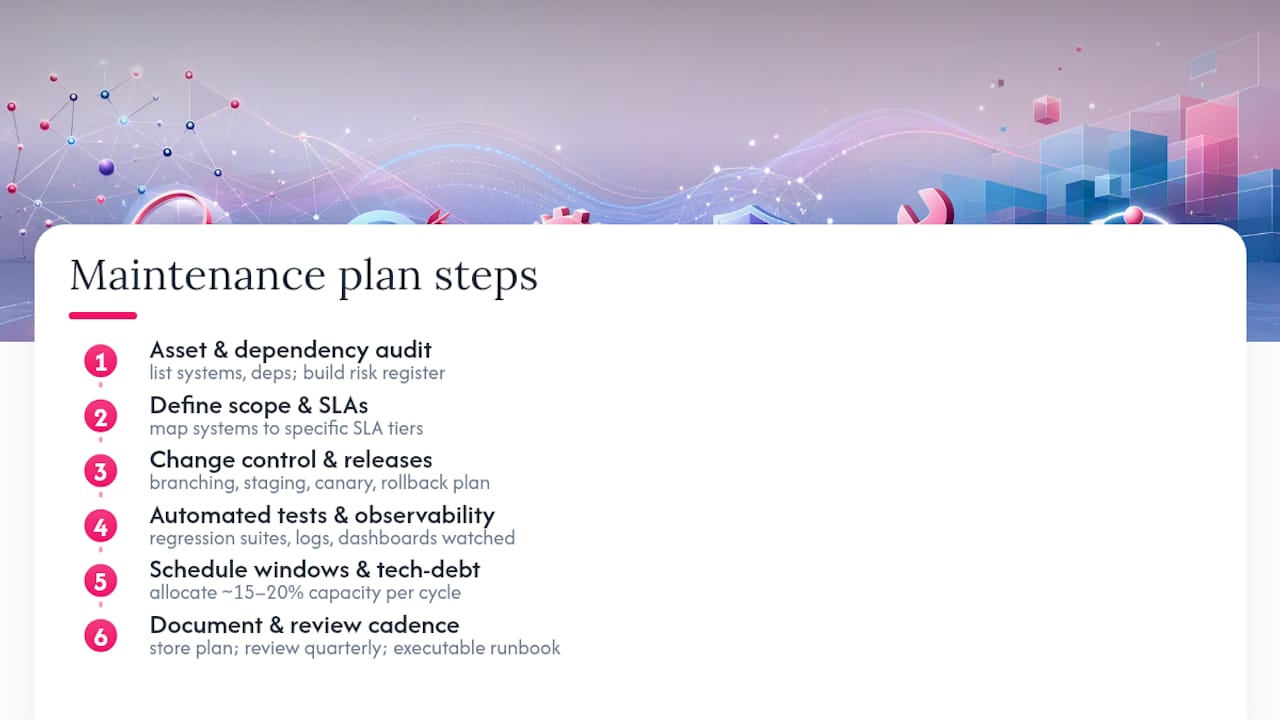
2. Define scope, objectives, and SLAs. Decide which systems the plan covers, what "maintained" actually means for each, and which KPIs matter. A payment gateway and an internal reporting dashboard don't need the same response time. Map each critical system to a specific SLA tier rather than applying one blanket target across the whole portfolio.
3. Design change control and release processes. Establish a branching strategy, a staging environment that mirrors production closely enough to catch real problems, and a canary or phased rollout approach for anything touching a critical path. Write the rollback plan before you write the deployment plan, not after.
4. Embed automated testing and observability into every pipeline. No release should reach production without passing a regression suite, and no service should run without logs and metrics feeding a dashboard someone actually watches. This is where a software testing and quality assurance process earns its budget: catching a regression in staging costs a fraction of catching it in production.
5. Schedule maintenance windows and budget tech-debt cycles. Recurring maintenance needs a calendar slot, not a "when we get to it" status. Many mature teams allocate a fixed percentage of engineering capacity, commonly 15 to 20 percent per cycle, specifically to technical-debt remediation, and that allocation shows up in measurably better preventive outcomes than ticket-only teams achieve.
6. Document everything and set a review cadence. The plan itself should live somewhere the whole team can find it, not in a founder's memory or a Slack thread from eighteen months ago. Review the document quarterly at minimum, more often for systems under active change.
Pro Tip: Write the rollback procedure as a runbook a junior engineer could follow at 3 a.m., not as a note only the original author understands. If it takes more than five minutes to explain, it's not a runbook yet.
Each of these steps maps directly to what NASA's SWE-105 specification requires in a formal maintenance plan: process implementation, modification analysis, review and acceptance, migration, retirement, and risk assessment. You don't need aerospace-grade rigor for a marketing website, but the categories still apply, just scaled to your system's criticality.
Who Should Own Your Maintenance Plan?
A maintenance plan without named owners becomes a document nobody enforces. Four roles cover most organizations:
- Maintainer: the engineer or small team responsible for day-to-day fixes and monitoring on a specific system
- On-call rotation: whoever answers when something breaks outside business hours, with a clear escalation path if they can't resolve it alone
- Incident commander: the person who coordinates response during a significant outage, separate from whoever is actually fixing the code
- Principal architect: owns the long-term technical direction and decides when a patch is a bandage versus when it's time for a structural fix
Development, QA, and operations split responsibilities cleanly when QA owns regression criteria, ops owns infrastructure and alerting, and development owns the fix itself. Smaller organizations often merge these into a shared-responsibility model; larger ones with multiple critical systems tend to justify a dedicated maintenance team once the fleet management or platform complexity crosses a certain threshold. The signal to watch: if maintenance work is consistently bumping feature work off the roadmap, it's time for dedicated ownership.
What SLAs and KPIs Should a Maintenance Plan Track?
Vague goals like "keep the system running well" don't survive contact with a real incident. Concrete metrics do. A maintenance plan should track, at minimum:
- MTTR (Mean Time to Repair): how long it takes from detection to resolution
- MTBF (Mean Time Between Failures): how often the system fails at all
- Uptime target: usually expressed as a percentage tied to the system's criticality tier
- Change failure rate: what percentage of deployments require a rollback or hotfix
- Deployment frequency: how often you ship, since infrequent deploys often correlate with riskier, bigger releases
- Error budgets: an SRE-style allowance for acceptable failure, balancing innovation speed against reliability
Practitioner guidance recommends mapping criticality tiers to specific SLA percentages and response windows: a customer-facing payment system might warrant 99.9% uptime and a 15-minute response SLA, while an internal reporting tool can tolerate 99% and a same-day response. Report these metrics monthly, and use the trend line, not just the snapshot, to decide where to invest the next maintenance cycle.
What Tools Should a Maintenance Plan Require?
Automation is what turns a maintenance plan from a document into an operating system. The core categories:
- Observability and APM to catch performance degradation before users notice
- Centralized logging so an incident doesn't turn into a scavenger hunt across five servers
- CI/CD pipelines that make deployment routine instead of an event
- Automated regression testing to catch breakage before release, not after
- SCA and vulnerability scanning to flag risky dependencies before they become a CVE headline
- Patch management systems that track what's outdated across your entire stack
When selecting tools, check integration with your existing stack, whether the vendor scales with your system, what SLA the vendor itself offers, and availability of support in your market. Automation doesn't just save time. It directly lowers MTTR, because a monitored, well-instrumented system surfaces the root cause in minutes instead of hours of manual log-diving.
How Should You Plan Patches and Releases?
Patch scheduling needs two lanes: scheduled patching for routine updates, and an emergency lane for CVE-driven fixes that can't wait for the next release window. Automated deployment handles the routine lane well; anything touching a critical path deserves a human sign-off before it ships.
- Track third-party dependency end-of-life dates on a calendar, not from memory
- Treat a critical CVE as an interrupt that jumps the queue, with a defined SLA for how fast it gets patched
- Use canary or blue/green deployment patterns for anything with real customer impact
- Test your rollback plan before you need it, not during the incident
Pro Tip: Run a rollback drill quarterly on a non-critical service. Teams that have never practiced a rollback tend to discover, mid-incident, that the rollback script itself is broken.
What Belongs in an Incident Response Process?
An incident lifecycle needs to be repeatable enough that anyone on the team can execute it under pressure.
- Detect and triage: monitoring flags the issue, and someone assigns a severity level within minutes
- Assign responsibility: the on-call engineer takes point, with an incident commander stepping in for anything above a low-severity threshold
- Communicate: use a pre-written template for stakeholder updates, so nobody's drafting a status message from scratch during a live outage
- Escalate if needed: a clear path to the next tier if the first responder can't resolve it within a defined window
- Run a blameless postmortem: focus on what broke in the process, not who broke it
- Track actions to closure: every postmortem action item gets an owner and a deadline, or it never gets fixed
The postmortem is where maintenance plans actually improve over time. Skip it, and you're guaranteed to relearn the same lesson in six months.
When Should You Migrate or Retire a System?
Some systems shouldn't be maintained forever. When annual maintenance costs approach 40 to 60 percent of the system's replacement cost, it's time to formally evaluate replacement rather than continue patching. Test coverage matters too: codebases sitting under 30 percent automated coverage are better candidates for replacement analysis than for deep incremental refactoring, unless regulatory constraints force otherwise.
- Migration checklist: run systems in parallel before cutover, convert data with a validation pass, and notify users well ahead of the switch
- Retirement checklist: archive data per your retention policy, clean up licenses and unused dependencies, and set a defined final support window before shutting the lights off
How Much Should a Software Maintenance Budget Be?
A workable starting point is 15 to 25 percent of the original build cost annually, adjusted up for complex or highly regulated systems and down for simple, stable ones. That figure needs to cover more than bug fixes: monitoring tools, on-call compensation, and scheduled refactor cycles all belong in the number, not as surprise line items later.
The strongest argument for the budget isn't the percentage. It's the cost-of-inaction calculation: estimate what an outage costs per hour in lost revenue and support overhead, multiply by your historical incident frequency, and compare that number to the maintenance budget you're asking for.

How Do You Start Drafting Your Plan Today?
A one-page template gets you moving faster than a blank document ever will. Structure it around: scope, roles, SLAs, maintenance schedule, tooling, process flows, risk register, budget, and review cadence.
- Scope: which systems this plan covers
- Roles: maintainer, on-call, incident commander, architect
- SLAs: MTTR, uptime, deployment frequency targets by tier
- Schedule: patch windows, refactor cycles, review dates
- Risk register: ranked by impact and likelihood
Your first seven days: 1) run the audit, 2) identify your single most critical system, 3) set one SLA for it, 4) schedule a patch window, 5) assign one named owner, 6) draft the risk register, 7) circulate the document for feedback. Tailor the depth to criticality: a payment system needs the full template; an internal tool can run on a lighter version.
How Requestum Turns a Maintenance Plan Into Delivery
Requestum's approach to maintenance follows the same sequence outlined above: audit first, then a roadmap, then automation, then ongoing governance. That order matters because skipping the audit is how vendors end up patching symptoms instead of causes.
- Recognized with the Upwork Ukraine Award for Best Agency and multiple Clutch awards, reflecting sustained delivery quality across engagements
- Applies AI and data science expertise to predictive monitoring and anomaly detection, not just reactive fixes
- Brings direct experience across logistics and real estate platforms, where uptime and data integrity carry real operational weight
If you're evaluating an outside vendor for maintenance work, require these in the contract: explicit SLAs tied to your criticality tiers, a documented knowledge-transfer process, and full documentation delivered as a standard artifact, not an afterthought you have to request.
What tends to break maintenance plans in practice
Ticket-only models fail because nobody owns the architecture, only the queue. Tickets get closed; root causes survive. The teams that hold up are the ones where a principal architect has standing authority to say "this needs a structural fix" before three more patches get bolted onto a weak foundation.
Test coverage is the other tripwire. Below roughly 30 percent coverage, every "quick fix" is a gamble, and that's exactly when rewrite conversations should start, not after the tenth regression.
My recommendation: put technical-debt time on the calendar before you need it, not after the third outage forces the conversation.
— Dmitry
Ready to Put Your Maintenance Plan Into Action?
Drafting the plan is the easy part. Running it week after week, monitoring dashboards, triaging patches, keeping regression suites current, is where most internal teams run out of bandwidth. Requestum handles that operational layer directly: audits that identify your actual risk exposure, automated testing pipelines that catch regressions before they ship, and predictive monitoring built on real AI and data science work rather than a generic dashboard template.
A short engagement typically starts with a discovery audit, the same kind outlined earlier in this guide, followed by a scoped roadmap covering patch cadence, SLA targets, and tooling gaps. From there, Requestum can run the ongoing maintenance work itself or hand your team a documented, ready-to-execute plan. If your systems need testing infrastructure built out before maintenance can even start, Requestum's web development services team can scope that work directly. Get in touch to start with an audit of your current setup.
Sources
For anyone drafting a formal plan, four sources are worth keeping open in a tab. NASA's SWE-105 lays out the required elements of a compliance-grade plan, useful for the template section above. ISO/IEC/IEEE 14764 covers scope, process activities, and predelivery maintainability planning, the backbone of the step-by-step section. The SWEBOK maintenance chapter explains process activities and the decision thresholds used in the migration and retirement section. For a more operational, less standards-heavy read, the Modernization Intel guide covers SLA design and budgeting in plain practitioner terms.
- SWE-105 - Software Maintenance Plan - NASA Software Engineering Handbook - Global Site
- ISO/IEC/IEEE 14764:2022 - Software engineering — Software life cycle processes — Maintenance
- Chapter 5: Software Maintenance — SWEBOK / Software Engineering Knowledge
- How to Build a Software Maintenance Plan That Actually Works | Modernization Intel