

A working web app security checklist verifies authentication, authorization, input and output handling, transport encryption, configuration hardening, dependency management, secrets handling, and logging and incident response, benchmarked against OWASP, SANS, and ASVS. Each control family needs a named owner and a piece of evidence, whether that's a test report, a config snippet, or a log excerpt, so the checklist produces proof instead of a checked box.
TL;DR:
- Passwords must be hashed with slow algorithms like bcrypt or Argon2, and MFA enforced for privileged accounts to prevent common breach vectors.
- Server-side authorization checks, including tests for privilege escalation and tenant boundary breaches, are essential to prevent data leaks.
- Input validation must be enforced on the server using parameterized queries and context-aware encoding to stop injection and cross-site scripting attacks.
- TLS must be configured with current protocols and strong ciphers, while secrets should be managed via dedicated secrets managers and rotated regularly.
- Backup strategies require the 3-2-1 principle, encrypted storage, and routine restore tests to ensure data recovery and protect against ransomware threats.
Table of Contents
- What Belongs on a Web App Security Checklist?
- What Should Authentication and Session Checks Cover?
- Does Your App Enforce Authorization at the Server?
- Are Inputs Validated and Outputs Encoded Correctly?
- How Do You Verify TLS and Secrets Handling?
- Is Your Deployment Pipeline Actually Hardened?
- Why Does Dependency Management Belong on Every Checklist?
- What Should You Log, and What Should You Never Log?
- Which Security Tests Actually Belong in the Pipeline?
- How Do You Build Security Into the SDLC Long-Term?
- What Backup and Recovery Strategy Does a Secure App Need?
- How Do You Prevent Error Messages From Leaking Data?
- Is Your CORS Configuration Actually Protecting Anything?
- What Makes a Content Security Policy Effective?
- Where Does API Security Fit Into the Checklist?
- Where Do Security Checklists Actually Fall Apart?
- Where Requestum Fits Into Your Security Roadmap
- Sources
What Belongs on a Web App Security Checklist?
Security professionals running an assessment need something faster than a full audit and more rigorous than a gut check. Here's the numbered version, organized so each row maps to a release gate rather than a vague aspiration.
- Authentication and session management. Verify password hashing (bcrypt/Argon2), MFA enforcement for privileged accounts at minimum, and session token rotation. Owner: application security lead. Evidence: config output plus a session fixation test log.
- Authorization and access control. Confirm server-side checks block horizontal and vertical privilege escalation. Owner: backend lead. Evidence: IDOR test cases with pass/fail results.
- Input validation and output encoding. Verify parameterized queries and context-aware encoding at every sink. Owner: dev lead. Evidence: SAST scan output.
- TLS, headers, and data protection. Verify HSTS and TLS 1.2+ with no weak ciphers. Owner: infrastructure lead. Evidence: test report or config snippet.
- Configuration and deployment hardening. Confirm minimal deploy identities and signed build artifacts. Owner: DevOps lead. Evidence: CI/CD pipeline audit log.
- Dependency and supply-chain management. Verify an SBOM exists and SCA runs on every build. Owner: platform lead. Evidence: SCA report with severity triage.
- Logging, monitoring, and incident response. Confirm auth events and privilege changes are logged and alertable. Owner: SRE/security operations. Evidence: sample alert and runbook.
- Security testing coverage. Verify SAST in CI, DAST on staging, and a recent pentest report exist. Owner: AppSec lead. Evidence: test artifacts tied to the release ticket.
What Should Authentication and Session Checks Cover?
Authentication failures still dominate real-world breach reports, and the checks here need to go beyond "is there a login page." Confirm password hashing uses a slow algorithm, not fast general-purpose hashes, and that MFA is enforced for privileged accounts at minimum. Test the account recovery flow separately. It's often the weakest link because it bypasses the primary login path entirely.
- Verify session tokens rotate on privilege change and expire on logout, not just on timeout.
- Test session fixation by attempting to reuse a pre-authentication token after login succeeds.
- Confirm cookie attributes: HttpOnly, Secure, and SameSite set appropriately for the app's cross-site needs.
- Collect evidence: config output, raw test requests and responses, and a log entry showing account lockout after failed attempts.
Pro Tip: Test the "forgot password" flow with an intercepting proxy. A surprising number of apps leak whether an email address exists in the system through response timing or wording differences, which hands attackers a free user enumeration tool.
Does Your App Enforce Authorization at the Server?
Client-side role checks are decoration, not defense. The real test is whether the server rejects a request when the token or session says one thing and the requested resource says another. Multi-tenant applications carry extra risk here, since a broken tenant boundary can expose one customer's data to another with a single manipulated ID.
- Build a centralized authorization policy and an action matrix mapping roles to permitted operations, not scattered if-statements across controllers.
- Write test cases for IDOR by incrementing or substituting object IDs across user accounts and tenants.
- Run vertical escalation tests: attempt admin-only actions from a standard user token.
- Run horizontal escalation tests: attempt to access another user's data using a valid session for a different account.
- Document expected results and an escalation path (block the release, file a ticket, assign an owner) for every failure.
Are Inputs Validated and Outputs Encoded Correctly?
Injection and cross-site scripting remain checklist staples because they remain exploitable, particularly wherever legacy code concatenates strings instead of using parameterized queries. Validation belongs on the server, always, regardless of what the client does.
- Use parameterized queries or an ORM with built-in escaping for every database call.
- Apply context-aware output encoding matched to the sink (HTML, JavaScript, URL, or attribute context).
- Validate file uploads by type, size, and content inspection, not filename extension alone.
- Confirm the
X-Content-Type-Options: nosniffheader is set to stop browsers from guessing MIME types on uploaded files. - Test with a proxy tool by injecting
<script>payloads and SQL metacharacters into every input field, including hidden and API-only parameters.
How Do You Verify TLS and Secrets Handling?
Encryption in transit and at rest is the baseline the OWASP Top Ten treats as table stakes, not an advanced feature. The checklist item is not "TLS is enabled." It's whether the configuration is current and the keys behind it are managed properly.
- Confirm TLS 1.2 or higher, with weak ciphers and TLS 1.0/1.1 disabled entirely.
- Verify encryption at rest for sensitive fields, with keys stored separately from the encrypted data.
- Confirm key rotation happens on a defined schedule, not "whenever someone remembers."
- Require secrets managers (Vault, AWS Secrets Manager, or equivalent) instead of environment files or hardcoded strings; evidence is a redacted audit log showing rotation dates.
Is Your Deployment Pipeline Actually Hardened?
Attackers increasingly target the build pipeline rather than the running application, because a compromised CI/CD system hands over the keys to everything downstream. This is where "we'll fix it later" turns into a genuinely dangerous habit.
- Confirm deploy identities run with minimal permissions scoped to their exact task, not broad admin credentials.
- Require signed build artifacts and verify build provenance; an SBOM should accompany each release.
- Confirm runtime containers and servers use hardened base images with unnecessary services disabled.
- Verify a documented rollback procedure and an emergency patch process exist and have been tested, not just written down.
Why Does Dependency Management Belong on Every Checklist?
Third-party code makes up the majority of most codebases, and a single unpatched library can undo every other control on this list. SAFECode's guidance treats dependency tracking as a core SDLC practice, not an optional add-on, and recommends managing findings through a formal tracking system tied to remediation.
- Generate a software bill of materials (SBOM) for every release and keep it current.
- Run software composition analysis (SCA) automatically in the CI pipeline on every build, not on a quarterly schedule.
- Set remediation SLAs by severity (critical within days, low within a defined sprint cycle) and enforce them.
- Define criteria for when to patch a dependency versus replace it entirely, especially for abandoned or unmaintained packages.
What Should You Log, and What Should You Never Log?
Logging done badly creates its own vulnerability. Teams that log everything often end up storing plaintext passwords or session tokens right alongside the audit trail meant to protect users. The SANS SWAT checklist recommends logging authentication events and privilege changes while explicitly excluding secrets from log output.
- Log authentication attempts, privilege changes, and suspicious outbound calls.
- Redact secrets, tokens, and full payment details before they ever reach a log file.
- Set alert thresholds for repeated failed logins, unusual data export volume, or privilege escalation attempts.
- Verify log integrity and restrict log access to a defined set of roles.
Pro Tip: Run a tabletop incident response drill twice a year using a fictional breach scenario. Teams that only test their runbook during a real incident usually discover the runbook was outdated the moment they need it most.
Which Security Tests Actually Belong in the Pipeline?
Automated scanning and manual testing solve different problems, and treating them as interchangeable is where most checklists fall apart. Automated tools reliably catch known injection patterns and misconfigurations, but manual testing finds the business logic flaws and multi-step abuse cases that scanners miss, since automated coverage tends to address roughly 40 to 50% of typical checklist items on its own.
- Run static application security testing (SAST) on every pull request to catch injection and insecure code patterns early.
- Run dynamic application security testing (DAST) nightly against a staging environment that mirrors production.
- Schedule a full penetration test at least annually, and after any major architectural change.
- Require targeted manual testing for authentication bypass, race conditions, and multi-step business logic abuse.
- Document acceptance criteria: no unresolved critical or high findings before a production release.
The OWASP Web Security Testing Guide provides testable procedures for each of these categories, which is worth pairing with your internal checklist rather than reinventing test cases from scratch.
How Do You Build Security Into the SDLC Long-Term?
A checklist run once before launch decays fast. Threat modeling at design time, paired with a risk register that ties each identified threat back to a specific control, keeps the checklist alive as the application changes. Assigning Security Champions within development teams embeds ownership instead of routing every question to a small central security team that becomes a bottleneck.
- Run threat modeling sessions at design time and log identified trust boundaries and attack surfaces.
- Appoint Security Champions on each team and set a recurring training cadence, not a one-time onboarding session.
- Maintain an owner-and-evidence ledger per control so release gating has something concrete to check against.
Pro Tip: Pair every checklist row with a recheck trigger, a specific event like a dependency upgrade or a new API endpoint that forces re-verification. A checklist without recheck triggers goes stale within months.
What Backup and Recovery Strategy Does a Secure App Need?
A security checklist that skips backups is only solving half the problem. Ransomware and data corruption don't care how well you encoded your outputs if there's no clean copy of the data to restore.
Start with the 3-2-1 principle: three copies of the data, on two different media types, with one copy stored off-site or in a separate cloud region. For a web application, that typically means automated database snapshots, a separate backup of file storage or object storage buckets, and configuration backups covering infrastructure-as-code definitions, not just data.
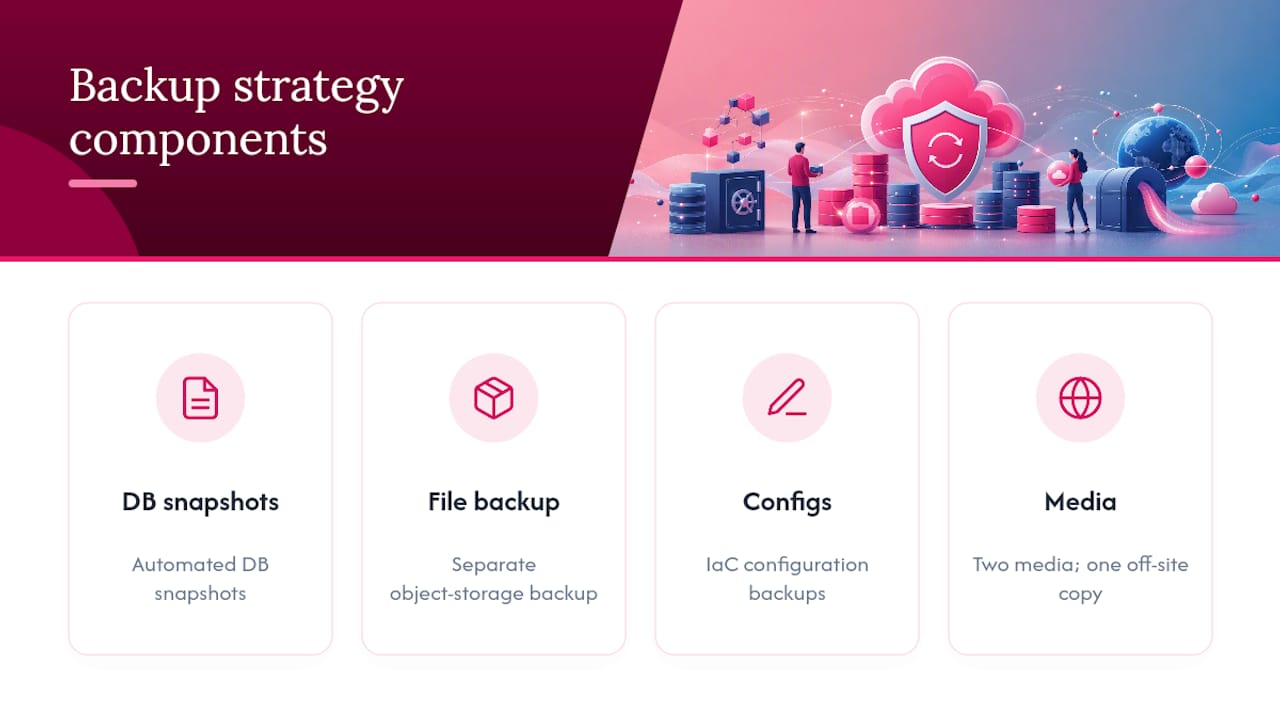
Encryption applies to backups the same way it applies to production data. An unencrypted backup sitting in cloud storage is a second attack surface, often a less monitored one than the primary database.
Test restores on a schedule, not just when disaster strikes. A backup nobody has restored in eighteen months is a hypothesis, not a safety net. Run a full restore drill quarterly, and time how long it takes. That number becomes your actual recovery time objective, not the aspirational one on a slide deck.
Define recovery point objective (RPO) and recovery time objective (RTO) explicitly for the application, and make sure the backup frequency actually supports the RPO you've committed to. An hourly RPO promise paired with nightly backups is a gap someone will discover during an actual outage, which is the worst possible time to find out.
Finally, isolate backup credentials from production credentials. If an attacker who compromises the app can also delete the backups, the backup strategy provides no real protection at all.

How Do You Prevent Error Messages From Leaking Data?
Verbose error messages are a gift to attackers, handing over stack traces, database schema details, and internal file paths for free. The fix isn't complicated, but it's frequently overlooked in the rush to ship.
Production environments should return generic, user-friendly error messages while logging the full detail server-side for engineers to review. A 500 error page should never display a stack trace, a SQL query fragment, or a framework version number to the end user. Configure the application framework explicitly to disable debug mode in production. This sounds obvious, but debug mode left active in production is a recurring finding in security audits year after year.
Distinguish between error categories carefully. Authentication failures should return the same generic message whether the username doesn't exist or the password is wrong. Returning different messages for each case hands attackers a user enumeration tool, similar to the account recovery issue mentioned earlier.
API error responses deserve the same scrutiny as HTML error pages. A JSON error response that includes a full exception trace is just as dangerous as an HTML one, and it's easy to miss during review since API responses get less visual attention than rendered pages.
Test this by deliberately triggering errors, malformed input, missing required fields, expired tokens, and unavailable dependencies, then reviewing exactly what comes back to the client. If anything beyond a generic message and an error code appears, that's a finding, and it belongs on the same remediation track as any other checklist gap.
Is Your CORS Configuration Actually Protecting Anything?
Cross-origin resource sharing (CORS) misconfiguration is one of the more common findings in web application security audits, largely because the fix for "it's not working" is often to loosen the policy rather than diagnose the actual problem.
The most dangerous pattern is reflecting the request's Origin header back in the response combined with Access-Control-Allow-Credentials: true. That combination effectively tells the browser any website can make authenticated requests on behalf of a logged-in user, which defeats the entire purpose of having a same-origin policy in the first place.
A defensible CORS configuration maintains an explicit allowlist of trusted origins rather than a wildcard or a reflected header. Credentials should only be allowed for origins on that list, and the list itself needs to live in version-controlled configuration, not a value someone typed into a cloud console during an incident and forgot to remove.
Test the CORS configuration directly. Send a request with an untrusted Origin header and confirm the response doesn't grant it access. Then confirm that preflight OPTIONS requests are handled correctly and don't silently approve methods or headers the application doesn't actually need to expose.
Also check whether CORS policy differs across environments. A permissive staging configuration that gets copied into production during a deploy is a classic, entirely preventable failure, and it belongs in the configuration hardening review alongside the deployment checks covered earlier.
What Makes a Content Security Policy Effective?
A Content Security Policy (CSP) is one of the few controls that can meaningfully blunt cross-site scripting even after an injection vulnerability slips through everything else on this list. That makes it a worthwhile investment, but only if the policy is actually restrictive.
Start with a policy that denies by default (default-src 'none') and explicitly allowlists the sources the application genuinely needs for scripts, styles, images, and fonts. A policy that includes unsafe-inline or unsafe-eval for scripts largely defeats the purpose, since those directives are exactly what most XSS payloads rely on to execute.
Use nonces or hashes for any inline scripts that are genuinely necessary, rather than blanket-allowing inline execution. This requires more upfront engineering work but closes the gap that unsafe-inline leaves wide open.
Deploy CSP in report-only mode first. The Content-Security-Policy-Report-Only header lets the application log violations without blocking anything, which surfaces legitimate resources the policy would otherwise break before you flip the switch to enforcement mode.
Set up a reporting endpoint to collect violation reports, and review them regularly rather than letting them pile up unread. A CSP with no monitoring behind it is a policy nobody is actually checking, which defeats a meaningful portion of its value.
Test the policy using browser developer tools and confirm that a deliberately injected inline script actually gets blocked. If it executes anyway, the policy has a gap, likely an overly broad script-src directive or a forgotten unsafe-inline left over from an earlier version.
Where Does API Security Fit Into the Checklist?
APIs have effectively become the primary attack surface for most modern web applications, since single-page apps and mobile clients route nearly everything through an API layer rather than server-rendered pages. Every control covered earlier, authentication, authorization, input validation, still applies, but APIs introduce a few failure modes specific to their structure.
Broken object level authorization is the API-specific version of the IDOR problem covered earlier, and it remains one of the most common API findings across security assessments. Every endpoint that accepts an object ID needs a server-side check confirming the requesting user actually has permission to access that specific object, not just any object of that type.
Rate limiting deserves explicit attention at the API layer, since APIs are frequently the target of credential stuffing and scraping attacks that a browser-facing login page's rate limits don't cover. Apply limits per endpoint, per user, and per IP address, and make the limits tight enough to slow automated abuse without blocking legitimate usage patterns.
Schema validation matters more for APIs than for traditional web forms, since APIs frequently accept structured JSON or XML that can carry unexpected fields or types if the validation layer isn't strict. Reject requests with unexpected fields rather than silently ignoring them, since silent acceptance can mask mass assignment vulnerabilities where an attacker adds a field like isAdmin: true to a request body and hopes the backend processes it.
Version your APIs deliberately and retire old versions on a schedule. Deprecated API versions that stay live indefinitely often carry weaker validation than the current version, and attackers know to check for them.
Where Do Security Checklists Actually Fall Apart?
When time is short, prioritize authentication, authorization, and injection controls first. Those three categories account for most real breaches. The gap is rarely the checklist itself. It's missing owners, missing evidence, and no recheck trigger when the code changes. Teams that need implementation help can lean on Requestum's development expertise to close these gaps directly in the codebase.
— Dmitry
Where Requestum Fits Into Your Security Roadmap
Running through this checklist tells you exactly where the gaps sit. Closing them is a different job, and it's usually where internal teams run out of bandwidth between feature deadlines and security remediation.
Requestum builds and hardens web applications with security controls integrated from the first sprint, not bolted on before launch. That includes secure coding practices across authentication, authorization, and input handling, plus QA and testing services that cover both automated regression and the manual test cases scanners miss. For teams that need SCA integrated into an existing CI pipeline or a pentest orchestrated against a specific release, Requestum's automated testing services plug directly into that workflow rather than requiring a separate audit engagement bolted onto your existing process.
If your checklist review just surfaced more gaps than your team can close before the next release, talk to Requestum about web development services and get a scoped plan for remediation instead of a growing backlog.
Sources
- OWASP Top Ten Web Application Security Risks | OWASP Foundation
- Fundamental Practices for Secure Software Development | SAFECode